https://github.com/cloofsiu/esp32-mac-address-scanner
ESP32: mac-address-scanner
https://github.com/cloofsiu/esp32-mac-address-scanner
esp32 macaddress robotics
Last synced: 4 months ago
JSON representation
ESP32: mac-address-scanner
- Host: GitHub
- URL: https://github.com/cloofsiu/esp32-mac-address-scanner
- Owner: cloofsiu
- License: mit
- Created: 2024-08-03T01:49:35.000Z (almost 2 years ago)
- Default Branch: main
- Last Pushed: 2024-08-07T03:11:48.000Z (almost 2 years ago)
- Last Synced: 2025-04-08T08:18:44.989Z (about 1 year ago)
- Topics: esp32, macaddress, robotics
- Language: C++
- Homepage:
- Size: 10.9 MB
- Stars: 0
- Watchers: 1
- Forks: 0
- Open Issues: 0
-
Metadata Files:
- Readme: README.md
- License: LICENSE
Awesome Lists containing this project
README
# GitHub Repository: ESP32 MAC Address Scanner
Welcome to the ESP32 MAC Address Sniffer project! This project is designed to help you scan and display MAC addresses of Bluetooth Low Energy (BLE) devices using an ESP32-WROOM module. The data is presented on a 1602 LCD module, making it a handy tool for robotics applications and BLE device management.

## Components Used
- [ESP32-WROOM](https://github.com/user-attachments/assets/22abd3a0-e08a-4ddc-9715-9f2bdde51bbb): The core microcontroller for this project.
- [1602 LCD Module](https://github.com/user-attachments/assets/62be00a6-b8b0-4ccc-8da5-08ef50e21eca): For displaying the scanned device information.
- Two Breadboards: For cable expansion and easy prototyping.
- Wires and Connectors: To connect all components together.


## Features
**BLE Scanning:** Scans for nearby BLE devices and retrieves their MAC addresses and names.
**LCD Display:** Displays the device information on a 1602 LCD module.
**Button Navigation:** Use the BOOT button to cycle through the list of detected devices.
## Demo video
[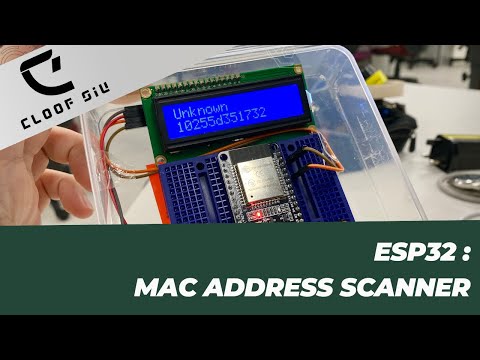](https://www.youtube.com/watch?v=rXiXpg-fihc)
## How to Use
**1. Hardware Setup:**
- Connect the ESP32-WROOM to the breadboards.
- Connect the 1602 LCD module to the ESP32 using an I2C interface.
- Connect the BOOT button to the ESP32.
**2. Software Setup:**
- Clone this repository.
- Upload the provided [code](code/ESP32_mac-scanner.h) to your ESP32 using the Arduino IDE or another suitable development environment.
- Make sure to install the necessary libraries ([Wire.h](https://github.com/esp8266/Arduino/blob/master/libraries/Wire/Wire.h), [LiquidCrystal_I2C.h](https://www.arduinolibraries.info/libraries/liquid-crystal-i2-c), [BLEDevice.h](https://github.com/nkolban/ESP32_BLE_Arduino/blob/master/src/BLEDevice.h)).
**3. Running the Scanner:**
- Power up the ESP32.
- The ESP32 will scan for BLE devices for 5 seconds.
- Detected devices will be displayed on the LCD. Use the BOOT button to navigate through the list.
## Applications in Robotics
This MAC Address Scanner Sniffer can be particularly useful in robotics for identifying and managing BLE devices such as sensors and controllers. It simplifies the process of troubleshooting and device management, making it an essential tool for any robotics enthusiast.
## Contributing
Feel free to fork this repository and contribute by adding new features or improving the existing code. Pull requests are welcome!
## License
This project is licensed under the MIT License. (see [LICENSE](LICENSE) file for details)
## Contact
For any questions or suggestions, please feel free to contact me via GitHub or email cloofsiu@gmail.com
Happy building,
**Cloof Siu**