https://github.com/cloudcoil/cloudcoil
Modern async-first Kubernetes client for Python with Pydantic models - bringing cloud-native operations and K8s development to life with elegant Pythonic APIs
https://github.com/cloudcoil/cloudcoil
async client cloud cloud-native k8s kubernetes modern pydantic pytest-plugin python
Last synced: over 1 year ago
JSON representation
Modern async-first Kubernetes client for Python with Pydantic models - bringing cloud-native operations and K8s development to life with elegant Pythonic APIs
- Host: GitHub
- URL: https://github.com/cloudcoil/cloudcoil
- Owner: cloudcoil
- License: apache-2.0
- Created: 2024-12-26T23:23:10.000Z (over 1 year ago)
- Default Branch: main
- Last Pushed: 2025-03-13T22:10:35.000Z (over 1 year ago)
- Last Synced: 2025-03-30T03:09:05.782Z (over 1 year ago)
- Topics: async, client, cloud, cloud-native, k8s, kubernetes, modern, pydantic, pytest-plugin, python
- Language: Python
- Homepage: https://cloudcoil.github.io/cloudcoil/
- Size: 1.24 MB
- Stars: 55
- Watchers: 1
- Forks: 5
- Open Issues: 15
-
Metadata Files:
- Readme: README.md
- License: LICENSE
- Code of conduct: CODE_OF_CONDUCT.md
- Security: SECURITY.md
Awesome Lists containing this project
README
# cloudcoil
🚀 Cloud native operations made beautifully simple with Python
[](https://pypi.python.org/pypi/cloudcoil)
[](https://pepy.tech/project/cloudcoil)
[](https://opensource.org/license/apache-2-0/)
[](https://github.com/cloudcoil/cloudcoil/actions/workflows/ci.yml)
> Modern, async-first Kubernetes client with elegant Pythonic syntax and full type safety
## 🤝 Support the Project
If you find Cloudcoil useful, please consider giving it a star on GitHub! Your support helps the project grow and encourages continued development.
[](https://github.com/cloudcoil/cloudcoil)
## ✨ Features
- 🔥 **Elegant, Pythonic API** - Feels natural to Python developers including fluent and context manager style resource builders
- ⚡ **Async First** - Native async/await support for high performance
- 🛡️ **Type Safe** - Full mypy support and runtime validation
- 🧪 **Testing Ready** - Built-in pytest fixtures for K8s integration tests
- 📦 **Zero Config** - Works with your existing kubeconfig
- 🪶 **Minimal Dependencies** - Only requires httpx, pydantic, and pyyaml
## 🔧 Installation
> [!NOTE]
> For versioning information and compatibility, see the [Versioning Guide](https://github.com/cloudcoil/cloudcoil/blob/main/VERSIONING.md).
Using [uv](https://github.com/astral-sh/uv) (recommended):
```bash
# Install with Kubernetes support
uv add cloudcoil[kubernetes]
# Install with specific Kubernetes version compatibility
uv add cloudcoil[kubernetes-1-29]
uv add cloudcoil[kubernetes-1-30]
uv add cloudcoil[kubernetes-1-31]
uv add cloudcoil[kubernetes-1-32]
```
Using pip:
```bash
pip install cloudcoil[kubernetes]
```
## 🔌 Integrations
Discover more Cloudcoil model integrations for popular Kubernetes operators and CRDs at [cloudcoil-models on GitHub](https://github.com/topics/cloudcoil-models).
Current first-class integrations include:
| Name | Github | PyPI |
| ------- | ------- | ------- |
| [cert-manager](https://github.com/cert-manager/cert-manager) | [models-cert-manager](https://github.com/cloudcoil/models-cert-manager) | [cloudcoil.models.cert_manager](https://pypi.org/project/cloudcoil.models.cert-manager) |
| [fluxcd](https://github.com/fluxcd/flux2) | [models-fluxcd](https://github.com/cloudcoil/models-fluxcd) | [cloudcoil.models.fluxcd](https://pypi.org/project/cloudcoil.models.fluxcd) |
| [istio](https://github.com/istio/istio) | [models-istio](https://github.com/cloudcoil/models-istio) | [cloudcoil.models.istio](https://pypi.org/project/cloudcoil.models.istio) |
| [keda](https://github.com/kedacore/keda) | [models-keda](https://github.com/cloudcoil/models-keda) | [cloudcoil.models.keda](https://pypi.org/project/cloudcoil.models.keda) |
| [knative-serving](https://github.com/knative/serving) | [models-knative-serving](https://github.com/cloudcoil/models-knative-serving) | [cloudcoil.models.knative_serving](https://pypi.org/project/cloudcoil.models.knative-serving) |
| [knative-eventing](https://github.com/knative/eventing) | [models-knative-eventing](https://github.com/cloudcoil/models-knative-eventing) | [cloudcoil.models.knative_eventing](https://pypi.org/project/cloudcoil.models.knative-eventing) |
| [kpack](https://github.com/pivotal/kpack) | [models-kpack](https://github.com/cloudcoil/models-kpack) | [cloudcoil.models.kpack](https://pypi.org/project/cloudcoil.models.kpack) |
| [kyverno](https://github.com/kyverno/kyverno) | [models-kyverno](https://github.com/cloudcoil/models-kyverno) | [cloudcoil.models.kyverno](https://pypi.org/project/cloudcoil.models.kyverno) |
| [prometheus-operator](https://github.com/prometheus-operator/prometheus-operator) | [models-prometheus-operator](https://github.com/cloudcoil/models-prometheus-operator) | [cloudcoil.models.prometheus_operator](https://pypi.org/project/cloudcoil.models.prometheus_operator) |
| [sealed-secrets](https://github.com/bitnami-labs/sealed-secrets) | [models-sealed-secrets](https://github.com/cloudcoil/models-sealed-secrets) | [cloudcoil.models.sealed_secrets](https://pypi.org/project/cloudcoil.models.sealed_secrets) |
| [velero](https://github.com/vmware-tanzu/velero) | [models-velero](https://github.com/cloudcoil/models-velero) | [cloudcoil.models.velero](https://pypi.org/project/cloudcoil.models.velero) |
You can install these integrations using
```bash
uv add cloudcoil[kyverno]
# You can also install multiple dependencies at once
uv add cloudcoil[cert-manager,fluxcd,kyverno]
# You can also install all available models in cloudcoil using
uv add cloudcoil[all-models]
```
> Missing an integration you need? [Open a model request](https://github.com/cloudcoil/cloudcoil/issues/new?template=%F0%9F%94%8C-model-request.md) to suggest a new integration!
## 💡 Examples
### Reading Resources
```python
from cloudcoil.client import Config
import cloudcoil.models.kubernetes as k8s
# Get a resource - as simple as that!
service = k8s.core.v1.Service.get("kubernetes")
# List resources with elegant pagination
for pod in k8s.core.v1.Pod.list(namespace="default"):
print(f"Found pod: {pod.metadata.name}")
# Async support out of the box
async for pod in await k8s.core.v1.Pod.async_list():
print(f"Found pod: {pod.metadata.name}")
```
### Building resources
#### Using Models
```python
from cloudcoil import apimachinery
import cloudcoil.models.kubernetes.core.v1 as k8score
import cloudcoil.models.kubernetes.apps.v1 as k8sapps
# Create a Deployment
deployment = k8sapps.Deployment(
metadata=apimachinery.ObjectMeta(name="nginx"),
spec=k8sapps.DeploymentSpec(
replicas=3,
selector=apimachinery.LabelSelector(
match_labels={"app": "nginx"}
),
template=k8score.PodTemplateSpec(
metadata=apimachinery.ObjectMeta(
labels={"app": "nginx"}
),
spec=k8score.PodSpec(
containers=[
k8score.Container(
name="nginx",
image="nginx:latest",
ports=[k8score.ContainerPort(container_port=80)]
)
]
)
)
)
).create()
# Create a Service
service = k8score.Service(
metadata=apimachinery.ObjectMeta(name="nginx"),
spec=k8score.ServiceSpec(
selector={"app": "nginx"},
ports=[k8score.ServicePort(port=80, target_port=80)]
)
).create()
# List Deployments
for deploy in k8sapps.Deployment.list():
print(f"Found deployment: {deploy.metadata.name}")
# Update a Deployment
deployment.spec.replicas = 5
deployment.save()
# Delete resources
k8score.Service.delete("nginx")
k8sapps.Deployment.delete("nginx")
```
#### Using the Fluent Builder API
Cloudcoil provides a powerful fluent builder API for Kubernetes resources with full IDE support and rich autocomplete capabilities:
```python
from cloudcoil.models.kubernetes.apps.v1 import Deployment
from cloudcoil.models.kubernetes.core.v1 import Service
# Create a Deployment using the fluent builder
# The fluent style is great for one-liners and simple configurations
nginx_deployment = (
Deployment.builder()
# Metadata can be configured in a single chain for simple objects
.metadata(lambda metadata: metadata
.name("nginx")
.namespace("default")
)
# Complex nested structures can be built using nested lambda functions
.spec(lambda deployment_spec: deployment_spec
.replicas(3)
# Each level of nesting gets its own lambda for clarity
.selector(lambda label_selector: label_selector
.match_labels({"app": "nginx"})
)
.template(lambda pod_template: pod_template
.metadata(lambda pod_metadata: pod_metadata
.labels({"app": "nginx"})
)
.spec(lambda pod_spec: pod_spec
# Lists can be built using array literals with lambda items
.containers([
lambda container: container
.name("nginx")
.image("nginx:latest")
# Nested collections can use the add() helper
.ports(lambda port_list: port_list.add(
lambda port: port.container_port(80)
))
])
)
)
)
.build()
)
# Create a Service using the builder
service = (
Service.builder()
.metadata(lambda m: m
.name("nginx")
.namespace("default")
)
.spec(lambda s: s
.selector({"app": "nginx"})
.ports(lambda ports: ports.add(lambda p: p.container_port(80)))
)
.build()
)
```
The fluent builder provides:
- ✨ Full IDE support with detailed type information
- 🔍 Rich autocomplete for all fields and nested objects
- ⚡ Compile-time validation of your configuration
- 🎯 Clear and chainable API that guides you through resource creation
#### Using the Context Manager Builder API
For complex nested resources, Cloudcoil also provides a context manager-based builder pattern that can make the structure more clear:
```python
from cloudcoil.models.kubernetes.apps.v1 import Deployment
from cloudcoil.models.kubernetes.core.v1 import Service
# Create a deployment using context managers
# Context managers are ideal for deeply nested structures
with Deployment.new() as nginx_deployment:
# Each context creates a clear visual scope
with nginx_deployment.metadata() as deployment_metadata:
deployment_metadata.name("nginx")
deployment_metadata.namespace("default")
with nginx_deployment.spec() as deployment_spec:
# Simple fields can be set directly
deployment_spec.replicas(3)
# Each nested object gets its own context
with deployment_spec.selector() as label_selector:
label_selector.match_labels({"app": "nginx"})
with deployment_spec.template() as pod_template:
with pod_template.metadata() as pod_metadata:
pod_metadata.labels({"app": "nginx"})
with pod_template.spec() as pod_spec:
# Collections use a parent context for the list
with pod_spec.containers() as container_list:
# And child contexts for each item
with container_list.add() as nginx_container:
nginx_container.name("nginx")
nginx_container.image("nginx:latest")
# Ports can be added one by one
with nginx_container.add_port() as container_port:
container_port.container_port(80)
final_deployment = nginx_deployment.build()
# Create a service using context managers
with Service.new() as nginx_service:
# Context managers make the structure very clear
with nginx_service.metadata() as service_metadata:
service_metadata.name("nginx")
service_metadata.namespace("default")
with nginx_service.spec() as service_spec:
# Simple fields can still be set directly
service_spec.selector({"app": "nginx"})
# Port configuration is more readable with contexts
with service_spec.add_port() as service_port:
service_port.port(80)
service_port.target_port(80)
final_service = nginx_service.build()
```
The context manager builder provides:
- 🎭 Clear visual nesting of resource structure
- 🔒 Automatic resource cleanup
- 🎯 Familiar Python context manager pattern
- ✨ Same great IDE support as the fluent builder
#### Mixing Builder Styles
CloudCoil's intelligent builder system automatically detects which style you're using and provides appropriate IDE support:
```python
from cloudcoil.models.kubernetes.apps.v1 import Deployment
from cloudcoil import apimachinery
# Mixing styles lets you choose the best approach for each part
# The IDE automatically adapts to your chosen style at each level
with Deployment.new() as nginx_deployment:
# Direct object initialization with full type checking
nginx_deployment.metadata(apimachinery.ObjectMeta(
name="nginx",
namespace="default",
labels={"app": "nginx"}
))
with nginx_deployment.spec() as deployment_spec:
# IDE shows all available fields with types
deployment_spec.replicas(3)
# Fluent style with rich autocomplete
deployment_spec.selector(lambda sel: sel.match_labels({"app": "nginx"}))
# Context manager style with full type hints
with deployment_spec.template() as pod_template:
# Mix and match freely - IDE adjusts automatically
pod_template.metadata(apimachinery.ObjectMeta(labels={"app": "nginx"}))
with pod_template.spec() as pod_spec:
with pod_spec.containers() as container_list:
with container_list.add() as nginx_container:
# Complete IDE support regardless of style
nginx_container.name("nginx")
nginx_container.image("nginx:latest")
# Switch styles any time
nginx_container.ports(lambda ports: ports
.add(lambda p: p.container_port(80))
.add(lambda p: p.container_port(443))
)
final_deployment = nginx_deployment.build()
```
This flexibility allows you to:
- 🔀 Choose the most appropriate style for each part of your configuration
- 📖 Maximize readability for both simple and complex structures
- 🎨 Format your code according to your team's preferences
- 🧠 Get full IDE support with automatic style detection
- ✨ Enjoy rich autocomplete in all styles
- ⚡ Benefit from type checking across mixed styles
- 🎯 Receive immediate feedback on type errors
- 🔍 See documentation for all fields regardless of style
### Creating Resources
```python
# Create with Pythonic syntax
namespace = k8s.core.v1.Namespace(
metadata=dict(name="dev")
).create()
# Generate names automatically
test_ns = k8s.core.v1.Namespace(
metadata=dict(generate_name="test-")
).create()
```
### Modifying Resources
```python
# Update resources fluently
deployment = k8s.apps.v1.Deployment.get("web")
deployment.spec.replicas = 3
deployment.update()
# Or use the save method which handles both create and update
configmap = k8s.core.v1.ConfigMap(
metadata=dict(name="config"),
data={"key": "value"}
)
configmap.save() # Creates the ConfigMap
configmap.data["key"] = "new-value"
configmap.save() # Updates the ConfigMap
```
### Deleting Resources
```python
# Delete by name
k8s.core.v1.Pod.delete("nginx", namespace="default")
# Or remove the resource instance
pod = k8s.core.v1.Pod.get("nginx")
pod.remove()
```
### Watching Resources
```python
for event_type, resource in k8s.core.v1.Pod.watch(field_selector="metadata.name=mypod"):
# Wait for the pod to be deleted
if event_type == "DELETED":
break
# You can also use the async watch
async for event_type, resource in await k8s.core.v1.Pod.async_watch(field_selector="metadata.name=mypod"):
# Wait for the pod to be deleted
if event_type == "DELETED":
break
```
### Waiting for Resources
```python
# Wait for a resource to reach a desired state
pod = k8s.core.v1.Pod.get("nginx")
pod.wait_for(lambda _, pod: pod.status.phase == "Running", timeout=300)
# You can also check of the resource to be deleted
await pod.async_wait_for(lambda event, _: event == "DELETED", timeout=300)
# You can also supply multiple conditions. The wait will end when the first condition is met.
# It will also return the key of the condition that was met.
test_pod = k8s.core.v1.Pod.get("tests")
status = await test_pod.async_wait_for({
"succeeded": lambda _, pod: pod.status.phase == "Succeeded",
"failed": lambda _, pod: pod.status.phase == "Failed"
}, timeout=300)
assert status == "succeeded"
```
### Dynamic Resources
```python
from cloudcoil.resources import get_dynamic_resource
# Get a dynamic resource class for any CRD or resource without a model
DynamicJob = get_dynamic_resource("Job", "batch/v1")
# Create using dictionary syntax
job = DynamicJob(
metadata={"name": "dynamic-job"},
spec={
"template": {
"spec": {
"containers": [{"name": "job", "image": "busybox"}],
"restartPolicy": "Never"
}
}
}
)
# Create on the cluster
created = job.create()
# Access fields using dict-like syntax
assert created["spec"]["template"]["spec"]["containers"][0]["image"] == "busybox"
# Update fields
created["spec"]["template"]["spec"]["containers"][0]["image"] = "alpine"
updated = created.update()
# Get raw dictionary representation
raw_dict = updated.raw
```
### Resource Parsing
```python
from cloudcoil import resources
# Parse YAML files
deployment = resources.parse_file("deployment.yaml")
# Parse multiple resources
resources = resources.parse_file("k8s-manifests.yaml", load_all=True)
# Get resource class by GVK if its an existing resource model class
Job = resources.get_model("Job", api_version="batch/v1")
```
### Context Management
```python
# Temporarily switch namespace
with Config(namespace="kube-system"):
pods = k8s.core.v1.Pod.list()
# Custom configs
with Config(kubeconfig="dev-cluster.yaml"):
services = k8s.core.v1.Service.list()
```
## 🧪 Testing Integration
Cloudcoil provides powerful pytest fixtures for Kubernetes integration testing:
### Installation
> uv add cloudcoil[test]
### Basic Usage
```python
import pytest
from cloudcoil.models.kubernetes import core, apps
@pytest.mark.configure_test_cluster
def test_deployment(test_config):
with test_config:
# Creates a fresh k3d cluster for testing
deployment = apps.v1.Deployment.get("app")
assert deployment.spec.replicas == 3
```
### Advanced Configuration
```python
@pytest.mark.configure_test_cluster(
cluster_name="my-test-cluster", # Custom cluster name
k3d_version="v5.7.5", # Specific k3d version
k8s_version="v1.31.4", # Specific K8s version
k8s_image="custom/k3s:latest", # Custom K3s image
remove=True # Auto-remove cluster after tests
)
async def test_advanced(test_config):
with test_config:
# Async operations work too!
service = await core.v1.Service.async_get("kubernetes")
assert service.spec.type == "ClusterIP"
```
### Shared Clusters
Reuse clusters across tests for better performance:
```python
@pytest.mark.configure_test_cluster(
cluster_name="shared-cluster",
remove=False # Keep cluster after tests
)
def test_first(test_config):
with test_config:
# Uses existing cluster if available
namespace = core.v1.Namespace.get("default")
assert namespace.status.phase == "Active"
@pytest.mark.configure_test_cluster(
cluster_name="shared-cluster", # Same cluster name
remove=True # Last test removes the cluster
)
def test_second(test_config):
with test_config:
# Uses same cluster as previous test
pods = core.v1.Pod.list(namespace="kube-system")
assert len(pods) > 0
```
### Parallel Testing
The fixtures are compatible with pytest-xdist for parallel testing:
```bash
# Run tests in parallel
pytest -n auto tests/
# Or specify number of workers
pytest -n 4 tests/
```
### Testing Fixtures API
The testing module provides two main fixtures:
- `test_cluster`: Creates and manages k3d clusters
- Returns path to kubeconfig file
- Handles cluster lifecycle
- Supports cluster reuse
- Compatible with parallel testing
- `test_config`: Provides configured `Config` instance
- Uses test cluster kubeconfig
- Manages client connections
- Handles cleanup automatically
- Context manager support
## 🛡️ MyPy Integration
cloudcoil provides a mypy plugin that enables type checking for dynamically loaded kinds from the scheme. To enable the plugin, add this to your pyproject.toml:
```toml
# pyproject.toml
[tool.mypy]
plugins = ['cloudcoil.mypy']
```
This plugin enables full type checking for scheme.get() calls when the kind name is a string literal:
```py
from cloudcoil import resources
# This will be correctly typed as k8s.batch.v1.Job
job_class = resources.get_model("Job")
# Type checking works on the returned class
job = job_class(
metadata={"name": "test"}, # type checked!
spec={
"template": {
"spec": {
"containers": [{"name": "test", "image": "test"}],
"restartPolicy": "Never"
}
}
}
)
```
## 🏗️ Model Generation
Cloudcoil supports generating typed models from CustomResourceDefinitions (CRDs). You can either use the provided cookiecutter template or set up model generation manually.
### Using the Cookiecutter Template
The fastest way to get started is using our cookiecutter template: [cloudcoil-models-cookiecutter](https://github.com/cloudcoil/cloudcoil/tree/main/cookiecutter)
### Codegen Config
Cloudcoil includes a CLI tool, cloudcoil-model-codegen, which reads configuration from your pyproject.toml under [tool.cloudcoil.codegen.models]. It supports options such as:
• namespace: The Python package name for generated models
• input: Path or URL to CRD (YAML/JSON) or OpenAPI schema
• output: Output directory for the generated code
• mode: Either "resource" (default) or "base" for the generated class hierarchy
• crd-namespace: Inject a namespace for CRD resources
• transformations / updates: Modify the schema before generation
• exclude-unknown: Exclude definitions that cannot be mapped
• aliases: Aliases for properties
• additional-datamodel-codegen-args: Pass extra flags to the underlying generator
Example pyproject.toml config -
```toml
[[tool.cloudcoil.codegen.models]]
# Unique name for the models
# This will be used as the name for the setuptools entrypoints
namespace = "cloudcoil.models.fluxcd"
input = "https://github.com/fluxcd/flux2/releases/download/v2.4.0/install.yaml"
crd-namespace = "io.fluxcd.toolkit"
```
For more examples, check out the [cloudcoil-models](https://github.com/topics/cloudcoil-models) topic on Github.
If you are building a models package to be used with cloudcoil, please make sure to tag it with this topic for discovery.
## 📚 Documentation
For complete documentation, visit [cloudcoil.github.io/cloudcoil](https://cloudcoil.github.io/cloudcoil)
## 📜 License
Apache License, Version 2.0 - see [LICENSE](LICENSE)
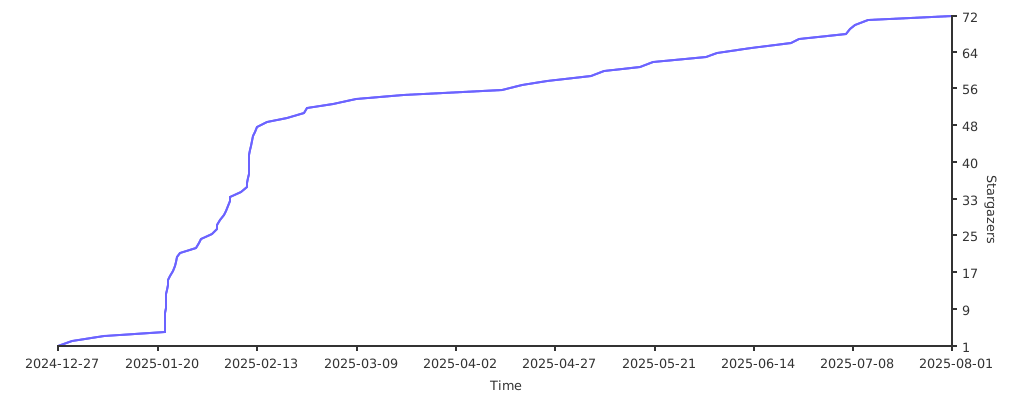
## 🌟 Stargazers over time
[](https://starchart.cc/cloudcoil/cloudcoil)