https://github.com/cloudogu/sudo-kubeconfig
Create a sudo kubeconfig for your current kubernetes context
https://github.com/cloudogu/sudo-kubeconfig
kubeconfig kubectl-sudo kubernetes sudo
Last synced: 8 months ago
JSON representation
Create a sudo kubeconfig for your current kubernetes context
- Host: GitHub
- URL: https://github.com/cloudogu/sudo-kubeconfig
- Owner: cloudogu
- License: mit
- Created: 2020-12-17T09:53:42.000Z (over 5 years ago)
- Default Branch: master
- Last Pushed: 2023-02-07T07:41:43.000Z (over 3 years ago)
- Last Synced: 2025-10-12T16:02:57.850Z (8 months ago)
- Topics: kubeconfig, kubectl-sudo, kubernetes, sudo
- Language: Shell
- Homepage:
- Size: 18.6 KB
- Stars: 7
- Watchers: 3
- Forks: 1
- Open Issues: 0
-
Metadata Files:
- Readme: README.md
- License: LICENSE
Awesome Lists containing this project
README
cloudogu/sudo-kubeconfig
===
Create a sudo kubeconfig for your current kubernetes context.
For questions or suggestions you are welcome to join us at our myCloudogu [community forum](https://community.cloudogu.com/c/kubernetes/54).
[](https://community.cloudogu.com/c/kubernetes/54)
## Motivation
The [kubectl sudo](https://github.com/postfinance/kubectl-sudo) and [helm sudo](https://github.com/cloudogu/helm-sudo) plugins use a powerful concept to prevent accidental `kubectl apply` or `helm install` to clusters: Using kuberentes' `impersonate` functionality as a `sudo` mechanism.
The plugins provide a good developer experience but are restricted to `kubectl` and `helm`.
What about other CLIs that rely on kubeconfig such as k9s, velero, fluxctl, istioctl, etc.? Can this mechanism be used
for them as well?
This repo provides an option for that: a "sudo-context".
The sudo-context is a duplicate of your usual context in kubeconfig that uses the same cluster but a different user.
This user sets `as` and `as-groups` just like `kubectl sudo` does.
## Creating a sudo-context
One option for creating a "sudo context" is [create-sudo-kubeconfig.sh](create-sudo-kubeconfig.sh).
It guides you through the "sudo context" creation interactively.
```shell
SUDO_KUBECONTEXT_VERSION=0.1.1
wget -P /tmp/ "https://raw.githubusercontent.com/cloudogu/sudo-kubeconfig/${SUDO_KUBECONTEXT_VERSION}/create-sudo-kubeconfig.sh"
chmod +x /tmp/create-sudo-kubeconfig.sh
/tmp/create-sudo-kubeconfig.sh
```
## Using a sudo-context
See bellow for an example using local KIND/k3s/k3d cluster.
* Create an impersonator `ClusterRole` (see [kubectl-sudo](https://github.com/postfinance/kubectl-sudo) for details of the concept)
`kubectl apply -f "https://raw.githubusercontent.com/cloudogu/sudo-kubeconfig/${SUDO_KUBECONTEXT_VERSION}/clusterrole-sudoer.yaml"`
* Authorize users via `ClusterRoleBinding`, e.g. like
`kubectl create clusterrolebinding cluster-sudoers --clusterrole=sudoer --user=you`
* Restrict your user to read-only permissions (e.g. using the built-in `viewer` clusterrole)
* Create sudo-kubeconfig
```shell
SUDO_KUBECONTEXT_VERSION=0.1.1
wget -P /tmp/ "https://raw.githubusercontent.com/cloudogu/sudo-kubeconfig/${SUDO_KUBECONTEXT_VERSION}/create-sudo-kubeconfig.sh"
chmod +x /tmp/create-sudo-kubeconfig.sh
/tmp/create-sudo-kubeconfig.sh
```
Once you created a sudo context, you can use it like so:
```shell
fluxctl --context SUDO-context
k9s --context SUDO-context # Hint: You can also change the context from within k9s using ":ctx"
```
⚠️ Please note
* The SUDO-context also contains a namespace. This might be different from your current context. So: better your `-n` in your commands or kubernetes ressources, or use `kubectl sudo` and `helm sudo` plugins.
* It's good practice *not* to use the "sudo context" as current context, but to use it explicitly via an additional parameter.
By the way, you can also use this context for kubectl or helm, as an alternative to `kubectl sudo` plugin:
```shell
kubectl--context SUDO-context # Hint use auto completion for the context
# This also works with aliases ...
kgpo --context SUDO-context
# ... and plugins
kubectl whoami --context SUDO-context
helm --kube-context SUDO-context # Hint use auto completion for the context
```
## Trying sudo-kubeconfig in KIND, k3s/k3d
The kubeconfig used by k3s/k3d and KIND uses a client cert that already is in the `system:masters` group. This makes it
difficult to restrict privileges using RBAC.
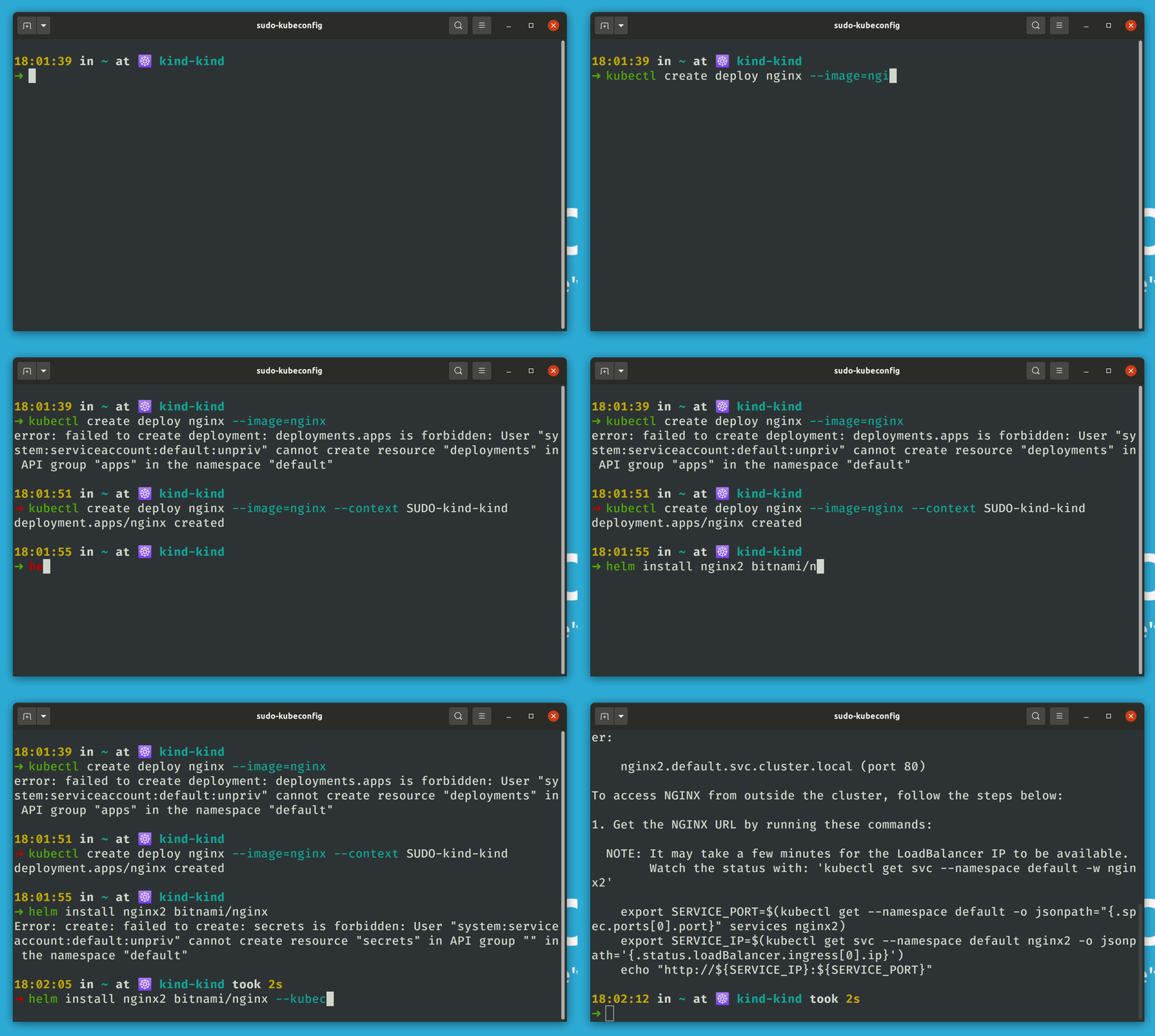
One option to try out sudo-kubeconfig is to create a service account and authenticate with its token.
```shell
# Preparations
# Create unprivileged service account
kubectl create sa unpriv --namespace default
# Enable sudo for service account
kubectl create clusterrolebinding cluster-sudoers \
--clusterrole=sudoer \
--serviceaccount=default:unpriv
# Optional: Allow read-only access by default
kubectl create clusterrolebinding cluster-viewers \
--clusterrole=view \
--serviceaccount=default:unpriv
# Create kubeconfig to authenticate using service account's token
wget -P /tmp https://raw.githubusercontent.com/zlabjp/kubernetes-scripts/4ed8/create-kubeconfig
chmod +x /tmp/create-kubeconfig
tmpConfig=$(mktemp)
/tmp/create-kubeconfig unpriv --namespace=default > ${tmpConfig}
export KUBECONFIG=${tmpConfig}
./create-sudo-kubeconfig.sh
# Fails with
# error: failed to create deployment: deployments.apps is forbidden: User "system:serviceaccount:default:unpriv" cannot create resource "deployments" in API group "apps" in the namespace "default"
kubectl create deployment nginx --image=nginx
# Success: deployment.apps/nginx created
kubectl create deploy nginx --image=nginx --context=SUDO-kind
# Fail
helm install nginx bitnami/nginx
# Success
helm install nginx bitnami/nginx --kube-context=SUDO-kind
# Reset to default kubeconfig
unset KUBECONFIG
```
## Options
Via Environment Variables.
* `SUDO_PREFIX` - Prefix added to current kubecontext and user to flag it as "sudo". Default: `SUDO-`
* `SUDO_CONTEXT_POSTFIX` - Postfix added to current kubecontext to raise attention to it being for sudo only. Default: ``
* `DEBUG` - prints echo of commands (set -x)