https://github.com/cmgrayb/hass-dyson
Unofficial Dyson integration, focusing on device capabilities and connection information to maximize compatibility
https://github.com/cmgrayb/hass-dyson
air-purifier custom-component dyson hacs home-assistant integration iot mqtt python smart-home
Last synced: 3 months ago
JSON representation
Unofficial Dyson integration, focusing on device capabilities and connection information to maximize compatibility
- Host: GitHub
- URL: https://github.com/cmgrayb/hass-dyson
- Owner: cmgrayb
- License: mit
- Created: 2025-08-23T17:21:12.000Z (11 months ago)
- Default Branch: main
- Last Pushed: 2026-04-13T02:11:24.000Z (3 months ago)
- Last Synced: 2026-04-13T02:25:31.987Z (3 months ago)
- Topics: air-purifier, custom-component, dyson, hacs, home-assistant, integration, iot, mqtt, python, smart-home
- Language: Python
- Homepage:
- Size: 3.03 MB
- Stars: 52
- Watchers: 0
- Forks: 6
- Open Issues: 5
-
Metadata Files:
- Readme: README.md
- Funding: .github/FUNDING.yml
- License: LICENSE
- Support: docs/SUPPORTED_DEVICES.md
Awesome Lists containing this project
README
# Dyson Integration for Home Assistant

[releases-shield]: https://img.shields.io/github/release/cmgrayb/hass-dyson.svg?style=for-the-badge
[releases]: https://github.com/cmgrayb/hass-dyson/releases
[commits-shield]: https://img.shields.io/github/commit-activity/y/cmgrayb/hass-dyson.svg?style=for-the-badge
[commits]: https://github.com/cmgrayb/hass-dyson/commits/main
[hacs]: https://github.com/hacs/integration
[hacsbadge]: https://img.shields.io/badge/HACS-Default-41BDF5.svg?style=for-the-badge
[license-shield]: https://img.shields.io/github/license/cmgrayb/hass-dyson.svg?style=for-the-badge
[codecov-shield]: https://img.shields.io/codecov/c/github/cmgrayb/hass-dyson?token=AG0CK5SE4R&style=for-the-badge
[codecov]: https://codecov.io/github/cmgrayb/hass-dyson
[![GitHub Release][releases-shield]][releases]
[![GitHub Activity][commits-shield]][commits]
[![License][license-shield]](LICENSE)
[![hacs][hacsbadge]][hacs]
[![Codecov][codecov-shield]][codecov]
A core-ready Home Assistant integration for Dyson air purifiers, heaters, humidifiers, fans, and robotic vacuums featuring real-time MQTT communication and complete platform coverage.
## Current Features
### All Supported Devices
- **Cloud Discovery** - Automatic device detection via Dyson API
- **Manual Setup** - Sticker-based or network-isolated configuration for local devices
- **Static IP Configuration** - Bypass mDNS with static IP/hostname for reliable connectivity
- **Capability Based Detection** - Automatic platform setup based on device features
### Environmental Cleaners (Fans/Purifiers)
- **Fan Control** - Speed adjustment (1-10), on/off, night mode
- **Air Quality Monitoring** - PM2.5, PM10, real-time sensor data
- **Smart Controls** - Auto mode, oscillation
- **Status Monitoring** - Connectivity, filter life, fault detection, firmware version
- **Precise Adjustments** - Timers, oscillation angles
- **Heating Support** - Climate Control with Heater mode, Heater Thermostat, and Fan Direction
- **Humidifier Support** Humidifier entity with set point, current level and empty tank alerts
- **Climate Control** - Climate Control with Humidistat (Experimental)
### Robotic Vacuums
- **Mid-run Controls** - Pause, Resume, and Stop (Return to Dock)
- **Vacuum Status** - Battery level, Unique Identifier for Current Cleaning Session (for future use)
## Planned Features
### BLE Devices
- **lec Support** - We hope to someday support Dyson "lec" or BLE devices such as lights via BLE proxy devices
- **Vacuum Start Controls** - Support the start in room functionality introduced in Home Assistant 2026.2.0 as well as "global" (all defined rooms)
## Quick Start
### Installation
1. **Install Integration via HACS**
- Open **HACS** in Home Assistant
- Search for "**Dyson**"
- Click **Download**
- Restart Home Assistant
> **Can't find it?** If the integration does not appear in HACS search, you can add it manually as a custom repository:
> - Go to **Settings** (three dots menu) in HACS
> - Select **Custom repositories**
> - Add repository URL: `https://github.com/cmgrayb/hass-dyson`
> - Select category: **Integration**
> - Click **Add**, then search for and download **Dyson** as above
### Setup
1. Go to **Settings** → **Devices & Services** → **Add Integration**
2. Search for "**Dyson**"
3. Choose setup method:
- **Cloud Discovery** - Enter Dyson account credentials
- **Manual Setup** - Enter device details from sticker or information gained through the Get Cloud Devices Action, or external tooling such as libdyson-rest or opendyson
## Configuration
### Cloud Account Configuration (**Recommended**)
When selecting **Cloud Discovery**, you'll be guided through the following steps:
#### **Step 1: Account Credentials**
- **Email or Mobile Number**: Your Dyson account email address or mobile number if in CN region
- **Country**: Verify your country and culture (affects API region and localization)
- **Password**: Your Dyson account password if using email
- **OTP**: The one-time password sent to your email by Dyson if using email, or the one-time password sent to your mobile device if not
#### **Step 2: Default Connection Method**
Choose your preferred default connection method for your devices:
- **Local Only**: Talks to the device only through the device's MQTT server
- Maximum privacy, can be used without internet access for the device
- Susceptible to local device MQTT server failures and mDNS resolution issues
- Note: This mode is most similar to the [ha-dyson](https://github.com/libdyson-wg/ha-dyson) integration
- When using this approach, we highly recommend assigning a DHCP reservation or using a static IP to minimize mDNS broadcast issues
- **Local with Cloud Fallback**: Stays local until and unless the local server cannot be
reached, then reconnects to the device through the Dyson-hosted MQTT Proxy service.
- Balances privacy and uptime by only using cloud when necessary
- Attempts to reconnect to local periodically
- Allows the user to reconnect to local manually through the Reconnect button
- **Cloud with Local Fallback**: Stays on the Dyson MQTT Proxy service until and unless
internet access is lost, then reconnects to the device directly
- Uses an encrypted connection as often as possible but switches to local to maintain connectivity in the event of internet outage
- Attempts to reconnect to cloud periodically
- Allows the user to reconnect to cloud manually through the Reconnect button
- **Cloud Only**: Stays on the Dyson MQTT Proxy
- Useful for environments which cannot support mDNS
- Can be used to control Dyson devices on other networks for remote management
- All communication with the device is encrypted in transit
**Note**: Each device may individually override its preferred connection method once discovered
#### **Step 3: Device Discovery Configuration**
Choose your preference for level of control of discovery:
- **Poll for New Devices**: If selected, the API will be queried for new devices periodically, making them available for discovery
- **Automatically Add Discovered Devices**: Uses the information from polling your Dyson account to connect to the devices using your Default Connection Method
Scenarios:
1. I want my Dyson devices to show up in Home Assistant as soon as they are found
- Leave both checkboxes selected
2. I want Home Assistant to ask me to add my devices as they are found so I can choose which ones to add or ignore
- Only select Poll for New Devices, leave Automatically Add Discovered Devices unchecked.
3. I want to add my Dyson devices individually and manually or I am only interested in using the Get Cloud Devices Action
- Deselect both checkboxes
- For more information, see: [Actions](docs/ACTIONS.md)
#### **Expected Entities Per Device**
Based on your device capabilities and category, you'll automatically get:
**All Devices (Basic Support):**
- Basic binary sensors (online/offline, faults)
**WiFi-Enabled Devices (EC/Robot Categories):**
- Connection status sensor (Local/Cloud/Disconnected)
- Reconnect button to attempt to re-establish preferred connectivity
- WiFi signal strength sensor (diagnostic)
- Temperature sensor
- Humidity sensor
- Carbon filter sensors
- HEPA filter sensors
**Air Quality Models (ExtendedAQ Capability):**
- PM2.5 air quality sensor
- PM10 air quality sensor
- HEPA filter life sensor (%)
- HEPA filter type sensor
- Carbon filter life sensor (%)
- Carbon filter type sensor
- VOC sensor
- NO2/NOx sensor
- CO2 sensor
- HCHO/Formaldehyde sensor
**Heating models (Heating Capability):**
- **Climate control platform**
- **HVAC Controls**:
- Mode control: Heat/Fan only/Off
- Heat minimum temperature (thermostat)
**Humidifier models (Humidifier Capability):**
- **Climate control platform**
- **Humidifier Controls**:
- Mode control: Humidify/Fan only/Off
- Humidifier minimum humidity (humidistat)
- Empty tank diagnostic sensor
**Robotic Vacuum models (Robot Category) (360/Heurist/Vis Nav, etc.)**:
- **Vacuum platform**
- **Mid-run Controls** - Pause, Resume, and Stop (Return to Dock)
- **Vacuum Status** - Battery level, Unique Identifier for Current Cleaning Session
#### **Setup Time**
- **Initial connection**: 10-30 seconds
- **Device discovery**: 5-15 seconds per device
- **Entity creation**: Values may take a minute or two to show up after new device creation or boot
#### **Troubleshooting Cloud Setup**
- **Invalid credentials**: Verify email/password and account region
- **No devices found**: Ensure devices are registered in Dyson app
- **Connection timeout**: Check internet connection and Dyson API status
- **Partial device data**: Some devices may need additional setup time
### Manual/Sticker Setup (Advanced Use Case such as isolated network)
**Please note: some features (like Firmware version) will not work without access to the Cloud API**
Required information from device sticker, libdyson-rest, or opendyson:
- **Serial Number** (e.g., MOCK-SERIAL-TEST123)
- **Device Password** (from sticker)
- **MQTT Prefix** (e.g., 438M for Pure Cool models)
- **Device Type** (e.g., EC for air purifiers)
### YAML Configuration (Optional, **Not** Recommended)
```yaml
hass_dyson:
devices:
- serial_number: "MOCK-SERIAL-TEST123"
discovery_method: "sticker"
hostname: "192.168.1.100" # Optional: IP address
credential: "your_device_password"
device_type: "ec"
mqtt_prefix: "438M"
capabilities: ["AdvanceOscillationDay1", "Scheduling", "ExtendedAQ"]
```
## Documentation
### **Additional Information**
- **[Actions](docs/ACTIONS.md)** - Information on included Home Assistant Actions
- **[Controls](docs/CONTROLS.md)** - Information on included controls for devices
- **[Device Compatibility Matrix](docs/DEVICE_COMPATIBILITY.md)** - Complete breakdown of which entities are available for each device type and capability
- **[Device Management](docs/DEVICE_MANAGEMENT.md)** - Information on device discovery and configuration
- **[Entities](docs/ENTITIES.md)** - Information on entities to expect for a given device type
- **[Sensors](docs/SENSORS.md)** - Information on included sensors for devices
- **[Supported Devices](docs/SUPPORTED_DEVICES.md)** - Information on devices tested and known to be supported
### **Quick References**
- **[Setup Guide](docs/SETUP.md)** - Detailed installation and configuration instructions
- **[Troubleshooting](docs/TROUBLESHOOTING.md)** - Troubleshooting Guide
### **For Developers**
- **[API Documentation](docs/API.md)** - Comprehensive API documentation with code examples and usage patterns for developers
- **[Developers Guide](docs/DEVELOPERS_GUIDE.md)** - See something you can help with? This is where to start!
- **[Integration Flow Diagrams](docs/INTEGRATION_FLOW.md)** - Visual flow diagrams showing the integration architecture and operation
## Requirements
- **Home Assistant** 2025.12+
- **Python** 3.11+
- **Dependencies** (auto-installed):
- `libdyson-rest>=0.12.1`
- `paho-mqtt>=2.1.0`
- `cryptography>=45.0.7`
## Acknowledgments
- **libshenxn** - For getting the Dyson community started with the original libdyson
- **dotvezz** - For maintaining the libdyson-wg working group, ha-dyson, and opendyson, the inspiration for this integration
- **libdyson-wg** - For maintaining excellent documentation and tooling without which this integration would not have been possible
- **paho-mqtt** - Reliable MQTT communication library
- **Home Assistant** - Amazing home automation platform
- **Dyson** - For making great products worth putting in the work for
## Star History
[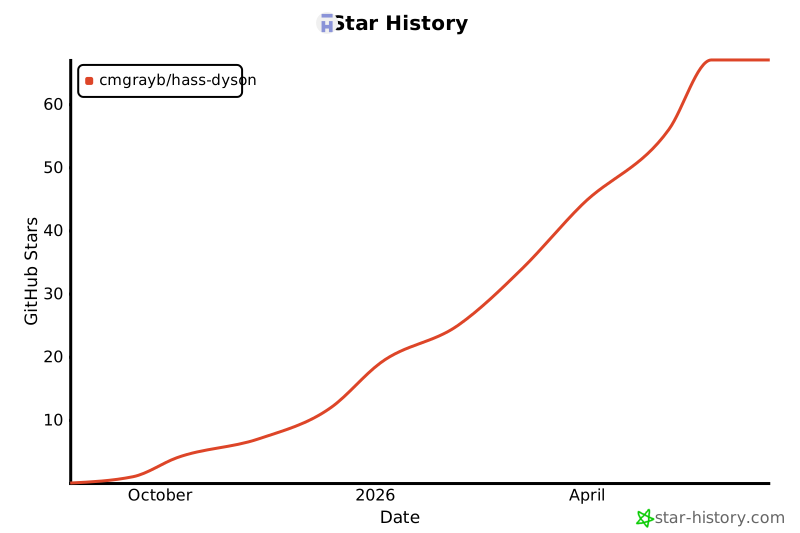](https://www.star-history.com/#cmgrayb/hass-dyson&type=date&legend=top-left)
If you like our work, please give us a star!
## Sponsorship
This integration is provided free of charge and there is no requirement expressed or implied to donate. Any money contributed through the sponsorship button as a gift goes to development devices to further improve this integration.
## License
This project is licensed under the MIT License - see the [LICENSE](LICENSE) file for details.
---
**⚠️ Disclaimer**: This is an unofficial integration not affiliated with Dyson Ltd. Use at your own risk.