https://github.com/codacy/codacy-dartanalyzer
Codacy Tool for Dart Analyzer
https://github.com/codacy/codacy-dartanalyzer
Last synced: 4 months ago
JSON representation
Codacy Tool for Dart Analyzer
- Host: GitHub
- URL: https://github.com/codacy/codacy-dartanalyzer
- Owner: codacy
- Created: 2022-01-14T11:31:37.000Z (over 4 years ago)
- Default Branch: master
- Last Pushed: 2025-10-02T11:17:30.000Z (10 months ago)
- Last Synced: 2026-02-07T21:48:28.925Z (5 months ago)
- Language: Dart
- Size: 813 KB
- Stars: 2
- Watchers: 8
- Forks: 1
- Open Issues: 1
-
Metadata Files:
- Readme: README.md
- Codeowners: .github/CODEOWNERS
Awesome Lists containing this project
README
# Codacy Dart Analyzer
This is the docker engine we use at Codacy to have [Dart Analyzer](https://github.com/dart-lang/sdk/tree/master/pkg/analyzer) support.
You can also create a docker to integrate the tool and language of your choice!
See the [codacy-engine-scala-seed](https://github.com/codacy/codacy-engine-scala-seed) repository for more information.
[](https://app.codacy.com/gh/codacy/codacy-dartanalyzer?utm_source=github.com&utm_medium=referral&utm_content=codacy/codacy-dartanalyzer&utm_campaign=Badge_Grade_Settings)
[](https://circleci.com/gh/codacy/codacy-dartanalyzer)
## Supported packages lints on analysis_config.yaml files
* [lints](https://pub.dev/packages/lints)
* [flutter_lints](https://pub.dev/packages/flutter_lints)
### Adding supported packages
To support new packages just add them on Dockerfile after the development context is created, like so:
```dockerfile
RUN dart pub add --dev
```
## How to bump the tool
- Update the version at `.tool_version` file with the new SDK version.
- Re-run the [doc generation](#how-to-update-the-documentation).
## Implementation Details
We use `dart analyze` command, which performs static analysis on dart source code. It works by having an `analysis_options.yaml` file, which specifies all the necessary rules for analysis. This file has the following structure:
```yaml
include: package:lints/recommended.yaml
analyzer:
exclude: [build/**]
language:
strict-casts: true
strict-raw-types: true
linter:
rules:
- cancel_subscriptions
```
The example above illustrates the most common entries you will have to specify:
- The include operation is used to import options from the specified URL. __You can include at most one file.__
- The analyzer entry customizes static analysis, where you can activate or de-activate specific rules, ignore files, etc.
- The linter entry specifies linting rules.
### Analysis Option File Precedence
You can have multiple `analysis_options.yaml` files in a project. However, there are some rules that apply when you do so.
The analyzer will always use the first analysis_options file it finds when searching through the file hierarchy.
The following image explains the rules used for the options files:
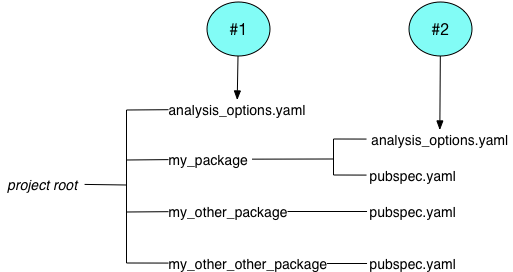
Fig.1 - Options files example (taken from the official documentation)
In the case demonstrated above, the analyzer uses file `#1` to analyze the code in `my_other_package` and `my_other_other_package`, and file `#2` to analyze the code in `my_package`.
This implies that any `analysis_options.yaml` files specified in the hierarchy will override the users' provided analysis configurations.
When building the docker image, we the necessary files required to support the `include` operation on the `analysis_options.yaml` files [supported packages](#supported-packages-lints-on-analysis_configyaml-files).
### Output formatting
By default, dart outputs the analysis results in a human-readable format. However, there is an optional argument `format` that makes it easier to parse.
We use `--format=machine` to provide the best format for parsing the results by Codacy.
## Usage
You can create the docker image by executing the following commands:
```bash
sbt graalvm-native-image:packageBin
docker build --build-arg TOOL_VERSION=$(cat .tool_version) -t codacy-dartanalyzer .
```
To run the docker image, you can use the following command:
```bash
docker run -it -v $srcDir:/src :
```
## Test
For a faster development loop, you can create a JVM-based Docker image instead of creating a native-image:
```bash
sbt universal:stage
docker build --build-arg TOOL_VERSION=$(cat .tool_version) -t codacy-dartanalyzer -f Dockerfile.dev .
```
We use the [codacy-plugins-test](https://github.com/codacy/codacy-plugins-test) to test our external tools integration.
You can follow the instructions there to make sure your tool is working as expected.
## How to update the documentation
To generate the pattern.json and rules descriptions you must run a dart program from the project root.
```bash
dart run doc-generator/lib/generatedocs.dart
```
---
## What is Codacy?
[Codacy](https://www.codacy.com/) is an Automated Code Review Tool that monitors your technical debt, helps you improve your code quality, teaches best practices to your developers, and helps you save time in Code Reviews.
### Among Codacy’s features:
- Identify new Static Analysis issues
- Commit and Pull Request Analysis with GitHub, BitBucket/Stash, GitLab (and also direct git repositories)
- Auto-comments on Commits and Pull Requests
- Integrations with Slack, HipChat, Jira, YouTrack
- Track issues in Code Style, Security, Error Proneness, Performance, Unused Code and other categories
Codacy also helps keep track of Code Coverage, Code Duplication, and Code Complexity.
Codacy supports PHP, Python, Ruby, Java, JavaScript, Dart, and Scala, among other languages.
### Free for Open Source
Codacy is free for Open Source projects.