https://github.com/code-rhapsodie/syliusextendedelasticsearchplugin
https://github.com/code-rhapsodie/syliusextendedelasticsearchplugin
Last synced: about 1 year ago
JSON representation
- Host: GitHub
- URL: https://github.com/code-rhapsodie/syliusextendedelasticsearchplugin
- Owner: code-rhapsodie
- License: mit
- Created: 2020-12-04T10:35:14.000Z (over 5 years ago)
- Default Branch: master
- Last Pushed: 2021-02-01T11:13:25.000Z (over 5 years ago)
- Last Synced: 2023-04-27T11:28:55.536Z (about 3 years ago)
- Language: PHP
- Size: 262 KB
- Stars: 0
- Watchers: 4
- Forks: 0
- Open Issues: 5
-
Metadata Files:
- Readme: README.md
- License: LICENSE
Awesome Lists containing this project
README
## Code Rhapsodie SyliusExtendedElasticsearchPlugin
Working [Sylius](https://sylius.com/) [Elasticsearch](https://www.elastic.co/products/elasticsearch) integration based on [FOSElasticaBundle](https://github.com/FriendsOfSymfony/FOSElasticaBundle). The main goal of this plugin is to support filtering products by
options, attributes, taxons, channels and name in the front product list page. It totally replaces the default Sylius `sylius_shop_product_index`
route.
What is more, the plugin has a nice Sylius-oriented architecture that allows mapping resources to the Elastic document easier. It is flexible as well,
so that you can customize the existing features for your specific business needs.
This project is based on [BitBag SyliusElasticsearchPlugin](https://github.com/BitBagCommerce/SyliusElasticsearchPlugin)
## Installation
*Note*: This Plugin currently supports ElasticSearch 5.3.x up to 6.8.x. ElasticSearch ^7.x is not currently supported.
```bash
$ composer require code-rhapsodie/extended-elasticsearch-plugin
```
Add plugin dependencies to your `config/bundles.php` file:
```php
return [
...
FOS\ElasticaBundle\FOSElasticaBundle::class => ['all' => true],
CodeRhapsodie\SyliusExtendedElasticsearchPlugin\CodeRhapsodieSyliusExtendedElasticsearchPlugin::class => ['all' => true],
];
```
Import required config in your `config/packages/_sylius.yaml` file:
```yaml
# config/packages/_sylius.yaml
imports:
...
- { resource: "@CodeRhapsodieSyliusExtendedElasticsearchPlugin/Resources/config/config.yml" }
```
Import routing **on top** of your `config/routes.yaml` file:
```yaml
# config/routes.yaml
cr_sylius_extended_elasticsearch_plugin:
resource: "@CodeRhapsodieSyliusExtendedElasticsearchPlugin/Resources/config/routing.yml"
```
Create a file named `bit_bag_sylius_elasticsearch.yaml` in `config/packages`
in which you will add this code to have the default configuration services :
```
code_rhapsodie_sylius_extended_elasticsearch:
excluded_filter:
options: ['option1']
attributes: ['attribute1']
filter_attributes_max: 30
filter_options_max: 30
```
...and set up the redirection from the default Sylius shop products index page on top of your `config/routes/sylius_shop.yaml`
file.
```
# config/routes/sylius_shop.yaml
redirect_sylius_shop_product_index:
path: /{_locale}/taxons/{slug}
controller: Symfony\Bundle\FrameworkBundle\Controller\RedirectController::redirectAction
defaults:
route: cr_sylius_extended_elasticsearch_plugin_shop_list_products
permanent: true
requirements:
_locale: ^[a-z]{2}(?:_[A-Z]{2})?$
slug: .+
```
...and update installed assets with the following command:
```
$ bin/console assets:install
```
...and remove the default ElasticSearch index (`app`) defined by `FOSElasticaBundle` in `config/packages/fos_elastica.yaml`:
```
fos_elastica:
clients:
default: { host: localhost, port: 9200 }
indexes:
app: ~
```
should become:
```
fos_elastica:
clients:
default: { host: localhost, port: 9200 }
```
In the end, with an elasticsearch server running, execute following command:
```
$ bin/console fos:elastica:populate
```
**Note:** If you are running it on production, add the `-e prod` flag to this command. Elastic are created with environment suffix.
## Usage
### Rendering the shop products list
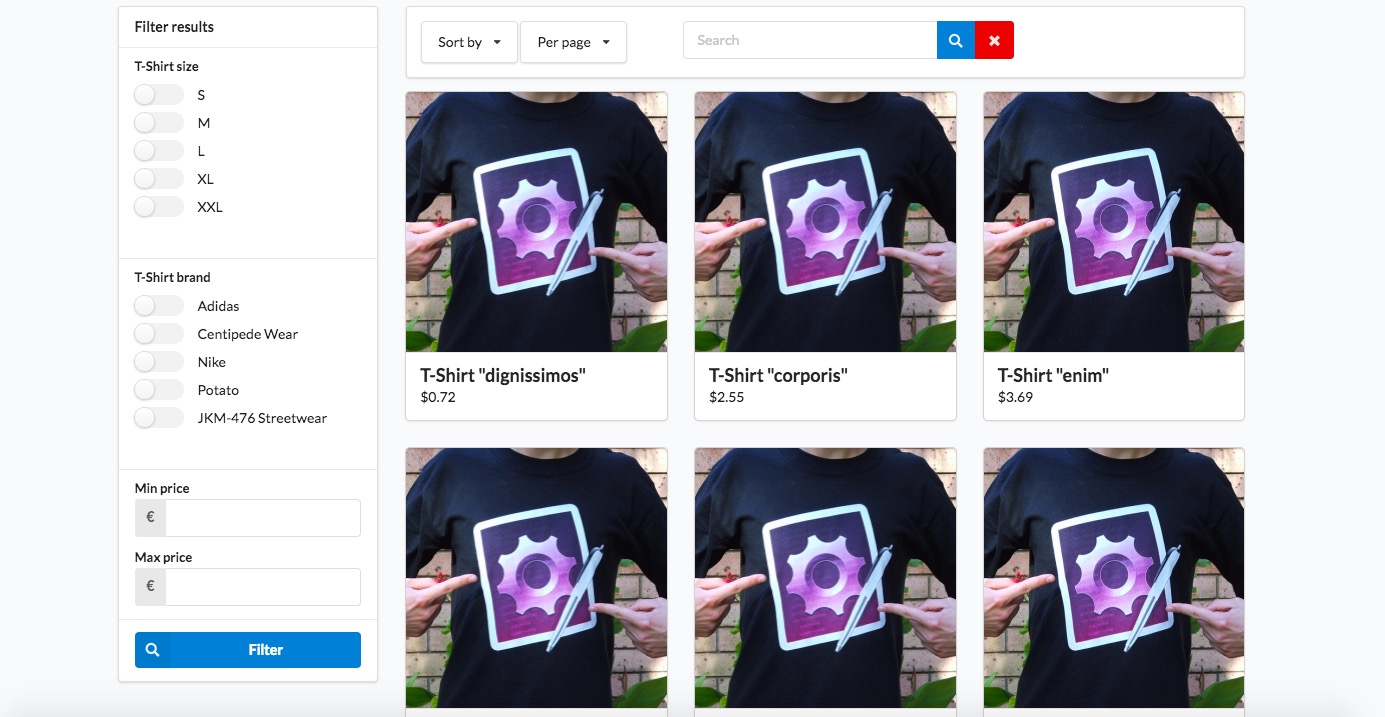
When you go now to the `/{_locale}/products/taxon/{slug}` page, you should see a totally new set of filters. You should see something like this:
You might also want to refer the horizontal menu to a new product list page. Follow below instructions to do so:
1. If you haven't done it yet, create two files:
* `_horizontalMenu.html.twig` in `templates/bundles/SyliusShopBundle/Taxon` directory
* `_breadcrumb.html.twig` in `templates/bundles/SyliusShopBundle/Product/Show` directory
2. Paste into those files content of respectively `vendor/sylius/sylius/src/Sylius/Bundle/ShopBundle/Resources/views/Taxon/_horizontalMenu.html.twig` and `vendor/sylius/sylius/src/Sylius/Bundle/ShopBundle/Resources/views/Product/Show/_breadcrumb.html.twig` files, replacing `sylius_shop_product_index` with `cr_sylius_extended_elasticsearch_plugin_shop_list_products` in both of them.
3. Clean your cache with `bin/console cache:clear` command.
4. :tada:
If you're using vertical menu - follow steps above with `_verticalMenu.html.twig` file instead. It's in the same directory as the `horizontal_menu.html.twig` file.
**Be aware! Elasticsearch does not handle dashes well. This plugin depends on the code field in Sylius resources. Please use underscores instead of dashes in your code fields.**
### Excluding options and attributes in the filter menu
You might not want to show some specific options or attributes in the menu. You can set specific parameters for that:
```yml
parameters:
cr_ees_excluded_filter_options: []
cr_ees_excluded_filter_attributes: ['book_isbn', 'book_pages']
```
By default all options and attributes are indexed. After you change these parameters, remember to run `bin/console fo:el:po` command again
(a shortcut for `fos:elastica:populate`).
### Exclude attributes and options dynamically from the search filter
To allow dynamic exclusion of product attributes (or product options) in admin menu page, the `App\Entity\Product\ProductAttribute` class must implement the` CodeRhapsodie\SyliusExtendedElasticsearchPlugin\Finder\FinderExcludable`interface
For example:
```