https://github.com/codeabinash/color-picker
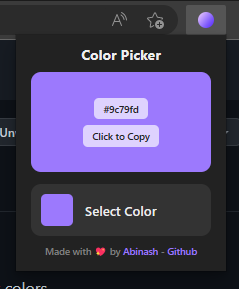
A chromium web browser extension to pick colors from the screen quickly.
https://github.com/codeabinash/color-picker
browser-extension chromium-extension
Last synced: 3 months ago
JSON representation
A chromium web browser extension to pick colors from the screen quickly.
- Host: GitHub
- URL: https://github.com/codeabinash/color-picker
- Owner: codeAbinash
- Created: 2022-12-21T11:25:02.000Z (over 3 years ago)
- Default Branch: main
- Last Pushed: 2022-12-24T20:07:32.000Z (over 3 years ago)
- Last Synced: 2025-01-01T21:46:31.133Z (over 1 year ago)
- Topics: browser-extension, chromium-extension
- Language: SCSS
- Homepage:
- Size: 1.4 MB
- Stars: 9
- Watchers: 1
- Forks: 0
- Open Issues: 0
-
Metadata Files:
- Readme: README.md
Awesome Lists containing this project
README
# Color Picker Browser(chromium) Extension




## Download
### [Download Zip](https://github.com/codeAbinash/color-picker/releases/download/v1.1.1/color_picker.zip) (Christmas Edition)
## How to install
- Extract the [download](https://github.com/codeAbinash/color-picker/releases/download/v1.1.1/color_picker.zip)ed zip file in a directory
- Open your chromium browser
- Go to manage extensions settings
- Turn on developer mode
- Then select `load unpacked extension` from your browser
- Select `src` directory from the directory where you extracted the [download](https://github.com/codeAbinash/color-picker/releases/download/v1.1.1/color_picker.zip)ed file
- Done 😊
> Do not delete the directory where you extracted files, otherwise the extension will be removed from your browser