https://github.com/codebox/js-planet-phase
A small JavaScript library for rendering realistic moon and planet phases in HTML
https://github.com/codebox/js-planet-phase
Last synced: 12 months ago
JSON representation
A small JavaScript library for rendering realistic moon and planet phases in HTML
- Host: GitHub
- URL: https://github.com/codebox/js-planet-phase
- Owner: codebox
- License: mit
- Created: 2014-11-22T13:23:01.000Z (over 11 years ago)
- Default Branch: master
- Last Pushed: 2019-03-06T08:37:37.000Z (over 7 years ago)
- Last Synced: 2025-06-12T12:13:39.841Z (about 1 year ago)
- Language: JavaScript
- Homepage: http://codebox.org.uk/pages/html-moon-planet-phases
- Size: 4.88 KB
- Stars: 27
- Watchers: 3
- Forks: 10
- Open Issues: 0
-
Metadata Files:
- Readme: README.md
- License: LICENSE
Awesome Lists containing this project
README
# js-planet-phase
This JavaScript library can be used to draw somewhat realistic lunar or planetary discs, complete with phase shadows:
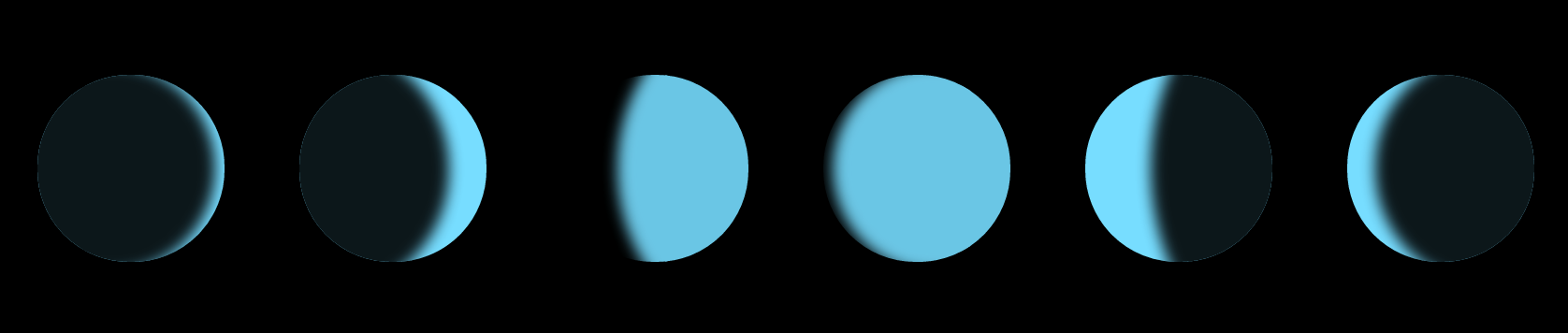
The library requires that browsers support the CSS `border-radius` and `box-shadow` properties, which means it [should work everywhere except IE8 (and earlier)](http://caniuse.com/#feat=css-boxshadow).
To use the library, just include the [planet_phase.js](https://github.com/codebox/js-planet-phase/blob/master/planet_phase.js) file somewhere in your page, and call the `drawPlanetPhase` function once for each disc that you want to draw.
The simplest way to call the function is like this:
drawPlanetPhase(document.getElementById('container'), 0.15, true);
* The first argument is the HTML element that you want to contain the disc.
* The second argument must be a value between 0 and 1, indicating how large the shadow should be:
* 0 = new moon
* 0.25 = crescent
* 0.50 = quarter
* 0.75 = gibbous
* 1.00 = full moon
* The third argument is a boolean value indicating whether the disc should be waxing or waning (i.e. which side of the disc the shadow should be on):
* true = waxing - shadow on the left
* false = waning - shadow on the right
* The function also accepts an optional fourth argument, containing configuration values which change the size, colour and appearance of the disc:
* `shadowColour` - CSS background-colour value for the shaded part of the disc
* `lightColour` - CSS background-colour value for the illuminated part of the disc
* `diameter` - diameter of the disc in pixels
* `earthshine` - a number between 0 and 1, specifying the amount of light falling on the shaded part of the disc (0 = none, 1 = full illumination)
* `blur` - amount of blur on the terminator in pixels (0 = no blur)