https://github.com/codedotjs/repocreate
:unicorn: An over-engineered but ultra-fast tool to create GitHub repositories from command-line!
https://github.com/codedotjs/repocreate
cli cli-app command-line-tool create github npm repository
Last synced: 3 months ago
JSON representation
:unicorn: An over-engineered but ultra-fast tool to create GitHub repositories from command-line!
- Host: GitHub
- URL: https://github.com/codedotjs/repocreate
- Owner: CodeDotJS
- License: mit
- Created: 2018-04-20T20:38:16.000Z (about 8 years ago)
- Default Branch: master
- Last Pushed: 2018-04-28T20:10:35.000Z (about 8 years ago)
- Last Synced: 2025-03-20T00:41:19.343Z (over 1 year ago)
- Topics: cli, cli-app, command-line-tool, create, github, npm, repository
- Language: JavaScript
- Homepage:
- Size: 395 KB
- Stars: 3
- Watchers: 1
- Forks: 0
- Open Issues: 0
-
Metadata Files:
- Readme: README.md
- License: license
Awesome Lists containing this project
README




An over-engineered but ultra-fast tool to create Github repositories from command-line!
### Install
```
$ npm install --global repocreate
```
__`OR`__
```
$ sudo npm install --global repocreate
````
### Preview
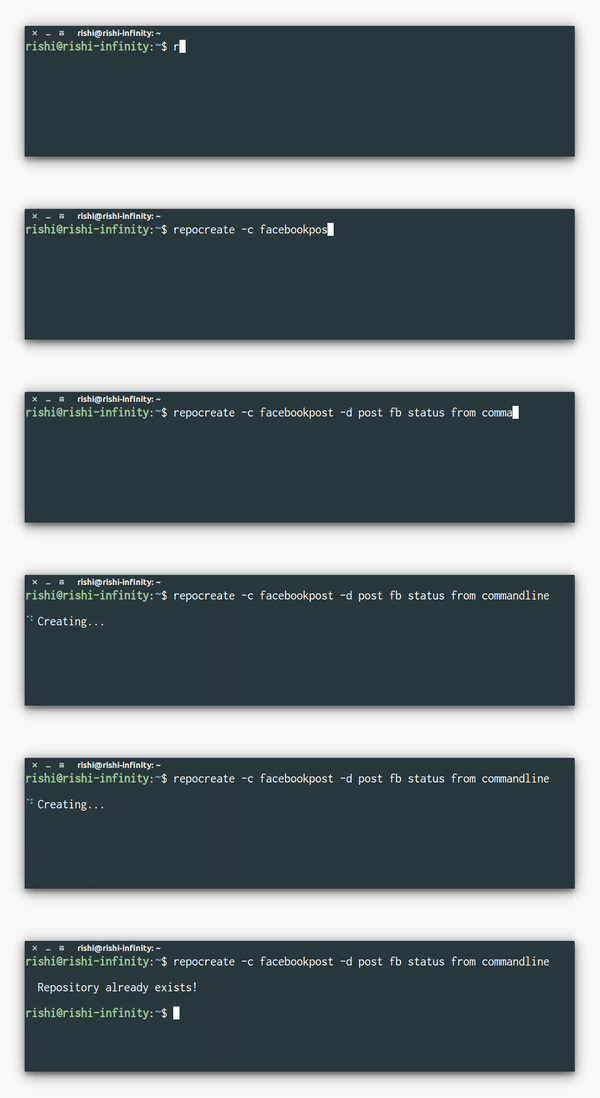
### Usage
```
Usage: repocreate [option]
Commands:
-c, --create name of the repository
-d, --description description of the repository
NOTE : --description is optional
Example:
$ repocreate -c foobar
$ repocreate -c "foo bar" -d Just another foobarism
Help:
-h, --help Display help
```
__`NOTE`__
- If the name of your repository is of more than one word, pass the argument as a single string inside single or double quotes.
- You don't have to put the descriptions inside quotes. Things will work fine even if you do that!
### Setup
- Generate your `access token` from [`here`](https://github.com/settings/tokens) and copy it.
- Run command `$ repocreate -c testrepo`
- A `token.json` file will open in Sublime with -
```json
{
"username": "enter your github username",
"token":"paste the access token"
}
```
- Enter your `username`, paste the `token` and save the file. You are ready to go!
__`NOTE`__
__`In case, you are not using sublime, follow the given steps -`__
- Manually open the `token.json` file saved under `.repocreate` folder under `home directory`
__`or`__
- Open the file using : `$ atom/code/vi ~/.repocreate/token.json`
- Copy-paste the genereated `access token`
- Save the file and that's it.
#### __`Why?`__
- I don't know, it's silly, but I use it. I don't know.
### License
MIT © [Rishi Giri](https://rishigiri.ml)