https://github.com/codeep/react-training-team-2
https://github.com/codeep/react-training-team-2
Last synced: 22 days ago
JSON representation
- Host: GitHub
- URL: https://github.com/codeep/react-training-team-2
- Owner: codeep
- Created: 2018-08-21T16:18:56.000Z (almost 8 years ago)
- Default Branch: master
- Last Pushed: 2018-09-05T13:10:00.000Z (almost 8 years ago)
- Last Synced: 2025-02-26T19:29:32.926Z (over 1 year ago)
- Language: JavaScript
- Size: 4.16 MB
- Stars: 1
- Watchers: 3
- Forks: 0
- Open Issues: 0
-
Metadata Files:
- Readme: README.md
Awesome Lists containing this project
README
# React Starter
A basic template that consists of the essential elements that are required to start building a React (v16.4) application using Webpack (v4).
The template consists of:
* a typcial project layout structure
* babel setup and configuration
* webpack setup and configuration
* eslint setup and configuration
* SCSS setup and configuration
* the main React components to get started
Additionaly, the template provides a development and production webpack configuration.
The template also allows one to include specific plugins as part of build. [Please see here for more detail](#build-application-with-bundleanalayzer-plugin-included)
---
## Developed With
* [Node.js 8.11](https://nodejs.org/en/) - Javascript runtime
* [React 16.4](https://reactjs.org/) - A javascript library for building user interfaces
* [Babel 6.26](https://babeljs.io/) - A transpiler for javascript
* [Webpack 4.x](https://webpack.js.org/) - A module bundler
* [SCSS](http://sass-lang.com/) - A css metalanguage
---
## Getting Started
These instructions will get you a copy of the project up and running on your local machine for development and testing purposes.
### Prerequisites
The following software is required to be installed on your system:
* Node 8.x
* Npm 3.x
Type the following commands in the terminal to verify your node and npm versions
```bash
node -v
npm -v
```
### Install
Follow the following steps to get development environment running.
* Clone _'react-starter'_ repository from GitHub
```bash
git clone https://github.com/drminnaar/react-starter.git
```
_OR USING SSH_
```bash
git clone git@github.com:drminnaar/react-starter.git
```
* Install node modules
```bash
cd react-starter
npm install
```
### Build
#### Build Application
dev | prod
:---: | :---:
npm run build:dev | npm run build:prod
#### Build Application And Watch For Changes
dev | prod
:---: | :---:
npm run build:dev:watch | npm run build:prod:watch
#### Build Application With BundleAnalayzer Plugin Included
dev | prod
:---: | :---:
npm run build:dev:bundleanalyze | npm run build:prod:bundleanalyze
After running the above command, a browser window will open displaying an interactive graph resembling the following image:

### Run ESlint
#### Lint Project Using ESLint
```bash
npm run lint
```
#### Lint Project Using ESLint, and autofix
```bash
npm run lint:fix
```
### Run
#### Run Start
This will run the _'serve:dev'_ npm task
```bash
npm start
```
#### Run Dev Server
```bash
npm run serve:dev
```
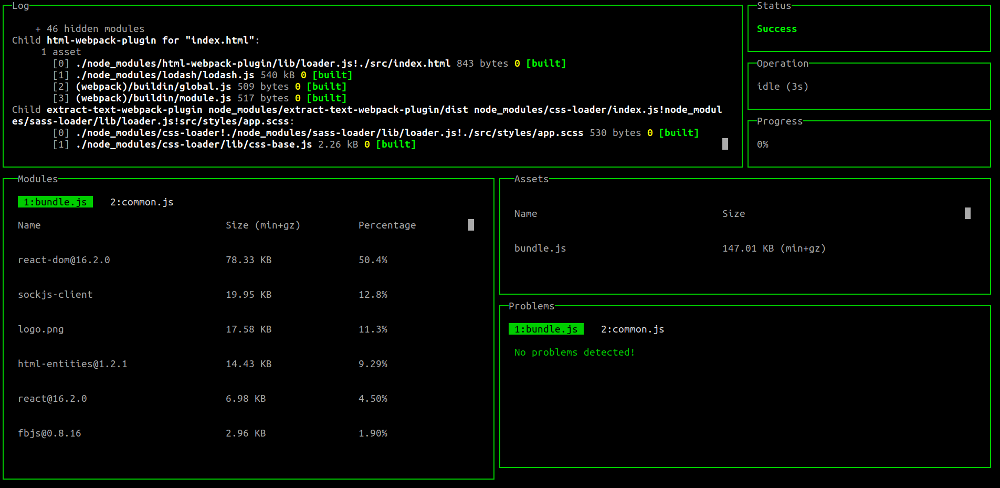
#### Run Dev Server With Dashboard
```bash
npm run serve:dev:dashboard
```
The above command will display a dashboard view in your console resembling the following image:
#### Run Prod Server
This command will build application using production settings and start the application using _live-server_
```bash
npm run serve:prod
```
---