https://github.com/codegyan-llc/quickphp
QuickPHP is a lightweight VS Code extension that executes PHP code inline, similar to how QuickPy works for PHP. It helps PHP developers see their output directly within the editor, without switching to the terminal.
https://github.com/codegyan-llc/quickphp
codegyan prathmeshyelne quickphp vscode-extension
Last synced: about 1 month ago
JSON representation
QuickPHP is a lightweight VS Code extension that executes PHP code inline, similar to how QuickPy works for PHP. It helps PHP developers see their output directly within the editor, without switching to the terminal.
- Host: GitHub
- URL: https://github.com/codegyan-llc/quickphp
- Owner: Codegyan-LLC
- License: mit
- Created: 2025-01-31T18:49:30.000Z (over 1 year ago)
- Default Branch: main
- Last Pushed: 2025-01-31T19:15:40.000Z (over 1 year ago)
- Last Synced: 2025-06-28T01:02:03.123Z (11 months ago)
- Topics: codegyan, prathmeshyelne, quickphp, vscode-extension
- Language: TypeScript
- Homepage: https://marketplace.visualstudio.com/items?itemName=Codegyan.quickphp
- Size: 862 KB
- Stars: 0
- Watchers: 0
- Forks: 0
- Open Issues: 0
-
Metadata Files:
- Readme: README.md
- Changelog: CHANGELOG.md
- License: LICENSE.md
Awesome Lists containing this project
README
# QuickPHP - PHP Inline Execution for VS Code
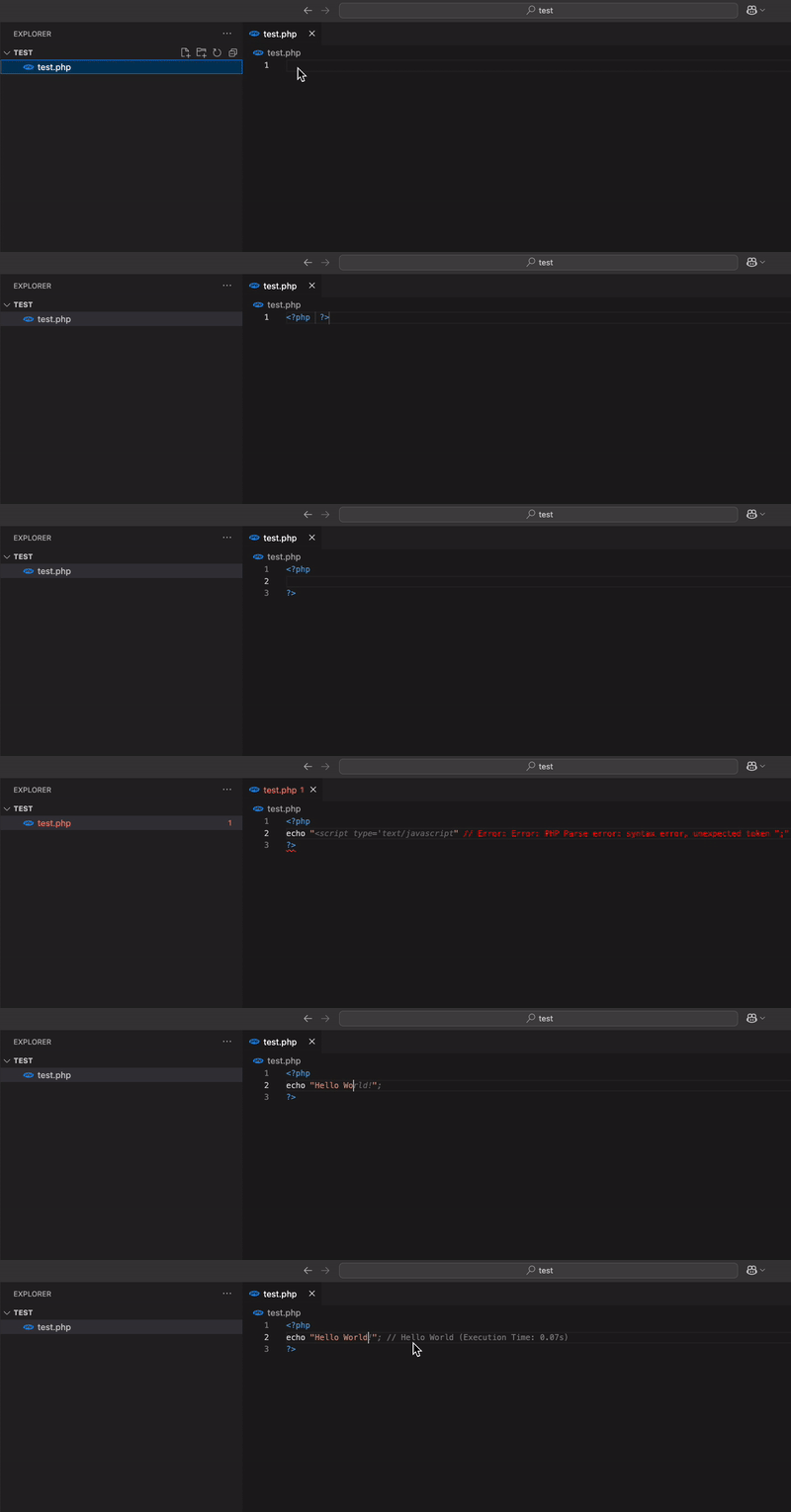
**QuickPHP** is a lightweight VS Code extension that executes PHP code inline, similar to how QuickPy works for PHP. It helps PHP developers see their output directly within the editor, without switching to the terminal.
## Getting Started
Installation
1. **VS Code Marketplace :**
* Open Visual Studio Code.
* Navigate to the Extensions view (Ctrl+Shift+X or Cmd+Shift+X on macOS).
* Search for QuickPHP.
* Click "Install" to add the extension to your VS Code.
2. **Install from VSIX :**
- Download the latest `.vsix` package from the [Releases](#) page.
- Open Visual Studio Code.
- Go to the Extensions view by clicking on the Extensions icon in the Activity Bar or pressing `Ctrl+Shift+X`.
- Click on the ellipsis (`...`) in the top-right corner of the Extensions view and select "Install from VSIX...".
- Navigate to the downloaded `.vsix` file and select it to install.
## Features
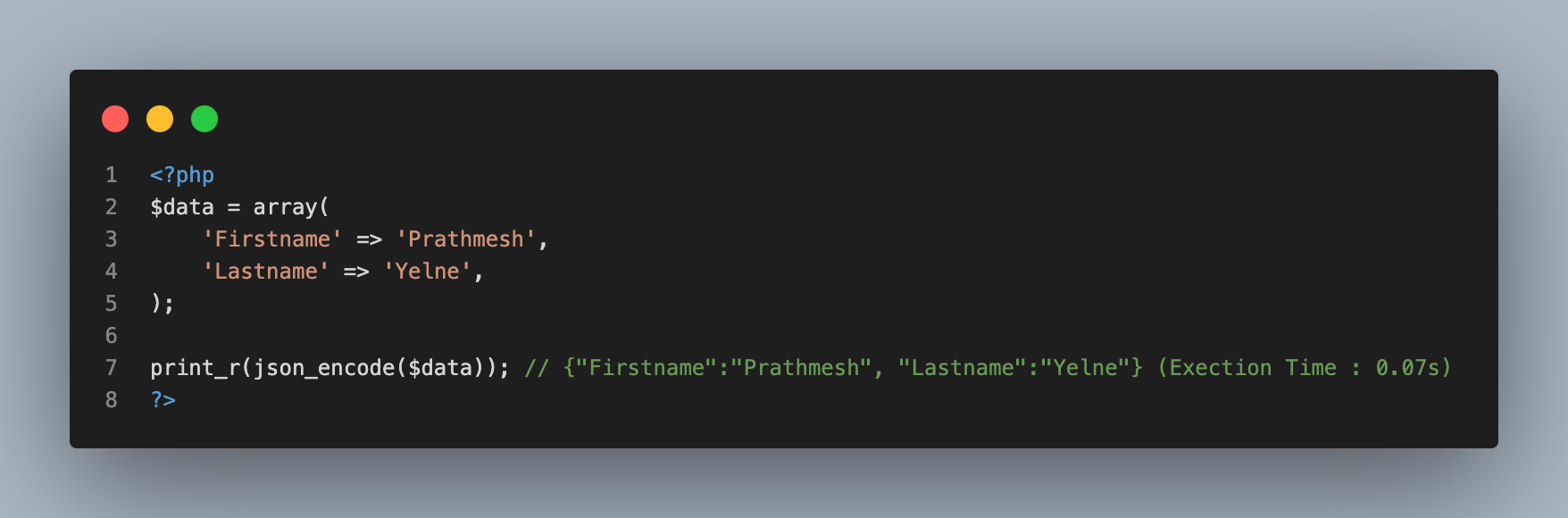
* `Inline Code Execution`: Run PHP code directly in the editor and display results as inline comments.
* `Real-Time Updates`: Automatically executes code on text changes or cursor movements.
* `Error Feedbac`k: Catch errors like NameError and display clear, formatted messages inline.
* `Temporary File Execution`: Ensures safe execution using temporary files without modifying your project files.
* `Output Formatting`: Displays clean and non-intrusive inline output for easy readability.
* `Enhanced Debugging`: Provides feedback for incomplete or invalid code to help developers debug faster.
## Usage
### Auto Execution
Just write a PHP echo, print_r, or var_dump statement, and the output will appear inline.
``` php
echo "Hello, QuickPHP!";
// Output: Hello, QuickPHP!
```
### Error Highlighting
Errors are shown inline, with the file and line number.
``` php
echo $undefinedVar;
// Error: Undefined variable $undefinedVar (line 3)
```
## Known Issues
* Large scripts or complex logic may cause delays in execution.
* Inline execution is limited to the lines above the current cursor.
Feel free to report bugs or suggest features by opening an issue on GitHub.
## Contributing
Contributions are welcome! If you have suggestions for improvements or new features, feel free to open an issue or submit a pull request on the Github.
## License
This extension is licensed under the **[MIT license](https://opensource.org/licenses/MIT)**..
## Contact
For questions or feedback, please contact support@codegyan.in.
---
Thank you for using **QuickPHP**! We hope it enhances your coding experience.