https://github.com/codelikeagirl29/profile-nextjs-v3
NextJS - About project with Tailwindcss, Nextjs, Typescript & deployed to Netlify
https://github.com/codelikeagirl29/profile-nextjs-v3
css html javascript netlify nextjs portfolio portfolio-website react tailwindcss typescript
Last synced: 3 months ago
JSON representation
NextJS - About project with Tailwindcss, Nextjs, Typescript & deployed to Netlify
- Host: GitHub
- URL: https://github.com/codelikeagirl29/profile-nextjs-v3
- Owner: CodeLikeAGirl29
- Created: 2022-12-05T09:19:39.000Z (over 3 years ago)
- Default Branch: main
- Last Pushed: 2023-06-22T09:57:52.000Z (about 3 years ago)
- Last Synced: 2025-06-02T07:39:17.017Z (about 1 year ago)
- Topics: css, html, javascript, netlify, nextjs, portfolio, portfolio-website, react, tailwindcss, typescript
- Language: TypeScript
- Homepage: https://mynextjsportfoliov3.netlify.app/
- Size: 851 KB
- Stars: 0
- Watchers: 0
- Forks: 0
- Open Issues: 0
-
Metadata Files:
- Readme: README.md
- Contributing: CONTRIBUTING.md
Awesome Lists containing this project
README
Welcome to (a version of) Portfolio
> Note: This is a portfolio template, feel free to use it. And star it if you liked :P

✨ [Live Demo](https://mynextjsportfoliov3.netlify.app/)
### Using the template
### Using the Portfolio Template
First, clone this repo
```bash
git clone https://github.com/CodeLikeAGirl29/profile-nextjs-v3
```

Now choose a name for your repo and create.

### Running locally
- Install the dependencies
```
npm install # for npm
yarn install # for yarn
```
- Start the server
```
npm run dev # for npm
yarn dev # for yarn
```
## Making changes
To add your details go to the data.json file in the public folder and replace my data with yours.
To customize the colors go to `tailwind.config.js` and replace the existing colors with your brand colors.
After you have added all your data. Push the code to GitHub with these commands
```
git add .
git commit -m "your commit message"
git push
```
## Deploying
- Go to [Vercel](https://vercel.com/dashboard)
- Sign up for an account
- Click on New project
- Import your repository
- Click skip while creating a team and then hit deploy
- After it is deployed click on go to dashboard
- Your site is successfully deployed 🥳
- Now grab the URL and show it to world

### Bonus ⭐
This portfolio template contain a Spotify Card component [here](./components/Misc/Spotify.card.tsx) which shows the current streaming song on spotify.
**Example:**
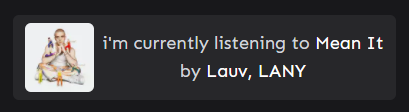
To configure this, you need to add `env` vars to thr `.env.local` file in the following format:
```txt
SPOTIFY_CLIENT_ID=
SPOTIFY_CLIENT_SECRET=
SPOTIFY_REFRESH_TOKEN=
```
Read this [article](https://leerob.io/blog/spotify-api-nextjs) to get our own keys in this format.
And you're good to go!
### Author
😊 Lindsey K
- [Portfolio](https://lindseyk.dev)
- [Github](https://github.com/codelikeagirl29)
- [Twitter](https://twitter.com/dev_lindseyk)
---