https://github.com/codelikeagirl29/to-do-list
To-do list 🚀 javascript, html, css | made for HyperSkill
https://github.com/codelikeagirl29/to-do-list
css html hyperskill javascript jetbrains practice-project todo-list
Last synced: about 1 month ago
JSON representation
To-do list 🚀 javascript, html, css | made for HyperSkill
- Host: GitHub
- URL: https://github.com/codelikeagirl29/to-do-list
- Owner: CodeLikeAGirl29
- Created: 2024-11-12T00:43:55.000Z (over 1 year ago)
- Default Branch: master
- Last Pushed: 2024-11-12T14:53:41.000Z (over 1 year ago)
- Last Synced: 2025-10-14T03:07:23.300Z (8 months ago)
- Topics: css, html, hyperskill, javascript, jetbrains, practice-project, todo-list
- Language: JavaScript
- Homepage: https://codelikeagirl29.github.io/To-Do-List/
- Size: 11.7 KB
- Stars: 0
- Watchers: 1
- Forks: 0
- Open Issues: 0
-
Metadata Files:
- Readme: README.md
Awesome Lists containing this project
README
# To-Do List Project
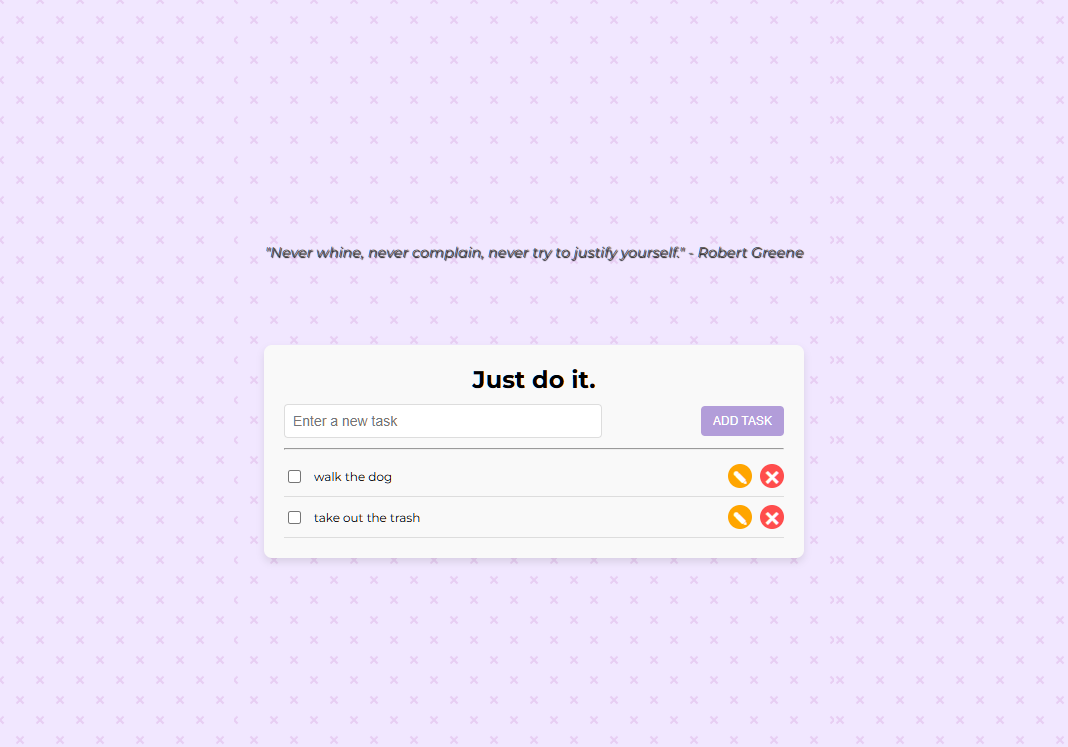
A simple to-do list application built using HTML, CSS, and JavaScript as part of the Hyperskill Frontend Developer Course. This [project](https://hyperskill.org/projects/183?utm_source=ide&utm_medium=ide&utm_campaign=ide&utm_content=project-card) allows users to add, complete, and delete tasks, with temporary task storage using the browser's `localStorage`. Additionally, a motivational quote from the [ZenQuotes API](https://zenquotes.io/) is displayed each time the page is refreshed.

[](https://www.codefactor.io/repository/github/codelikeagirl29/to-do-list)
## Features
- **Task Management**: Add, mark as complete, and delete tasks easily.
- **Persistent Task Storage**: Utilizes `localStorage` to temporarily save tasks so they remain available even after a page refresh.
- **Motivational Quotes**: Each page load fetches a new, inspiring quote from the ZenQuotes API to keep users motivated.
## Technologies Used
- **HTML**: Markup for the structure of the app.
- **CSS**: Styles for layout and design.
- **JavaScript**: Handles app functionality, including localStorage management and API calls.
- **ZenQuotes API**: Fetches quotes to inspire users upon each page load.
## Screenshot
## Getting Started
1. **Clone the Repository**:
```bash
git clone https://github.com/CodeLikeAGirl29/To-Do-List
cd To-Do-List
```
2. **Open the Project**:
Simply open `index.html` in your browser to start using the to-do list application.
## How It Works
- **Adding Tasks**: Type a task in the input field and press "Add" to include it in the list.
- **Completing Tasks**: Click on a task to mark it as complete or incomplete.
- **Deleting Tasks**: Use the delete button next to each task to remove it from the list.
- **Motivational Quote**: A fresh motivational quote from the ZenQuotes API displays at the top each time the page reloads.
## Code Snippet
### Fetching a Quote from ZenQuotes API
```javascript
fetch("https://zenquotes.io/api/random")
.then(response => response.json())
.then(data => {
const quoteElement = document.getElementById("quote");
quoteElement.innerText = `"${data[0].q}" - ${data[0].a}`;
})
.catch(error => console.error("Error fetching quote:", error));
```
## Acknowledgments
- **ZenQuotes API** for providing inspirational quotes.
- **Hyperskill** for offering a platform to learn and develop frontend skills.
## License
This project is open-source and available under the MIT License.
---
This README is designed to be informative and helpful to any user or developer who wants to learn more about your to-do list project!