https://github.com/codelikeagirl29/weather-app
Responsive weather app - search for your city and find current weather using OpenWeather API 🌩️
https://github.com/codelikeagirl29/weather-app
css game html javascript practice-project
Last synced: about 2 months ago
JSON representation
Responsive weather app - search for your city and find current weather using OpenWeather API 🌩️
- Host: GitHub
- URL: https://github.com/codelikeagirl29/weather-app
- Owner: CodeLikeAGirl29
- Created: 2024-11-29T19:51:51.000Z (over 1 year ago)
- Default Branch: main
- Last Pushed: 2024-12-10T11:17:57.000Z (over 1 year ago)
- Last Synced: 2025-06-24T04:07:50.382Z (about 1 year ago)
- Topics: css, game, html, javascript, practice-project
- Language: CSS
- Homepage: https://openweather-search-api.netlify.app/
- Size: 22.5 KB
- Stars: 0
- Watchers: 1
- Forks: 0
- Open Issues: 0
-
Metadata Files:
- Readme: README.md
Awesome Lists containing this project
README
# Weather App 🌦️
A sleek and responsive weather application that uses the [OpenWeather API](https://openweathermap.org/api) to fetch real-time weather data based on user input. Built with **HTML**, **CSS**, and **JavaScript**, this project is ideal for users who want a simple yet powerful way to check weather conditions.
> view project [here](https://openweather-search-api.netlify.app/)
[](https://app.netlify.com/sites/openweather-search-api/deploys)
[](https://www.codefactor.io/repository/github/codelikeagirl29/weather-app)
---
## 🚀 Features
- **Real-Time Weather Data**: Fetch current weather data for any city in the world.
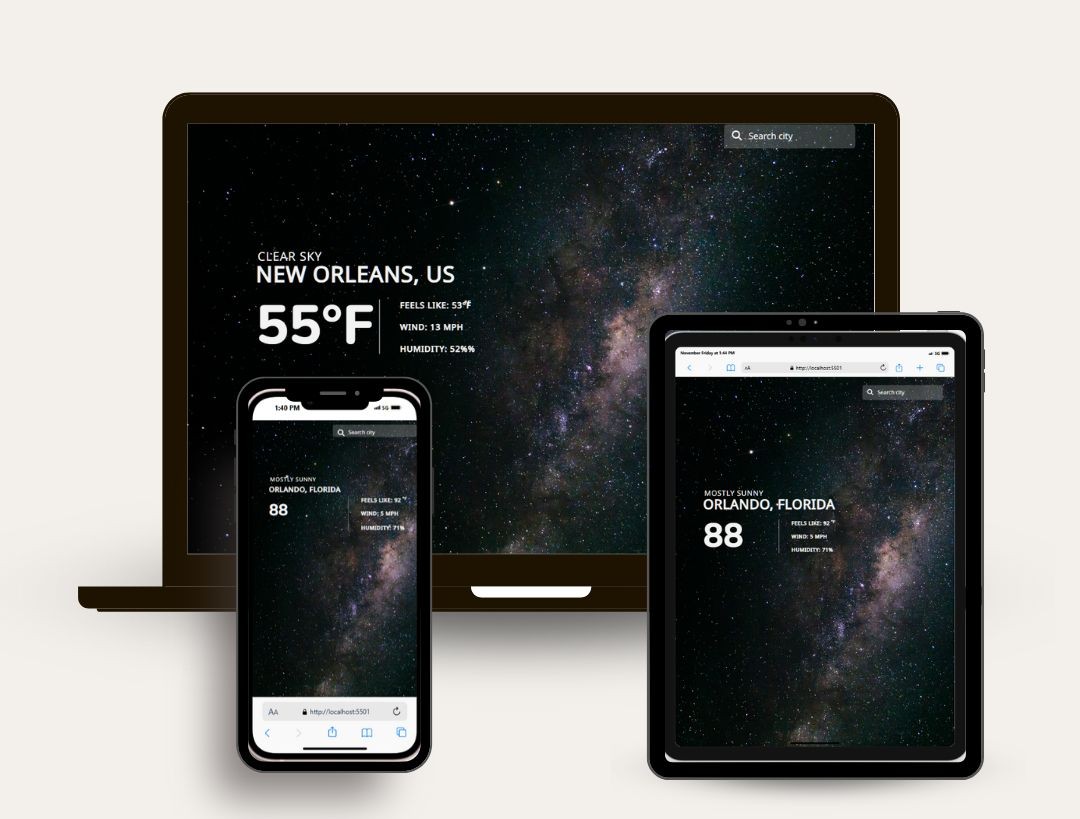
- **Dynamic UI Updates**: Displays temperature, weather conditions, wind speed, and humidity.
- **Responsive Design**: Fully optimized for both desktop and mobile devices.
- **Error Handling**: Displays appropriate error messages for invalid inputs or network issues.
- **Autocomplete (Optional)**: Incorporates city name suggestions for an enhanced user experience.
---
## 🔧 Technologies Used
- **HTML**: Structuring the web app.
- **CSS**: Styling and layout.
- **JavaScript**: Fetching and processing data dynamically.
- **OpenWeather API**: Providing accurate weather data.
- (Optional) **Foursquare API**: For city autocomplete suggestions.
---
## 🛠️ Installation
Follow these steps to set up the project locally:
1. Clone this repository to your local machine:
```bash
git clone https://github.com/codelikeagirl29/weather-app.git
```
2. Navigate to the project folder:
```bash
cd weather-app
```
3. Open `index.html` in your preferred browser to run the app.
---
## ⚙️ Configuration
1. **Set up an API Key**:
- Sign up at [OpenWeather](https://openweathermap.org/api) to get your API key.
- Replace `YOUR_API_KEY` in the JavaScript file with your actual API key:
```javascript
const response = await fetch(
`https://api.openweathermap.org/data/2.5/weather?q=${location}&appid=YOUR_API_KEY&units=imperial`
);
```
2. (Optional) If using autocomplete, set up the [Foursquare API](https://developer.foursquare.com/docs) and add its key similarly.
---
## 🖥️ How It Works
1. Users can input a city name in the form field.
2. The app sends a request to the OpenWeather API and fetches the current weather conditions.
3. The weather data is processed and displayed on the screen, including:
- Location
- Temperature (current and feels-like)
- Weather condition
- Wind speed
- Humidity
4. Handles errors gracefully if the city name is invalid or there are network issues.
---
## 📸 Screenshots
### Desktop View
---
## 🌟 Acknowledgments
- [OpenWeather API](https://openweathermap.org/api) for providing accurate weather data.
- [FontAwesome](https://fontawesome.com/) for weather icons (if used).
- [Unsplash](https://unsplash.com/) for any background images (if applicable).