https://github.com/codenoid/goimagemerge
https://github.com/codenoid/goimagemerge
Last synced: over 1 year ago
JSON representation
- Host: GitHub
- URL: https://github.com/codenoid/goimagemerge
- Owner: codenoid
- License: apache-2.0
- Created: 2021-10-27T16:00:38.000Z (over 4 years ago)
- Default Branch: master
- Last Pushed: 2021-10-27T16:02:11.000Z (over 4 years ago)
- Last Synced: 2025-02-02T16:19:43.537Z (over 1 year ago)
- Language: Go
- Size: 53.7 KB
- Stars: 1
- Watchers: 2
- Forks: 0
- Open Issues: 0
-
Metadata Files:
- Readme: README.md
- Changelog: CHANGELOG.md
- License: LICENSE
Awesome Lists containing this project
README
## gim - Grid Based Image Merge Library (FORK)
[github.com/ozankasikci/go-image-merge](github.com/ozankasikci/go-image-merge)
`gim` is a image merging library that can accept image paths as input, read the image contents, add background color, draw layers on top of each other, merge them into a grid with the desired size.
## Table of Contents
- [Overview](#overview)
- [Installation](#installation)
- [Getting Started](#getting-started)
- [Examples](#examples)
* [Grid Unit Count - Vertical & Horizontal](#grid-unit-count---vertical--horizontal)
* [Grid Background Color](#grid-background-color)
* [Grid Layers - Draw Grids on top of Grids](#grid-layers---draw-grids-on-top-of-grids)
- [Functional Options](#functional-options)
- [TODO](#todo)
## Installation
`go get -u github.com/codenoid/goimagemerge`
## Getting Started
Import the library and give the image paths and grid size as the minimum required arguments.
Basic usage:
```go
import gim "github.com/ozankasikci/go-image-merge"
// accepts *Grid instances, grid unit count x, grid unit count y
// returns an *image.RGBA object
grids := []*gim.Grid{
{ImageFilePath: "file.jpg"},
{ImageFilePath: "file.png"},
}
rgba, err := gim.New(grids, 2, 1).Merge()
// save the output to jpg or png
file, err := os.Create("file/path.jpg|png")
err = jpeg.Encode(file, rgba, &jpeg.Options{Quality: 80})
err = png.Encode(file, rgba)
```
See [Examples](#examples) for available options and advanced usage.
## Examples
### Grid Unit Count - Vertical & Horizontal
```go
grids := []*gim.Grid{
{ImageFilePath: "./cmd/gim/input/kitten.jpg"},
{ImageFilePath: "./cmd/gim/input/kitten.jpg"},
{ImageFilePath: "./cmd/gim/input/kitten.jpg"},
{ImageFilePath: "./cmd/gim/input/kitten.jpg"},
}
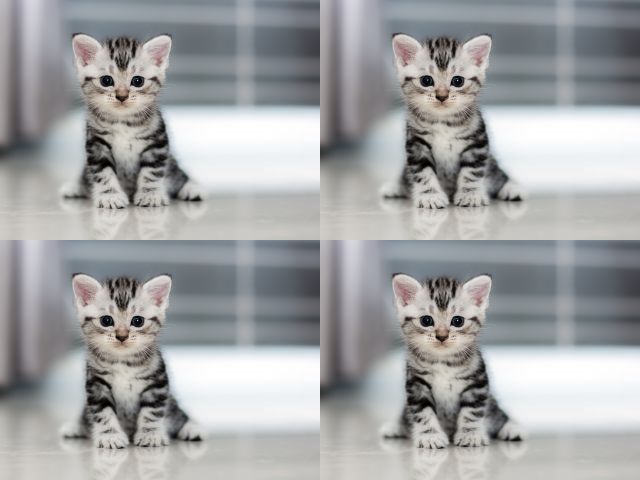
rgba, err := gim.New(grids, 2, 2).Merge()
```
#### Output
### Grid Background Color
```go
grids := []*gim.Grid{
{
ImageFilePath: "./cmd/gim/input/ginger.png",
BackgroundColor: color.White,
},
{
ImageFilePath: "./cmd/gim/input/ginger.png",
BackgroundColor: color.RGBA{R: 0x8b, G: 0xd0, B: 0xc6},
},
}
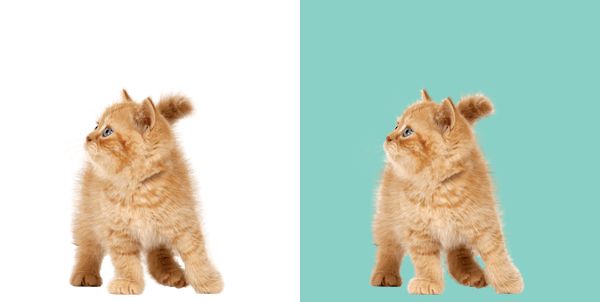
rgba, err := gim.New(grids, 2, 1).Merge()
```
#### Output
### Grid Layers - Draw Grids on top of Grids
```go
grids := []*gim.Grid{
{
ImageFilePath: "./cmd/gim/input/ginger.png",
BackgroundColor: color.White,
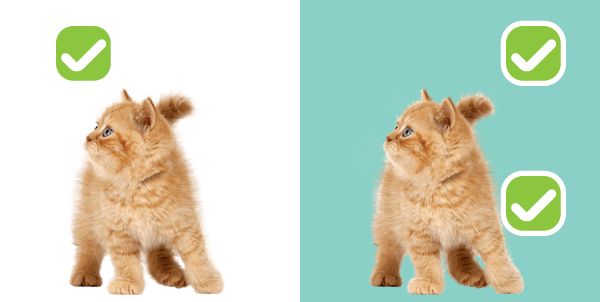
// these grids will be drawn on top of the first grid
Grids: []*gim.Grid{
{
ImageFilePath: "./cmd/gim/input/tick.png",
OffsetX: 50, OffsetY: 20,
},
},
},
{
ImageFilePath: "./cmd/gim/input/ginger.png",
BackgroundColor: color.RGBA{R: 0x8b, G: 0xd0, B: 0xc6},
// these grids will be drawn on top of the second grid
Grids: []*gim.Grid{
{
ImageFilePath: "./cmd/gim/input/tick.png",
OffsetX: 200, OffsetY: 170,
},
{
ImageFilePath: "./cmd/gim/input/tick.png",
OffsetX: 200, OffsetY: 20,
},
},
},
}
rgba, err := gim.New(grids, 2, 1).Merge()
```
#### Output
## Functional Options
### OptBaseDir
```go
// you can omit the full path if you set a base dir
grids := []*gim.Grid{
{ImageFilePath: "kitten.jpg"},
{ImageFilePath: "kitten.jpg"},
}
rgba, err := gim.New(grids, 1, 2,
gim.OptBaseDir("./cmd/gim/input"),
).Merge()
```
### OptGridSize
```go
// you can resize the grids in pixels
grids := []*gim.Grid{
{ImageFilePath: "kitten.jpg"},
{ImageFilePath: "kitten.jpg"},
}
rgba, err := gim.New( grids, 2, 1,
gim.OptBaseDir("./cmd/gim"),
gim.OptGridSize(200,150),
).Merge()
```
#### Output

## TODO
- [x] Add colored background support
- [ ] Add resize support (stretch, fit etc.)