https://github.com/codenoid/sdfs
a Connector |> Distributed File System based on Symlinking (that fit author need)
https://github.com/codenoid/sdfs
distributed-file-system distributed-systems
Last synced: about 1 year ago
JSON representation
a Connector |> Distributed File System based on Symlinking (that fit author need)
- Host: GitHub
- URL: https://github.com/codenoid/sdfs
- Owner: codenoid
- License: mit
- Created: 2019-05-09T14:24:08.000Z (about 7 years ago)
- Default Branch: master
- Last Pushed: 2019-10-23T12:53:00.000Z (over 6 years ago)
- Last Synced: 2025-03-29T17:12:40.451Z (over 1 year ago)
- Topics: distributed-file-system, distributed-systems
- Language: Go
- Homepage:
- Size: 6.19 MB
- Stars: 5
- Watchers: 2
- Forks: 0
- Open Issues: 0
-
Metadata Files:
- Readme: README.md
- License: LICENSE.txt
Awesome Lists containing this project
README
# SDFS [](https://goreportcard.com/report/github.com/codenoid/sdfs)
Symlinked Distributed File System
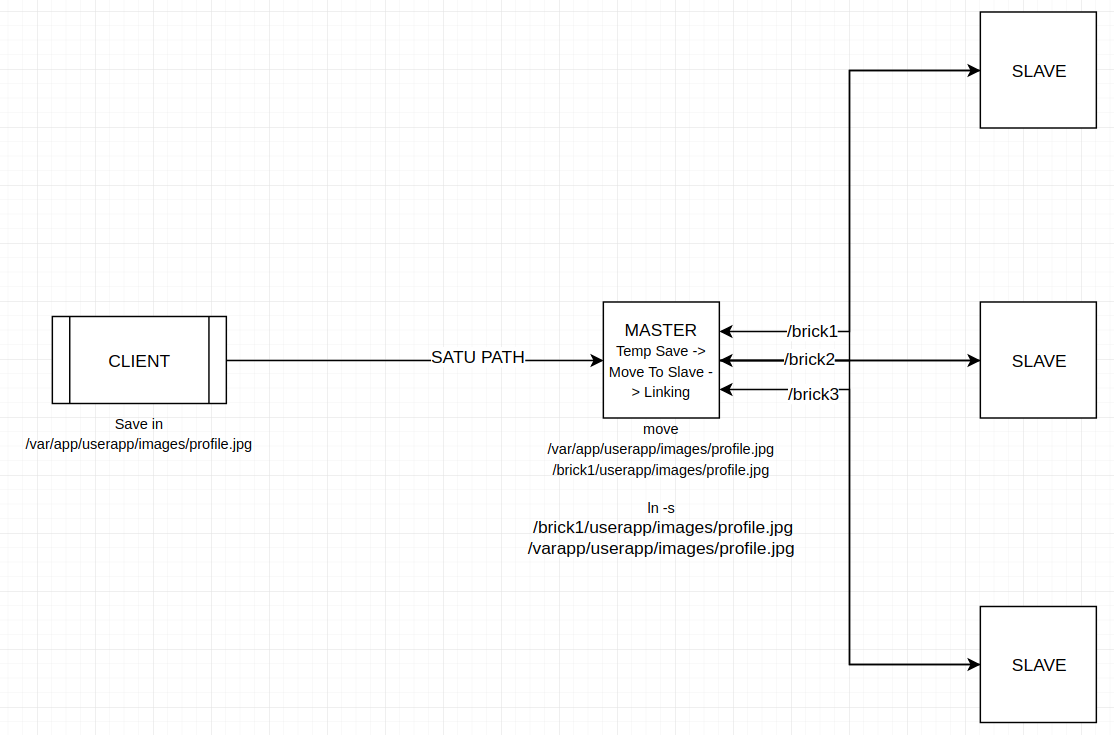
SDFS use Symlink method to distribute file accross node (multi data center)
Current important feature that missing in SDFS is :
1. Replication (You can use Glusterfs in storage node)
2. Disordered Process/Async NFS (non-queue), probably your data can lost when your node (that use <92% disk usage) is crash
3. Permission Validation
4. Option & Customization
5. Documentation
6. Web Monitoring (Usage, Health Check, etc)
7. etc
## Usage
SDFS Has 2 route API, `/api/connect` for combine new node and `/api/symlink` to tell the master what and where the file should i distribute accross available node, yes you can use FileSystem watcher, but what if you have thousand of directory ?, yeah more RAM (currently master-server only save symlink file)
> Tested & Used in Ubuntu 16.04
### Master Server
1. create a `/data` directory
2. install `sudo apt-get install nfs-common` (make sure /etc/fstab are exist)
3. Build master-server and run as sudo
### Storage Server
1. create a directory to receive data from Master-Server
2. install `sudo apt-get install nfs-kernel-server` (make sure /etc/exports are exist)
3. build storage-server and run `./storage-server connect 6.6.6.28 /path/to/receive/data storagenodeid` (6.6.6.28 is master ip address)
### Example Usage
1. Your application receive a file from user, and save that file in `/mnt/storage/application/image/image.jpg`
2. After saving that file, tell master-server to distribute `/mnt/storage/application/image/image.jpg` (use /api/symlink)
3. SDFS Will choose available storage-server and move the real file to storage-server then SDFS will create a symlink from storage-server to the first file path / saved file path
4. You can easily use `connect` command to add new storage-server
```
POST master-server.ip:2219/api/symlink
# form url encoded, call this after you file has been saved
url: /path/to/saved/file.mp4
```
**or**
1. use [File Mover](https://github.com/codenoid/sdfs/tree/master/services/file-mover)
## Development Log
* 13 May 2019
Some code has not been tested (yet !)