https://github.com/codephiliax/chat2db-internlm-deploy
use
https://github.com/codephiliax/chat2db-internlm-deploy
Last synced: about 1 year ago
JSON representation
use
- Host: GitHub
- URL: https://github.com/codephiliax/chat2db-internlm-deploy
- Owner: CodePhiliaX
- Created: 2024-02-01T08:08:45.000Z (over 2 years ago)
- Default Branch: main
- Last Pushed: 2024-02-04T06:43:01.000Z (over 2 years ago)
- Last Synced: 2025-06-03T02:14:44.556Z (about 1 year ago)
- Size: 2.93 KB
- Stars: 5
- Watchers: 5
- Forks: 3
- Open Issues: 0
-
Metadata Files:
- Readme: README.md
Awesome Lists containing this project
README
# chat2db-internlm-deploy
语言:中文 | [English](README_EN.md)
## 📖 简介
这个工程介绍了如何在[InternLM](https://github.com/InternLM/InternLM)的[InternStudio](https://studio.intern-ai.org.cn/)上部署InternLM的各个版本的模型,并将大模型应用到Chat2DB客户端中。读者也可以自行选择合适的云平台进行部署。
感谢[InternLM](https://github.com/InternLM/InternLM)对本项目的大力支持,欢迎大家关注[InternLM](https://github.com/InternLM/InternLM)获取更多信息,后续会在本文档中陆续加入如何微调InternLM模型的教程。
## 📦 硬件要求
| 模型 | 最低GPU显存(推理) | 最低GPU显存(高效参数微调) |
|:-------------:|:-----------:|:---------------:|
| InternLM-7b | 18GB | 24GB |
| InternLM2-7b | 18GB | 24GB |
| InternLM-20b | 42GB | 58GB |
| InternLM2-20b | 42GB | 58GB |
## 📦 部署
### 📦 在InternStudio中部署InternLM模型
1. 前往[InternStudio平台](https://studio.intern-ai.org.cn/)
2. 创建一个开发机实例,可以根据需要的算力配置开发机的规格

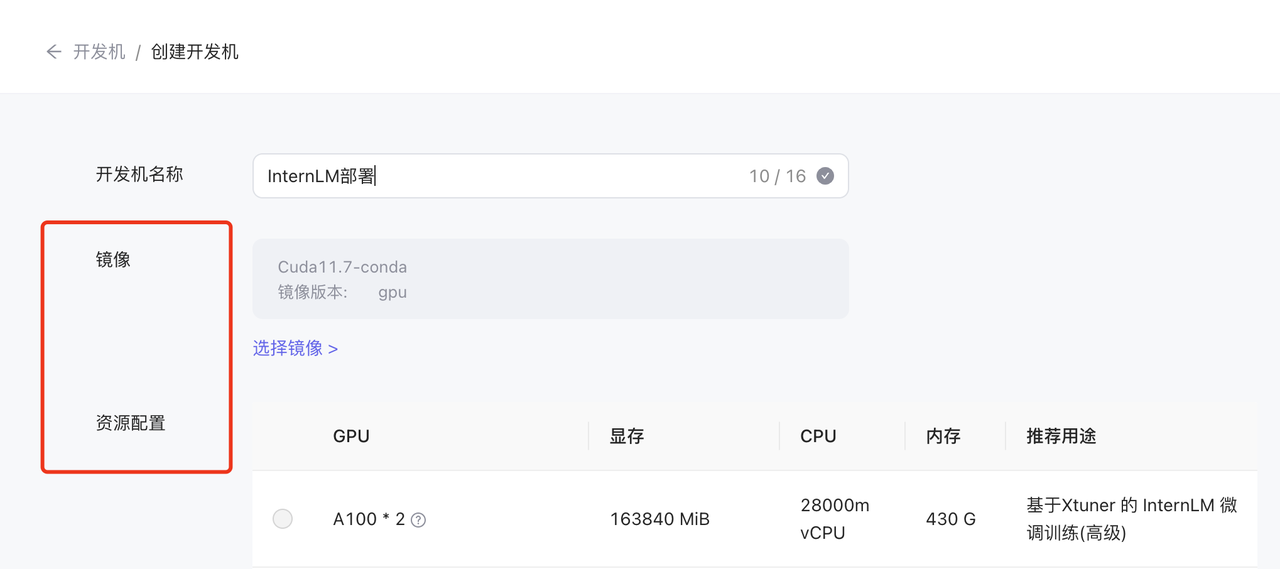
3. 进入开发机在开发机上打开一个终端,安装[FastChat](https://github.com/lm-sys/FastChat)
```bash
conda create -n fastchat python=3.10 -y
conda activate fastchat
pip install "fschat[model_worker,webui]" -i https://pypi.tuna.tsinghua.edu.cn/simple
pip install einops -i https://pypi.tuna.tsinghua.edu.cn/simple
```
4. 执行如下命令来启动InternLM模型,InternLM各个版本的模型默认放在/root/share/model_repos/文件夹下,启动不同的模型只需修改如下命令中的模型路径即可,如果读者是使用的其他云平台,可以手动[下载模型](https://github.com/InternLM/InternLM)并将模型放在任意路径下,然后修改如下命令中的模型路径即可
```
python -m fastchat.serve.controller --host 0.0.0.0 --port 21001
python -m fastchat.serve.model_worker --model-path /root/share/model_repos/internlm2-7b --host 0.0.0.0
python -m fastchat.serve.test_message --model-name internlm2-7b
python3 -m fastchat.serve.openai_api_server --host 0.0.0.0 --port 8000
```
5.参考[InternLM文档](https://aicarrier.feishu.cn/wiki/RkBWwdOfQiuLJHkEbqhceIRjnGg)将服务器上的8000端口转发到本地开发机的9990端口
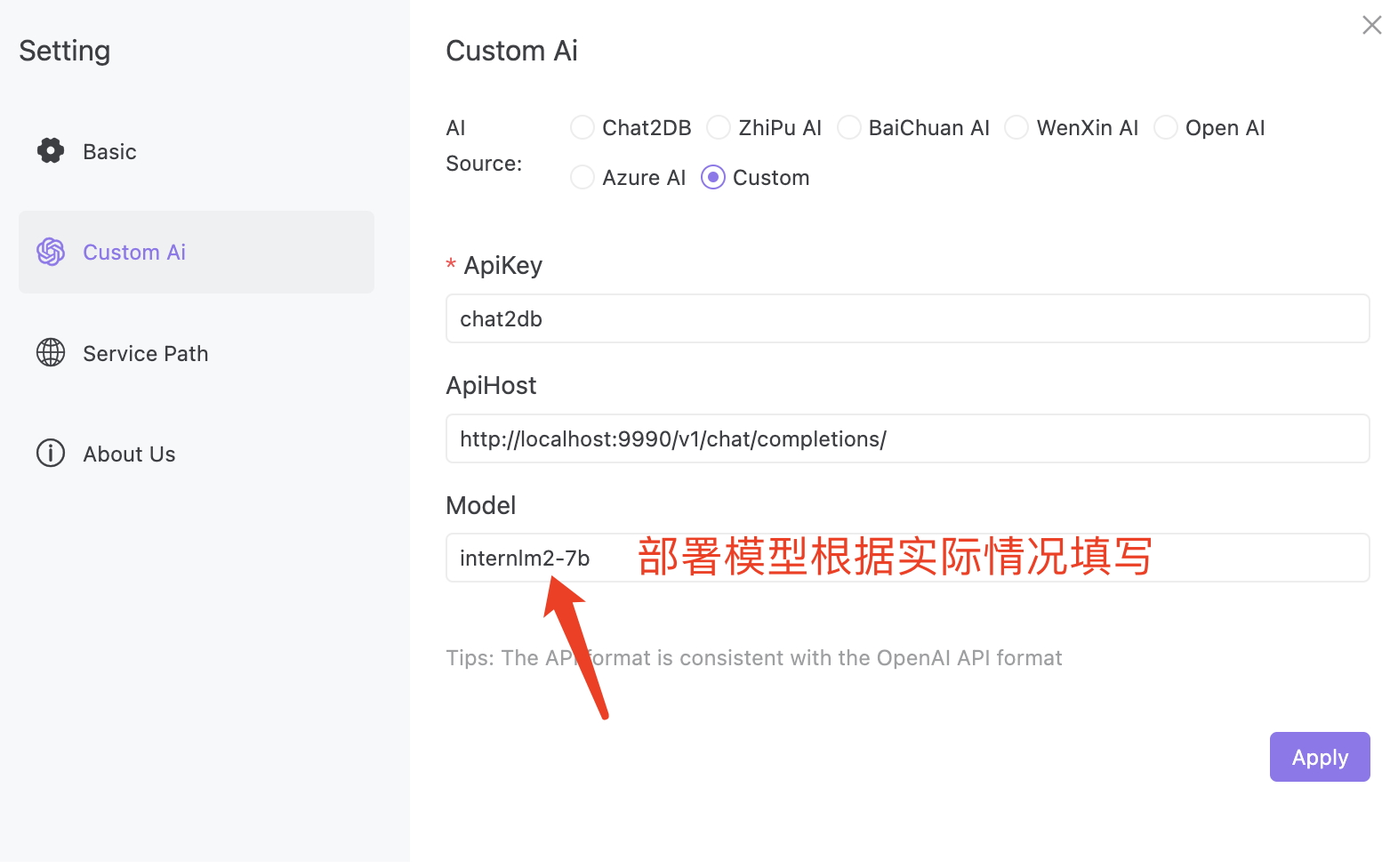
6.参考下图配置Chat2DB客户端,如果读者是部署的其他版本模型,对应的修改如下模型配置即可
7.如上配置客户端之后即可本地体验InternLM模型的效果啦
## 微调
### 📦 在InternStudio中微调InternLM模型
#### TODO:待添加