https://github.com/coder7475/github-actions
All about github actions
https://github.com/coder7475/github-actions
Last synced: 5 months ago
JSON representation
All about github actions
- Host: GitHub
- URL: https://github.com/coder7475/github-actions
- Owner: coder7475
- Created: 2024-09-01T05:40:33.000Z (almost 2 years ago)
- Default Branch: main
- Last Pushed: 2024-09-07T03:00:53.000Z (almost 2 years ago)
- Last Synced: 2024-09-08T04:50:45.875Z (almost 2 years ago)
- Size: 13.7 KB
- Stars: 0
- Watchers: 1
- Forks: 0
- Open Issues: 0
-
Metadata Files:
- Readme: README.md
Awesome Lists containing this project
README
## GitHub Actions
GitHub Actions is a continuous integration and continuous delivery (CI/CD) platform that allows you to **automate** your build, test, and deployment pipeline
## Introduction
- GitHub Actions is a **CI/CD pipeline directly integrated with github repository**
- GitHub Actions optimize code-delivery time, from idea to deployment, on a community-powered platform.
- It allows us to **automate**:
- Running Test Suits
- Building Images
- Compiling static sites
- Deploying code to servers
- GitHub Actions files are defined as **YAML** files located in the _.github/workflow_ folder in the repo.
- GitHub Actions has **templates** that one can use.
- Can have multiple **workflows** in repo triggered by different events.
## Tasks to automate
The following tasks are up for automation:
- Ensure the code passes all unit tests
- Perform code quality and compliance checks to make sure the source code meets the organization's standards
- Check the code and its dependencies for known security issues
- Build the code integrating new source from (potentially) multiple contributors
- Ensure the software passes integration tests
Version the new build
- Deliver the new binaries to the appropriate filesystem location
- Deploy the new binaries to one or more servers
- If any of these tasks don't pass, report the issue to the proper individual or team for resolution
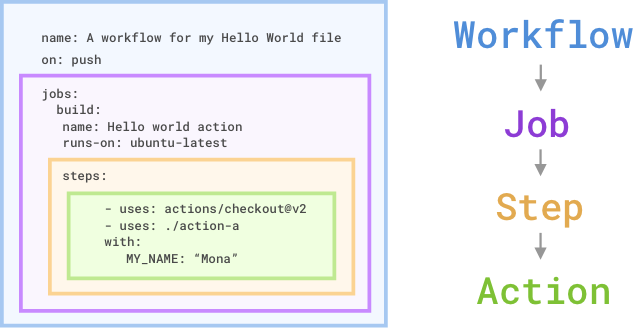
## The Components of GitHub Actions
## Explanation of Components
- GitHub Actions **workflows** can be **triggered by events** in a repository, such as a pull request or an issue being created.
- A workflow consists of one or more **jobs**.
- Jobs can run _sequentially_ or in _parallel_.
- Each job runs in its own **virtual machine runner** or a container.
- Jobs contain steps that either:
- Run a **script** defined by the user.
- Run an **action**, which is a reusable extension to simplify the workflow.
### Workflows
- A workflow is an automated process that you add to your repository.
- A workflow needs to have at least one job, and different events can trigger it.
- You can use it to build, test, package, release, or deploy your repository's project on GitHub.
### Events
- An event is a specific activity in a repository that triggers a workflow run.
- The **on** attribute specifies the **event trigger** to be used.
- There are 35+ event triggers:
- Examples:
- **Pushes**: Trigger an action on any push to the repo
- **Pull Request**: Run actions when pull request are opened, updated or merged
- **Issues**: Execute actions based on issue activities, like creation or labeling
- **Release**: Automate workflows when a new release is published
- **Schedule Events**: Schedule actions to run at specific times
- **Manual Triggers**: Allow manual triggering of actions through the GitHub UI.
### Jobs
- A job is a set of steps in a workflow executed on the same runner.
- Each step can either be a shell script or an action.
- Steps are executed sequentially and can share data between them since they run on the same runner.
- Jobs can be configured to run independently or have dependencies on other jobs. By default, jobs run in parallel unless a dependency is specified.
- For example, multiple build jobs can run in parallel, and a packaging job can depend on their successful completion.
### Actions
- An action is a reusable application for the GitHub Actions platform that performs complex but repetitive tasks.
- Actions help reduce repetitive code in workflows, such as setting up the build environment or authentication.
- You can create custom actions or use actions available in the GitHub Marketplace.
- - There are three types of github actions:
- Container Actions
- JavaScript Actions
- Composite Actions
- With **container actions**, the environment is part of the action's code. These actions can only be run in a Linux environment that GitHub hosts. Container actions support many different languages.
- **JavaScript actions** don't include the environment in the code. You'll have to specify the environment to execute these actions. You can run these actions in a VM in the cloud or on-premises. JavaScript actions support Linux, macOS, and Windows environments.
- **Composite actions** allow you to combine multiple workflow steps within one action. For example, you can use this feature to bundle together multiple run commands into an action, and then have a workflow that executes the bundled commands as a single step using that action.
### Runners
- A runner is a server that executes workflows when triggered.
- Each runner runs a single job at a time.
- GitHub provides runners for Ubuntu Linux, Microsoft Windows, and macOS, each running on a newly provisioned virtual machine.
- GitHub also offers larger runners for more demanding workloads.
- Alternatively, you can host your own runners for custom operating systems or specific hardware needs.
## Recommendations when using GitHub Actions
- Review the action's `action.yml` file for inputs, outputs, and to make sure the code does what it says it does.
- Check if the action is in the GitHub Marketplace. This is a good check, even if an action does not have to be on the GitHub Marketplace to be valid.
- Check if the action is verified in the GitHub Marketplace. This means that GitHub has approved the use of this action. However, you should still review it before using it.
- Include the version of the action you're using by specifying a Git ref, SHA, or tag
## References
- [GitHub Docs](https://docs.github.com/en/actions/about-github-actions/understanding-github-actions)
- [Exam Pro](https://www.exampro.co/github-actions)
- [Microsoft Learn](https://learn.microsoft.com/en-us/training/modules/github-actions-automate-tasks/?source=docs)