https://github.com/coderamp-labs/gitingest
Replace 'hub' with 'ingest' in any GitHub URL to get a prompt-friendly extract of a codebase
https://github.com/coderamp-labs/gitingest
ai code developer-tool ingestion
Last synced: 5 months ago
JSON representation
Replace 'hub' with 'ingest' in any GitHub URL to get a prompt-friendly extract of a codebase
- Host: GitHub
- URL: https://github.com/coderamp-labs/gitingest
- Owner: coderamp-labs
- License: mit
- Created: 2024-11-29T08:27:18.000Z (over 1 year ago)
- Default Branch: main
- Last Pushed: 2025-10-17T19:45:22.000Z (9 months ago)
- Last Synced: 2025-10-18T04:27:25.702Z (9 months ago)
- Topics: ai, code, developer-tool, ingestion
- Language: Python
- Homepage: https://gitingest.com
- Size: 1.31 MB
- Stars: 12,840
- Watchers: 48
- Forks: 955
- Open Issues: 25
-
Metadata Files:
- Readme: README.md
- Changelog: CHANGELOG.md
- Contributing: CONTRIBUTING.md
- License: LICENSE
- Code of conduct: CODE_OF_CONDUCT.md
- Security: SECURITY.md
Awesome Lists containing this project
- awesome - coderamp-labs/gitingest - friendly extract of a codebase (AI)
- awesome-agent-cli - gitingest - friendly text digest. \ (Catalog / agent)
- awesome - coderamp-labs/gitingest - Replace 'hub' with 'ingest' in any GitHub URL to get a prompt-friendly extract of a codebase (Python)
- awesome-llm-tools - gitingest - friendly text dump; replace "hub" with "ingest" in any GitHub URL |  | MIT | (12. Miscellaneous / Data & Alignment Tools)
- definitive-opensource - Gitingest - friendly extract of a codebase | `Web (Cloud)` `Chromium` `Firefox` | **15k** | (Table of Contents / Information Processing)
- awesome - coderamp-labs/gitingest - Replace 'hub' with 'ingest' in any GitHub URL to get a prompt-friendly extract of a codebase (Python)
- awesome-ccamel - coderamp-labs/gitingest - Replace 'hub' with 'ingest' in any GitHub URL to get a prompt-friendly extract of a codebase (Python)
- awesome-ai-coding-agent-tools - GitIngest - Lightweight tool that prepares Git repositories for LLM context windows. (Supporting Infrastructure / Codebase Context)
README
# Gitingest
[](https://gitingest.com)






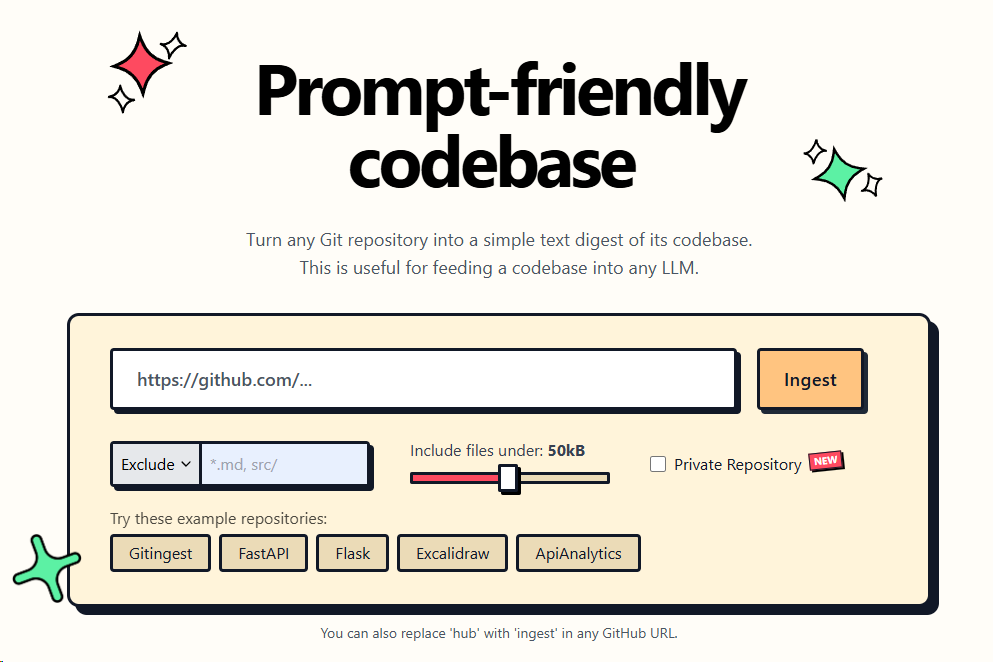
Turn any Git repository into a prompt-friendly text ingest for LLMs.
You can also replace `hub` with `ingest` in any GitHub URL to access the corresponding digest.
[gitingest.com](https://gitingest.com) · [Chrome Extension](https://chromewebstore.google.com/detail/adfjahbijlkjfoicpjkhjicpjpjfaood) · [Firefox Add-on](https://addons.mozilla.org/firefox/addon/gitingest)
[Deutsch](https://www.readme-i18n.com/coderamp-labs/gitingest?lang=de) |
[Español](https://www.readme-i18n.com/coderamp-labs/gitingest?lang=es) |
[Français](https://www.readme-i18n.com/coderamp-labs/gitingest?lang=fr) |
[日本語](https://www.readme-i18n.com/coderamp-labs/gitingest?lang=ja) |
[한국어](https://www.readme-i18n.com/coderamp-labs/gitingest?lang=ko) |
[Português](https://www.readme-i18n.com/coderamp-labs/gitingest?lang=pt) |
[Русский](https://www.readme-i18n.com/coderamp-labs/gitingest?lang=ru) |
[中文](https://www.readme-i18n.com/coderamp-labs/gitingest?lang=zh)
## 🚀 Features
- **Easy code context**: Get a text digest from a Git repository URL or a directory
- **Smart Formatting**: Optimized output format for LLM prompts
- **Statistics about**:
- File and directory structure
- Size of the extract
- Token count
- **CLI tool**: Run it as a shell command
- **Python package**: Import it in your code
## 📚 Requirements
- Python 3.8+
- For private repositories: A GitHub Personal Access Token (PAT). [Generate your token **here**!](https://github.com/settings/tokens/new?description=gitingest&scopes=repo)
### 📦 Installation
Gitingest is available on [PyPI](https://pypi.org/project/gitingest/).
You can install it using `pip`:
```bash
pip install gitingest
```
or
```bash
pip install gitingest[server]
```
to include server dependencies for self-hosting.
However, it might be a good idea to use `pipx` to install it.
You can install `pipx` using your preferred package manager.
```bash
brew install pipx
apt install pipx
scoop install pipx
...
```
If you are using pipx for the first time, run:
```bash
pipx ensurepath
```
```bash
# install gitingest
pipx install gitingest
```
## 🧩 Browser Extension Usage


The extension is open source at [lcandy2/gitingest-extension](https://github.com/lcandy2/gitingest-extension).
Issues and feature requests are welcome to the repo.
## 💡 Command line usage
The `gitingest` command line tool allows you to analyze codebases and create a text dump of their contents.
```bash
# Basic usage (writes to digest.txt by default)
gitingest /path/to/directory
# From URL
gitingest https://github.com/coderamp-labs/gitingest
# or from specific subdirectory
gitingest https://github.com/coderamp-labs/gitingest/tree/main/src/gitingest/utils
```
For private repositories, use the `--token/-t` option.
```bash
# Get your token from https://github.com/settings/personal-access-tokens
gitingest https://github.com/username/private-repo --token github_pat_...
# Or set it as an environment variable
export GITHUB_TOKEN=github_pat_...
gitingest https://github.com/username/private-repo
# Include repository submodules
gitingest https://github.com/username/repo-with-submodules --include-submodules
```
By default, files listed in `.gitignore` are skipped. Use `--include-gitignored` if you
need those files in the digest.
By default, the digest is written to a text file (`digest.txt`) in your current working directory. You can customize the output in two ways:
- Use `--output/-o ` to write to a specific file.
- Use `--output/-o -` to output directly to `STDOUT` (useful for piping to other tools).
See more options and usage details with:
```bash
gitingest --help
```
## 🐍 Python package usage
```python
# Synchronous usage
from gitingest import ingest
summary, tree, content = ingest("path/to/directory")
# or from URL
summary, tree, content = ingest("https://github.com/coderamp-labs/gitingest")
# or from a specific subdirectory
summary, tree, content = ingest("https://github.com/coderamp-labs/gitingest/tree/main/src/gitingest/utils")
```
For private repositories, you can pass a token:
```python
# Using token parameter
summary, tree, content = ingest("https://github.com/username/private-repo", token="github_pat_...")
# Or set it as an environment variable
import os
os.environ["GITHUB_TOKEN"] = "github_pat_..."
summary, tree, content = ingest("https://github.com/username/private-repo")
# Include repository submodules
summary, tree, content = ingest("https://github.com/username/repo-with-submodules", include_submodules=True)
```
By default, this won't write a file but can be enabled with the `output` argument.
```python
# Asynchronous usage
from gitingest import ingest_async
import asyncio
result = asyncio.run(ingest_async("path/to/directory"))
```
### Jupyter notebook usage
```python
from gitingest import ingest_async
# Use await directly in Jupyter
summary, tree, content = await ingest_async("path/to/directory")
```
This is because Jupyter notebooks are asynchronous by default.
## 🐳 Self-host
### Using Docker
1. Build the image:
``` bash
docker build -t gitingest .
```
2. Run the container:
``` bash
docker run -d --name gitingest -p 8000:8000 gitingest
```
The application will be available at `http://localhost:8000`.
If you are hosting it on a domain, you can specify the allowed hostnames via env variable `ALLOWED_HOSTS`.
```bash
# Default: "gitingest.com, *.gitingest.com, localhost, 127.0.0.1".
ALLOWED_HOSTS="example.com, localhost, 127.0.0.1"
```
### Environment Variables
The application can be configured using the following environment variables:
- **ALLOWED_HOSTS**: Comma-separated list of allowed hostnames (default: "gitingest.com, *.gitingest.com, localhost, 127.0.0.1")
- **GITINGEST_METRICS_ENABLED**: Enable Prometheus metrics server (set to any value to enable)
- **GITINGEST_METRICS_HOST**: Host for the metrics server (default: "127.0.0.1")
- **GITINGEST_METRICS_PORT**: Port for the metrics server (default: "9090")
- **GITINGEST_SENTRY_ENABLED**: Enable Sentry error tracking (set to any value to enable)
- **GITINGEST_SENTRY_DSN**: Sentry DSN (required if Sentry is enabled)
- **GITINGEST_SENTRY_TRACES_SAMPLE_RATE**: Sampling rate for performance data (default: "1.0", range: 0.0-1.0)
- **GITINGEST_SENTRY_PROFILE_SESSION_SAMPLE_RATE**: Sampling rate for profile sessions (default: "1.0", range: 0.0-1.0)
- **GITINGEST_SENTRY_PROFILE_LIFECYCLE**: Profile lifecycle mode (default: "trace")
- **GITINGEST_SENTRY_SEND_DEFAULT_PII**: Send default personally identifiable information (default: "true")
- **S3_ALIAS_HOST**: Public URL/CDN for accessing S3 resources (default: "127.0.0.1:9000/gitingest-bucket")
- **S3_DIRECTORY_PREFIX**: Optional prefix for S3 file paths (if set, prefixes all S3 paths with this value)
### Using Docker Compose
The project includes a `compose.yml` file that allows you to easily run the application in both development and production environments.
#### Compose File Structure
The `compose.yml` file uses YAML anchoring with `&app-base` and `<<: *app-base` to define common configuration that is shared between services:
```yaml
# Common base configuration for all services
x-app-base: &app-base
build:
context: .
dockerfile: Dockerfile
ports:
- "${APP_WEB_BIND:-8000}:8000" # Main application port
- "${GITINGEST_METRICS_HOST:-127.0.0.1}:${GITINGEST_METRICS_PORT:-9090}:9090" # Metrics port
# ... other common configurations
```
#### Services
The file defines three services:
1. **app**: Production service configuration
- Uses the `prod` profile
- Sets the Sentry environment to "production"
- Configured for stable operation with `restart: unless-stopped`
2. **app-dev**: Development service configuration
- Uses the `dev` profile
- Enables debug mode
- Mounts the source code for live development
- Uses hot reloading for faster development
3. **minio**: S3-compatible object storage for development
- Uses the `dev` profile (only available in development mode)
- Provides S3-compatible storage for local development
- Accessible via:
- API: Port 9000 ([localhost:9000](http://localhost:9000))
- Web Console: Port 9001 ([localhost:9001](http://localhost:9001))
- Default admin credentials:
- Username: `minioadmin`
- Password: `minioadmin`
- Configurable via environment variables:
- `MINIO_ROOT_USER`: Custom admin username (default: minioadmin)
- `MINIO_ROOT_PASSWORD`: Custom admin password (default: minioadmin)
- Includes persistent storage via Docker volume
- Auto-creates a bucket and application-specific credentials:
- Bucket name: `gitingest-bucket` (configurable via `S3_BUCKET_NAME`)
- Access key: `gitingest` (configurable via `S3_ACCESS_KEY`)
- Secret key: `gitingest123` (configurable via `S3_SECRET_KEY`)
- These credentials are automatically passed to the app-dev service via environment variables:
- `S3_ENDPOINT`: URL of the MinIO server
- `S3_ACCESS_KEY`: Access key for the S3 bucket
- `S3_SECRET_KEY`: Secret key for the S3 bucket
- `S3_BUCKET_NAME`: Name of the S3 bucket
- `S3_REGION`: Region for the S3 bucket (default: us-east-1)
- `S3_ALIAS_HOST`: Public URL/CDN for accessing S3 resources (default: "127.0.0.1:9000/gitingest-bucket")
#### Usage Examples
To run the application in development mode:
```bash
docker compose --profile dev up
```
To run the application in production mode:
```bash
docker compose --profile prod up -d
```
To build and run the application:
```bash
docker compose --profile prod build
docker compose --profile prod up -d
```
## 🤝 Contributing
### Non-technical ways to contribute
- **Create an Issue**: If you find a bug or have an idea for a new feature, please [create an issue](https://github.com/coderamp-labs/gitingest/issues/new) on GitHub. This will help us track and prioritize your request.
- **Spread the Word**: If you like Gitingest, please share it with your friends, colleagues, and on social media. This will help us grow the community and make Gitingest even better.
- **Use Gitingest**: The best feedback comes from real-world usage! If you encounter any issues or have ideas for improvement, please let us know by [creating an issue](https://github.com/coderamp-labs/gitingest/issues/new) on GitHub or by reaching out to us on [Discord](https://discord.com/invite/zerRaGK9EC).
### Technical ways to contribute
Gitingest aims to be friendly for first time contributors, with a simple Python and HTML codebase. If you need any help while working with the code, reach out to us on [Discord](https://discord.com/invite/zerRaGK9EC). For detailed instructions on how to make a pull request, see [CONTRIBUTING.md](./CONTRIBUTING.md).
## 🛠️ Stack
- [Tailwind CSS](https://tailwindcss.com) - Frontend
- [FastAPI](https://github.com/fastapi/fastapi) - Backend framework
- [Jinja2](https://jinja.palletsprojects.com) - HTML templating
- [tiktoken](https://github.com/openai/tiktoken) - Token estimation
- [posthog](https://github.com/PostHog/posthog) - Amazing analytics
- [Sentry](https://sentry.io) - Error tracking and performance monitoring
### Looking for a JavaScript/FileSystemNode package?
Check out the NPM alternative 📦 Repomix:
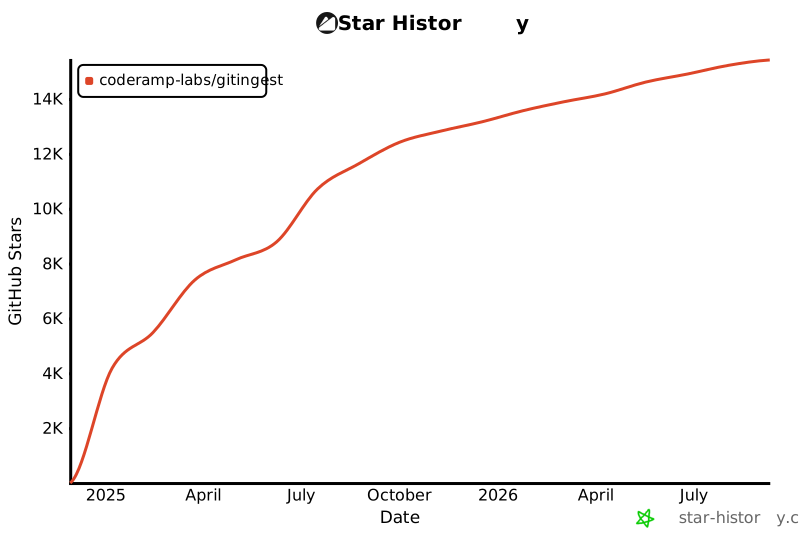
## 🚀 Project Growth
[](https://star-history.com/#coderamp-labs/gitingest&Date)