https://github.com/coderboy-raiyan/carwow
A car selling website
https://github.com/coderboy-raiyan/carwow
django django-templates sqlite3
Last synced: 2 months ago
JSON representation
A car selling website
- Host: GitHub
- URL: https://github.com/coderboy-raiyan/carwow
- Owner: coderboy-raiyan
- Created: 2023-12-15T11:34:49.000Z (over 2 years ago)
- Default Branch: main
- Last Pushed: 2023-12-16T12:26:58.000Z (over 2 years ago)
- Last Synced: 2025-07-20T14:39:40.541Z (11 months ago)
- Topics: django, django-templates, sqlite3
- Language: Python
- Homepage:
- Size: 1.25 MB
- Stars: 2
- Watchers: 1
- Forks: 0
- Open Issues: 0
-
Metadata Files:
- Readme: README.md
Awesome Lists containing this project
README
### CARWOW a car selling Website
This is a fully functional car sales website that facilitates car listings for users, allowing them to filter cars by brand, create an account, login, logout, and buy cars. The platform consists of various features, including user-facing functionalities and backend operations.
#### ERD Diagram
[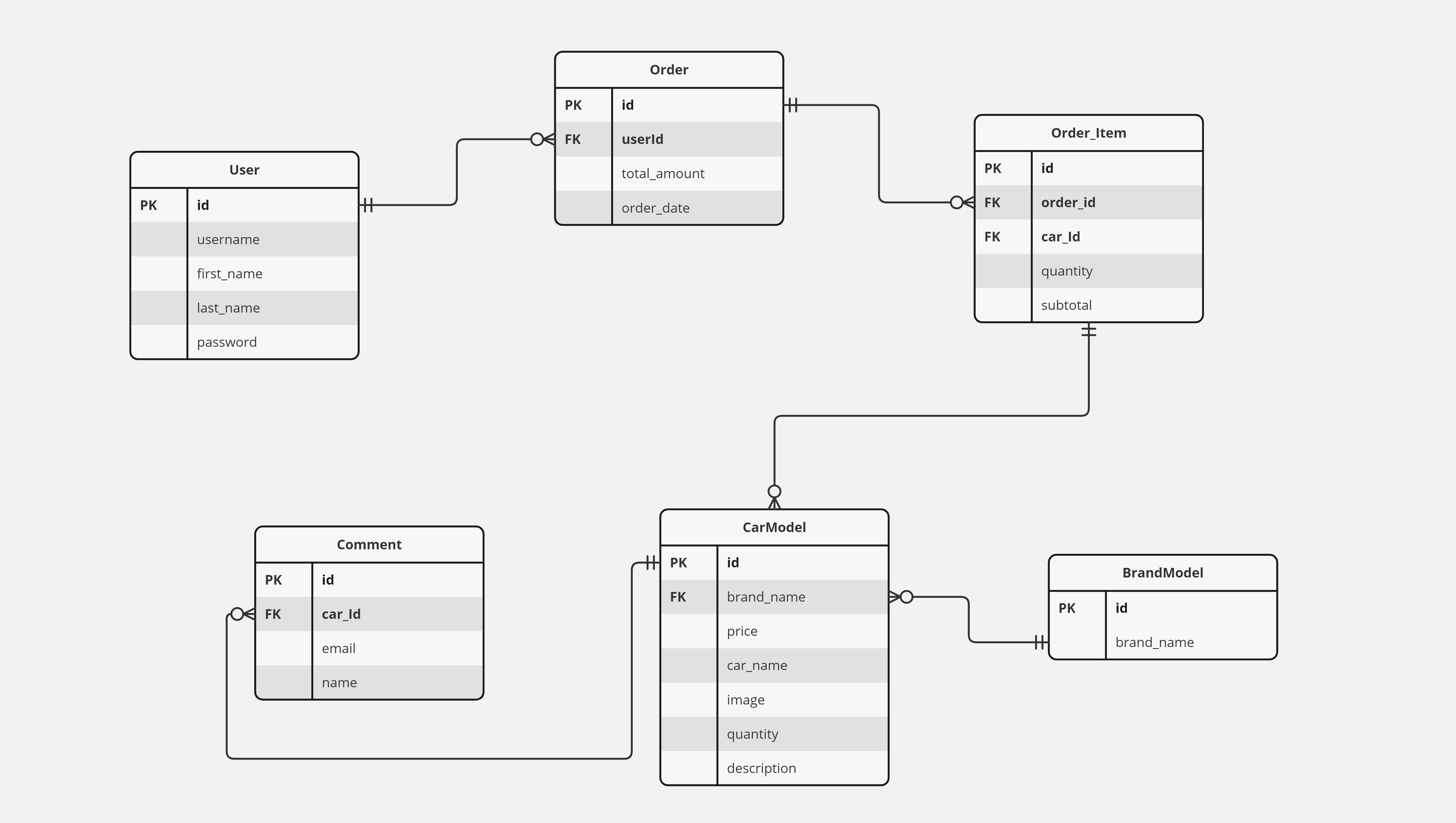](https://miro.com/app/board/uXjVNCwVDJw=/?share_link_id=465095210235)
## User-Facing Features
### 1. Car Listings
- Navbar: Authenticated users will see options like home, profile, and logout, while unauthenticated users will see home, signup, login.
- Home Page: Initial display of text and an image. Users can browse car listings with images, prices, and filter cars by brand name.
- Models: Two models - Car Model and Brand Model with a relationship between them (A brand has multiple cars, but a car has only one brand).
- Car Details Page: Displays car image, name, description, quantity, price, brand name, and a "Buy Now" button for authenticated users.
- Comments: Users can comment on cars with their name and comment.
### 2. User Registration and Authentication
- User Registration: Users can sign up with their details.
- Login System: Users can log in to their accounts.
- Profile Editing: Users can edit their profile details.
### 3. Placing Orders
- Authentication Check: Only authenticated users can buy cars.
- Buy Now Button: Appears only for authenticated users. Clicking it purchases the car, reducing the total quantity by one.
### 4. Order History
- Profile Page: Users can view their bought cars list.
## Implementation Details
### Models
- Car Model
- Image
- Title
- Description
- Quantity
- Price
- Brand (Foreign Key to Brand Model)
- Brand Model
- Name
### Views (Class-Based)
1. Home View: Display initial content and car listings.
2. Car Details View: Display detailed information about a selected car.
3. Profile View: Display user profile details and order history.
### Authentication
- User Registration View: Allows users to register.
- Login View: Allows users to log in.
- Logout View: Logs users out.
## Installation
1. Clone the repository:
```bash
git clone https://github.com/coderboy-raiyan/carwow
cd carwow
```
2. Create a virtual environment:
```bash
python -m venv venv
```
3. Activate the virtual environment:
```bash
# For Windows
venv\Scripts\activate
# For macOS/Linux
source venv/bin/activate
```
4. Install dependencies:
```bash
pip install -r requirements.txt
```
5. Apply database migrations:
```bash
python manage.py makemigrations
python manage.py migrate
```
6. Run the development server:
```bash
python manage.py runserver
```
Visit [http://localhost:8000/](http://localhost:8000/) in your web browser to access the car sales website.
Feel free to customize and extend the project based on your specific requirements.