https://github.com/coderofsalvation/deployogi
easy, automatic deployment of webapplications/databases on staging/production webservers using GIT hooks and bash triggers. DEPRECATED: use pm.sh
https://github.com/coderofsalvation/deployogi
Last synced: about 1 year ago
JSON representation
easy, automatic deployment of webapplications/databases on staging/production webservers using GIT hooks and bash triggers. DEPRECATED: use pm.sh
- Host: GitHub
- URL: https://github.com/coderofsalvation/deployogi
- Owner: coderofsalvation
- License: bsd-3-clause
- Created: 2013-08-01T16:27:05.000Z (almost 13 years ago)
- Default Branch: master
- Last Pushed: 2020-05-28T18:47:42.000Z (about 6 years ago)
- Last Synced: 2025-02-12T06:22:35.206Z (over 1 year ago)
- Language: Shell
- Homepage:
- Size: 38.1 KB
- Stars: 2
- Watchers: 2
- Forks: 0
- Open Issues: 0
-
Metadata Files:
- Readme: README.md
- Funding: .github/FUNDING.yml
- License: LICENSE
Awesome Lists containing this project
README

Deployogi
=========
The yoga of autodeployment, in other words: putting a new version of a website in production by simply hitting enter.
Workflow / the philosophy behind this deploymenttool/model
==========================================================
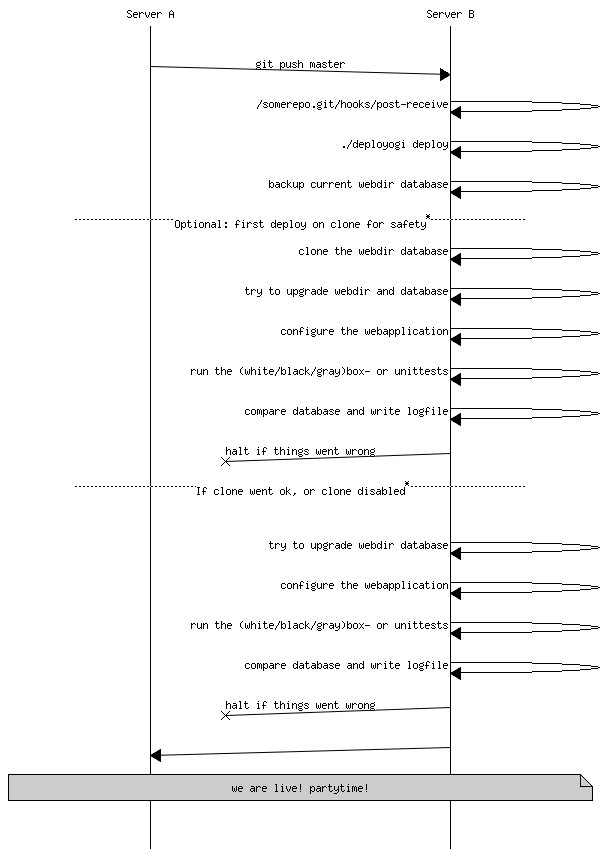
Deployogi assumes a push-backup-clone-merge-test and compare-deploymentmodel.
Read [this article](http://leon.vankammen.eu/blog/automatic-deployment-with-git-and-deployogi-scripts) to learn more about it.
Here you can see the simplest way of deploying (for more details read article) :
Why? For who?
=============
Well in the first place: to get rid of handhacked deployment, and for people who dont always need PaaS solutions.
There are many PaaS solutions which take away the pain of handhacked deployment.
However, there are cases where deployogi does the same.
Deployogi is an effort to stimulate teams to deploy and upgrade many webapplications in a similar way.
Demonstration
=============
This is a log of an [actual deploymentlog](https://raw.github.com/coderofsalvation/deployogi/master/example/examplelog.txt) facilitated by deployogi.
Also, check the following link to see a [very basic tutorial/showcase of deployogi](http://playterm.org/r/deployogi-automatic-webdeployment-1375465953)
> `NOTE`: the showcase is very basic, and does not really show how to extend deployogi. Many webframeworks offer entrypoints to trigger integritytests,
> configuration thru console. Please keep in mind that deployogi has been designed to specifically trigger these things, in order to
> find out if the deployment is going good or bad (and alternatively refuse to deploy). Ideally every webapplication has its own deployogi-triggerscripts
> and/or reuses scripts by using symbolic links.
Installation
============
For now lets assume you wanna get started asap, then copy/paste this oneliner into your terminal :
wget "https://raw.github.com/coderofsalvation/deployogi/master/deployogi" -O deployogi; chmod 755 deployogi;
Then run:
./deployogi
For who?
========
Well not for one-man-banddevelopers, in those cases handhacking is part of the fun!
But in case of a devteam it is the only way to be flexible in scalability of your team.
Actually `deployogi` applies to Rule 14 of the UN*X philosophy: *Rule of Generation: Avoid hand-hacking; write programs to write programs when you can.*,
so if you like unix, you'll like this as well.
How?
====
Simply by pushing to a remote git-repository.
Only thing to do once is writing a config-file, and make sure git calls deployogi when [you push to a sharedrepo with this git-hook](https://raw.github.com/coderofsalvation/deployogi/master/example/post-receive).
Thats it!
Further extension can be done using deployogi hook-scripts (n a similar fashion as git hooks), because deployogi automatically installs this folder to your githooks-dir:
deployogi.d/config <-- here you can define your project variables, so deployogi can do its magic
deployogi.d/10-on.begin
deployogi.d/20-on.backup
deployogi.d/30-on.begin
deployogi.d/40-on.merge
deployogi.d/50-on.configure
deployogi.d/60-on.generatedocs
deployogi.d/70-on.test
deployogi.d/80-on.exit
> NOTE: these files represent triggers which are described in the sequencediagram below.
A typical, simplified setup for multiple websitedeployment would look like this (Lets suppose 2 Zendwebsites) :
/var/www/.deployogi.shared/Zend.on.exit <---------------------------------,--,
/var/www/yourwebsite1 <--- merge -------------, | |
| | |
git push --> /gitrepos/yourwebsite1.git/hooks/post-receive ---'-, | |
| | |
hooks/deployogi.d/ (run hooks) | |
| | |
hooks/deployogi.d/70-on.exit --- source ---' |
|
/var/www/yourwebsite1 <--- merge ------------, |
| |
git push --> /gitrepos/yourwebsite2.git/hooks/post-receive ----, |
| |
hooks/deployogi.d/ (run hooks) |
| |
hooks/deployogi.d/70-on.exit --- symboliclink ---'
> `NOTE: dont worry, deployogi will not merge directly, you can tweak that process by merging to a clone of your website to see if things go fine`
The idea is that the deploymentmodel is the same, however each website can have its customized deployment, and
still benefit from shared code (using sourcing or symbolic links, see this [WIKI article](https://github.com/coderofsalvation/deployogi/wiki/hint:-shared-scripts).
Are git hooks not enough?
=========================
No, if you dive into this matter you'll soon find out there will be many obstacles because [GIT is not a deploymenttool](http://gitolite.com/the-list-and-irc/deploy.html)
My webapplication has no tests!
===============================
No worries, Deployogi works well with [Testosteron](https://github.com/coderofsalvation/testosteron), a modular testingtool which works with all programminglanguages.
Just write some testosteron tests and call `'./test all white'` in deployogi's 'deployogi.d/60-on.test'-hook.
Syslog
======
If installed, deployogi automatically logs to (r)syslogd daemon(almost on every linux system).
You can check the syslog by running 'tail -f /var/log/syslog' or using [logfilter](http://playterm.org/r/logfilter---an-interactive-greptool-1399067818), [lnav](http://lnav.org), or simply
forward it to a remote syslogd service.

Requirements
============
* something which supports bash (usually LAMP/linuxserver)
* a webapplication which supports cli-invokation (to configure frameworkrelated variables from the commandline)
* you have to know about of commandline (bash) stuff
Backups
=======
Here is an example '20-on.backup'-hook:
cd $PROJECTDIR
if [[ $USE_SQL ]]; then
echo "[x] creating backup of current database $SQL_DB into '$PROJECTDIR/$PROJECTSQL'"
mysqldump --extended-insert=FALSE -u $SQL_LOGIN -p$SQL_PW $SQL_DB > $PROJECTDIR/$PROJECTSQL
fi
echo "[x] make backup of current website: $BACKUPFILE (please wait)"
zip -r $BACKUPFILE . -x *.git* -x *.log* | while read line; do printf "\r[x] $i files"; ((i=i+1)); done; echo ""
This is handy, because in rare cases its faster to rollout the last database/code.
Ofcoarse, on failure deployogi automatically removes the last commit, but this could leave your database crippled.