https://github.com/coderofsalvation/dpd-acl-roles-permissions
Easily configure roles/permissions and limitations for methods and (nested) keyvalue-pairs for deployd
https://github.com/coderofsalvation/dpd-acl-roles-permissions
Last synced: about 1 year ago
JSON representation
Easily configure roles/permissions and limitations for methods and (nested) keyvalue-pairs for deployd
- Host: GitHub
- URL: https://github.com/coderofsalvation/dpd-acl-roles-permissions
- Owner: coderofsalvation
- Created: 2016-11-14T08:58:41.000Z (over 9 years ago)
- Default Branch: master
- Last Pushed: 2020-07-13T00:12:11.000Z (almost 6 years ago)
- Last Synced: 2025-04-12T20:08:46.441Z (about 1 year ago)
- Language: JavaScript
- Homepage:
- Size: 453 KB
- Stars: 3
- Watchers: 3
- Forks: 6
- Open Issues: 1
-
Metadata Files:
- Readme: README.md
- Funding: .github/FUNDING.yml
Awesome Lists containing this project
README
Easily configure roles/permissions regarding methods and (nested) keyvalue-pairs for deployd


## Usage
$ npm install dpd-acl-roles-permissions dpd-event --save
## Centralized configuration
* Run deployd and go to your dashboard
* Make sure you have a users-collection resource
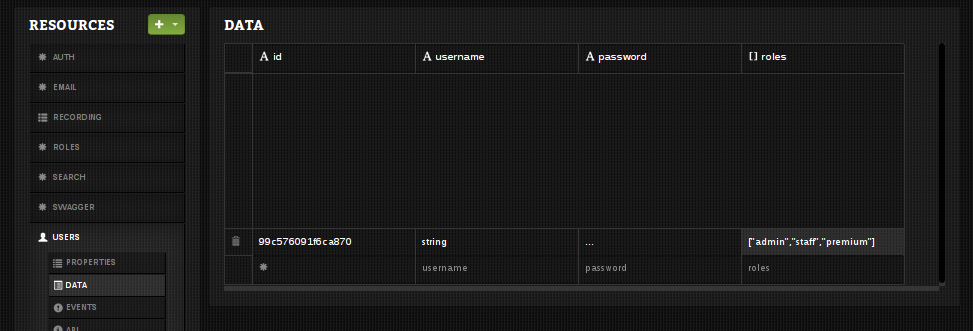
* Add a `roles`-property in there (array value: `["admin","staff","premium"]`) and set username to '`admin`'
* Hit the green button, and add an '`event`'-resource (name: `/roles`)
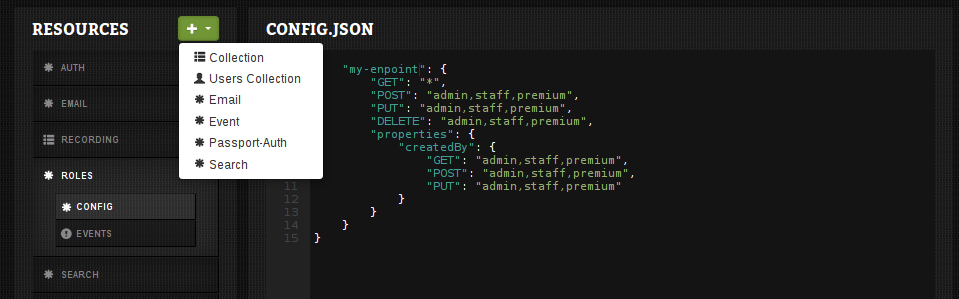
* In the `CONFIG.JSON`-screen paste the json below
{
"my-endpoint": {
"GET": "*",
"POST": "admin,staff,premium",
"PUT": "admin,staff,premium",
"DELETE": "admin,staff,premium",
"properties": {
"email": {
"GET": "admin,staff,premium",
"POST": "admin,staff,premium",
"PUT": "admin,staff,premium"
}
}
}
}
Done!
* `curl -X GET http://localhost/my-endpoint` will now work (but hides 'email'-field for users without 'admin' or 'staff' or 'premium'-role )
* `curl -X POST http://localhost/my-endpoint` will now only work for user with admin- or staff- or premium-roles
> NOTE: feel free to play around with the config
## Automatically filter results by owner
`dpd-acl-roles-permissions` has an integration for [dpd-collection-systemfields](https://npmjs.org/package/dpd-collection-systemfields).
It allows you to easily setup endpoints which return owned-only results:
* run `npm install dpd-collection-systemfields --save`
* add at least the 'createdBy'-fields to all your collection-endpoints (see [docs](https://npmjs.org/package/dpd-collection-systemfields) )
{
"my-endpoint": {
"GET": "*",
"POST": "admin,staff,premium",
"PUT": "admin,staff,premium",
"DELETE": "admin,staff,premium",
"properties": {
"createdBy": {
"restrict": true, <--- add this to filter *any* mongodb query on current user
"GET": "admin,staff,premium",
"POST": "admin,staff,premium",
"PUT": "admin,staff,premium"
}
}
}
}
## Automatically filter results by group
We can 'abuse' roles to act as organisations- or groups too.
> NOTE: this feature requires the *dpd-collection-systemfields* module mentioned above
Here's how to easily filter results based on roles (lets say 'staff'):
* add a `roles`-array property in a collection-resource with value: `["staff"]`
* add a `public`-boolean property in there too
Now for non logged-in users:
* `curl -X GET http://localhost/my-endpoint` returns zero-role and public records
Now for logged-in users:
* `curl -X GET http://localhost/my-endpoint` returns zero-role, public, owned and records with matching roles
* `curl -X GET http://localhost/my-endpoint?account=1` returns only owned records and/or records with matching roles
## Writing tests
Testing endpoints can be done using [dpd-test](https://npmjs.org/package/dpd-test):
var dpdTest = require('dpd-test')
var request = require('superagent')
var port = 3030
dpdTest.run({
port: port,
user: {username:"foo", "password":"bar", roles:["user"]}, // specify user/role
ready: function(dpd, done, sessionid ){
request // do request as user foo
.get('http://localhost:'+port+'/scraper')
.set('Cookie', 'sid='+sessionid)
.set('Content-Type', 'application/json')
.set('Accept', 'application/json')
.end(function(err, res){
console.dir(res.body)
done()
})
},
done: function(err, database){
console.log("done")
process.exit( err ? 1 : 0 )
}
})
## Features
* restrict methods (POST/GET/PUT/DELETE method)
* restrict (nested) key-permissions in incoming payloads (or outgoing results)
* no need to use hide() and protect() all over the place
* TODO: more tests