https://github.com/coderofsalvation/parse-server-jsreactor
A flexible IFTTT-engine with generated gui (backend-agnostic)
https://github.com/coderofsalvation/parse-server-jsreactor
Last synced: 10 months ago
JSON representation
A flexible IFTTT-engine with generated gui (backend-agnostic)
- Host: GitHub
- URL: https://github.com/coderofsalvation/parse-server-jsreactor
- Owner: coderofsalvation
- Created: 2019-11-22T17:04:53.000Z (over 6 years ago)
- Default Branch: master
- Last Pushed: 2021-05-11T12:55:53.000Z (about 5 years ago)
- Last Synced: 2025-05-18T13:06:17.132Z (about 1 year ago)
- Language: JavaScript
- Size: 216 KB
- Stars: 3
- Watchers: 2
- Forks: 1
- Open Issues: 1
-
Metadata Files:
- Readme: README.md
- Funding: .github/FUNDING.yml
Awesome Lists containing this project
README
> WARNING: this project is in BETA
An flexible IFTTT-engine with generated gui.
This is basically a wrapper for [jsreactor](https://npmjs.com/package/@coderofsalvation/jsreactor).
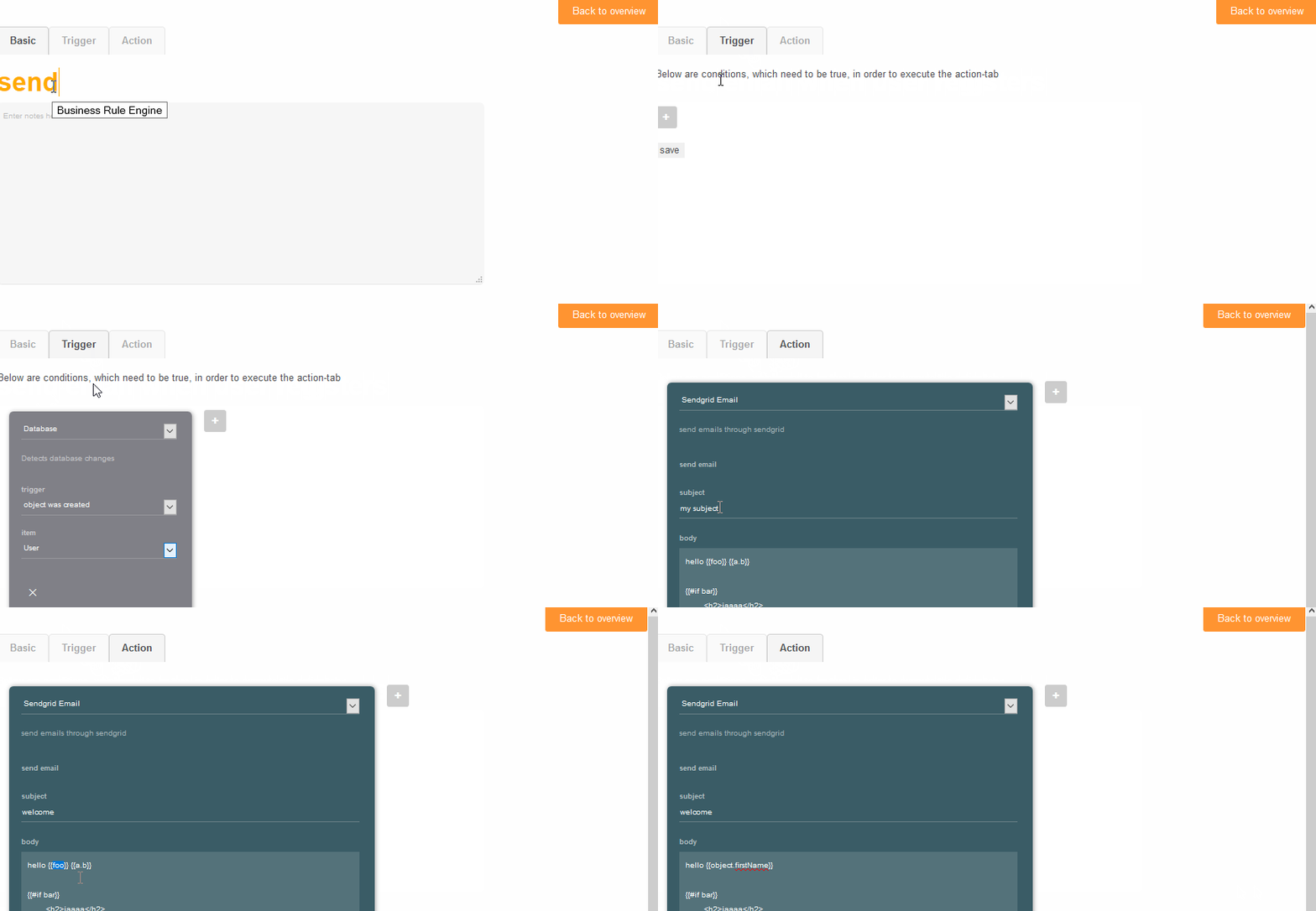
## Installation
npm install parse-server-jsreactor @coderofsalvation/jsreactor --save
then in your cloud-code entrypoint (`cloud/index.js` e.g.) add this:
```
// add the business rule engine (BRE) + channels
var BRE = require('parse-server-jsreactor')
var Database = require('parse-server-jsreactor/channel/Database')
var Input = BRE.Channel.Input
var bre = new BRE(Parse,{languages:['EN'],logConsole:true})
new Database({bre})
new Input({bre})
bre.init()
```
Then specify which (database) classes you want to expose to it:
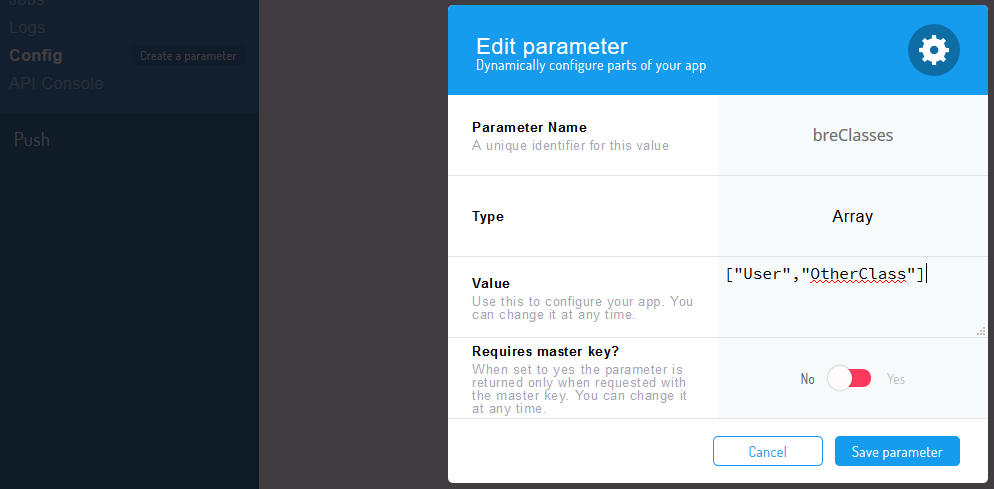
Do yourself a favor and **don't** include the `Rule`-class (recursion:the universe will explode)
> NOTE: All the Parse Config-variables are accessible (and refreshed when needed) in the channels thru the `opts`-variable.
Therefore you could also move the `languages:['EN']`-array from the init-code here (so it can be updated outside of the code)
## Running the BRE
This will pass {foo:1} into the BRE (channels)
```
var res = await Parse.Cloud.run('bre',{foo:1})
```
> NOTE: set environment variable `MEMOIZE_AGE=10000` to change database-call-cache for 10 seconds (getting roles, getting schemas) etc. (default is 15sec on production, 5sec on localhost)
## What are Channels?
A channel is basically an object which describes triggers and/or actions.
For example, Twilio (the smsservice) can be seen as a channel with triggers (receive sms) and actions (send sms)
> search for `jsreactor-channel` on npm, and check the [jsreactor docs](https://npmjs.com/package/@coderofsalvation/jsreactor) on how to use them
## Live-coding cloud functions
Setup a cloudfunction-trigger (with name `foo` e.g.), and add a javascript-action like so:
```
Parse.Cloud.on.foo = (req) => new Promise((resolve,reject) => {
resolve({foo:123})
})
```
## Extending the Rule-class
Feel free to just add columns from the Parse dashboard, as your used to.
However, in case your user-interface is using jsonschema to generate itself, you might want to read along:
> NOTE: during runtime this package automatically creates a *Rule* parseClass to store the rules. In case you want to add custom properties to that class then write your own adapter and pass it as `new BRE(Parse,myAdapter)` (Just copy the adapter-code from index.js and modify it)
Bear in mind that you probably want to patch the `breGetSchema`-endpoint to hint your custom fields to your frontend-app.
## Forwarding the Parse-email-adapter to BRE
In case you want to enjoy editable sendgrid templates when using Parse's __password reset__ feature, you can redirect all email to the BRE:
> Just use this emailadapter when initializing Parse:
```
verifyUserEmails:true,
emailAdapter: require('parse-server-jsreactor').emailAdapter(),
```
> NOTE: dont forget to run `npm install jsreactor-channel-sendgrid` and read its [docs](https://npmjs.com/package/jsreactor-channel-sendgrid)
## Multi-tenant: Unique Rules per App
The `Parse`-object is a singleton by default.
However, we can work around this to enable per-app Parse instances:
```
Parse.initializeMulti = (appId, javascriptKey, masterKey, Parse) => {
Object.keys(require.cache).forEach(function(key) { delete require.cache[key] })
var _Parse = require('parse/node')
_Parse.initialize( appId, javascriptKey, masterKey )
_Parse.Cloud = Parse.Cloud
return _Parse
}
var init = async (app) => {
// init globally
Parse.initialize( app.appId, app.javascriptKey, app.masterKey ) // remember instance
// but also 'fork' an instance
Parse[ app.appId ] = Parse.initializeMulti( app.appId, app.javascriptKey, app.masterKey, Parse )
Parse[ app.appId ].serverURL = app.serverURL
...
// use Parse[ app.appId ] from here to initialize BRE
var bre = new BRE(Parse[ app.appId ],{languages:['EN'],logConsole:true})
}
for( var i in apps ) await init(apps[i])
```