https://github.com/codeturion/unity-api-mcp
Instant, accurate Unity API lookups instead of expensive source file reads, saving your agent tokens, context, and hallucinations
https://github.com/codeturion/unity-api-mcp
ai api-documentation claude cursor game-development mcp mcp-server model-context-protocol unity unity2022 unity2023 unity3d unity6 windsurf
Last synced: 4 months ago
JSON representation
Instant, accurate Unity API lookups instead of expensive source file reads, saving your agent tokens, context, and hallucinations
- Host: GitHub
- URL: https://github.com/codeturion/unity-api-mcp
- Owner: Codeturion
- License: other
- Created: 2026-02-24T21:40:04.000Z (5 months ago)
- Default Branch: master
- Last Pushed: 2026-02-28T22:49:20.000Z (5 months ago)
- Last Synced: 2026-03-02T01:48:38.625Z (4 months ago)
- Topics: ai, api-documentation, claude, cursor, game-development, mcp, mcp-server, model-context-protocol, unity, unity2022, unity2023, unity3d, unity6, windsurf
- Language: Python
- Homepage: https://www.codeturion.me
- Size: 7.45 MB
- Stars: 30
- Watchers: 1
- Forks: 2
- Open Issues: 0
-
Metadata Files:
- Readme: README.md
- License: LICENSE
Awesome Lists containing this project
README
# unity-api-mcp
[](https://registry.modelcontextprotocol.io/servers/io.github.Codeturion/unity-api-mcp)
[](https://pypi.org/project/unity-api-mcp/)
[](https://pypi.org/project/unity-api-mcp/)
[](https://opensource.org/licenses/MIT)
[](https://www.python.org/downloads/)
**MCP server that gives AI agents accurate Unity API documentation. Prevents hallucinated signatures, wrong namespaces, and deprecated API usage.**
Supports **Unity 2022 LTS**, **2023**, and **Unity 6** with separate databases for each version. Works with Claude Code, Cursor, Windsurf, or any MCP-compatible AI tool. No Unity installation required.
## Quick Start
```bash
pip install unity-api-mcp
```
Add to your MCP config (`.mcp.json`, `mcp.json`, or your tool's MCP settings), setting `UNITY_VERSION` to match your project:
```json
{
"mcpServers": {
"unity-api": {
"command": "unity-api-mcp",
"args": [],
"env": {
"UNITY_VERSION": "2022"
}
}
}
}
```
Valid values: `"2022"`, `"2023"`, or `"6"`. On Windows, use `unity-api-mcp.exe`.
On first run the server downloads the correct database (~18-24 MB) to `~/.unity-api-mcp/`.
## How It Works
1. **Version detection.** The server figures out which Unity version to serve:
| Priority | Source | Example |
|----------|--------|---------|
| 1 | `UNITY_VERSION` env var | `"2022"`, `"6"`, or `"6000.3.8f1"` |
| 2 | `UNITY_PROJECT_PATH` | Reads `ProjectSettings/ProjectVersion.txt`, maps `2022.3.62f1` to `"2022"` |
| 3 | Default | `"6"` |
2. **Database download.** If the database for that version isn't cached locally, it downloads from GitHub (one time).
3. **Serve.** All tool calls query the version-specific SQLite database. Every query returns in <15ms.
Each version has its own database with the correct signatures, deprecation warnings, and member lists for that release.
## Tools
| Tool | Purpose | Example |
|------|---------|---------|
| `search_unity_api` | Find APIs by keyword | "Tilemap SetTile", "async load scene" |
| `get_method_signature` | Exact signatures with all overloads | `UnityEngine.Physics.Raycast` |
| `get_namespace` | Resolve `using` directives | "SceneManager" -> `using UnityEngine.SceneManagement;` |
| `get_class_reference` | Full class reference card | "InputAction" -> all methods/fields/properties |
| `get_deprecation_warnings` | Check if an API is obsolete | "WWW" -> Use UnityWebRequest instead |
## Coverage
All UnityEngine and UnityEditor modules, plus packages parsed from C# source: Input System, Addressables, uGUI, TextMeshPro, AI Navigation, and Netcode.
| Version | Records | Deprecated | Modules | Size |
|---------|---------|------------|---------|------|
| Unity 2022 LTS | 32,000 | 442 | 86 XML + packages | 18 MB |
| Unity 2023 | 31,387 | 436 | 92 XML | 18 MB |
| Unity 6 | 42,223 | 516 | 139 XML + packages | 24 MB |
Does **not** cover third-party assets (DOTween, VContainer, Newtonsoft.Json). For those, rely on project source.
## Benchmarks
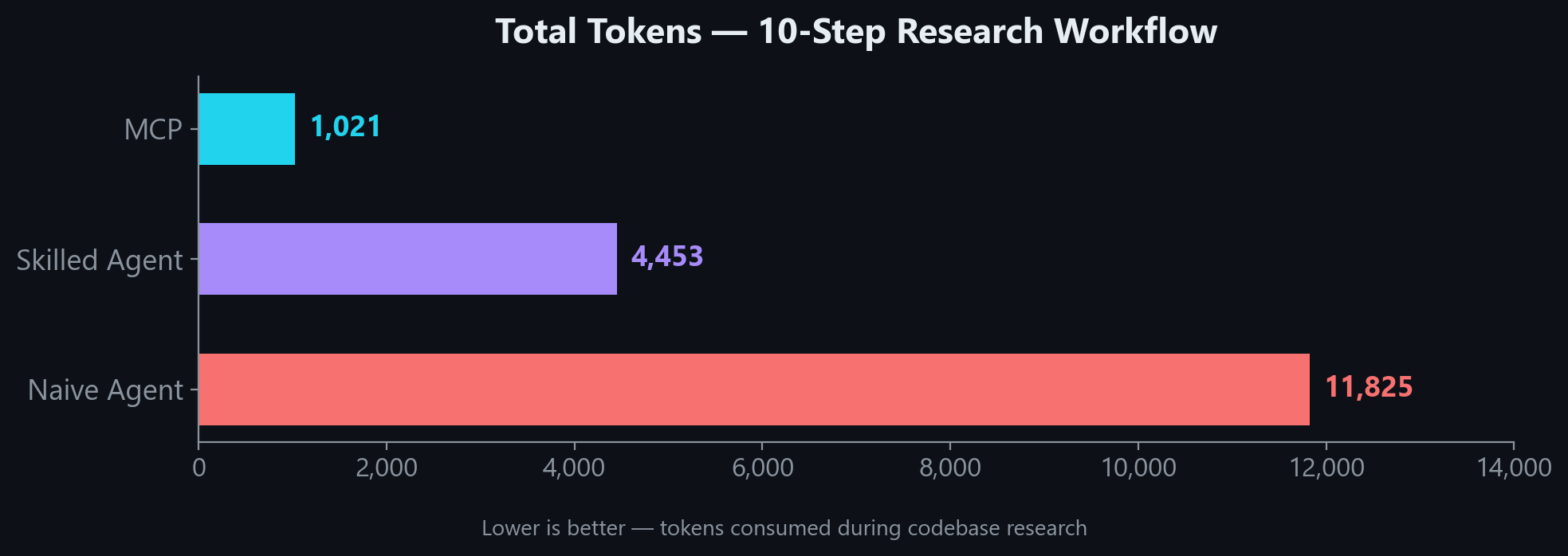
In a 10-step research workflow, MCP uses **4x fewer tokens** than a skilled agent and **11x fewer** than a naive agent:
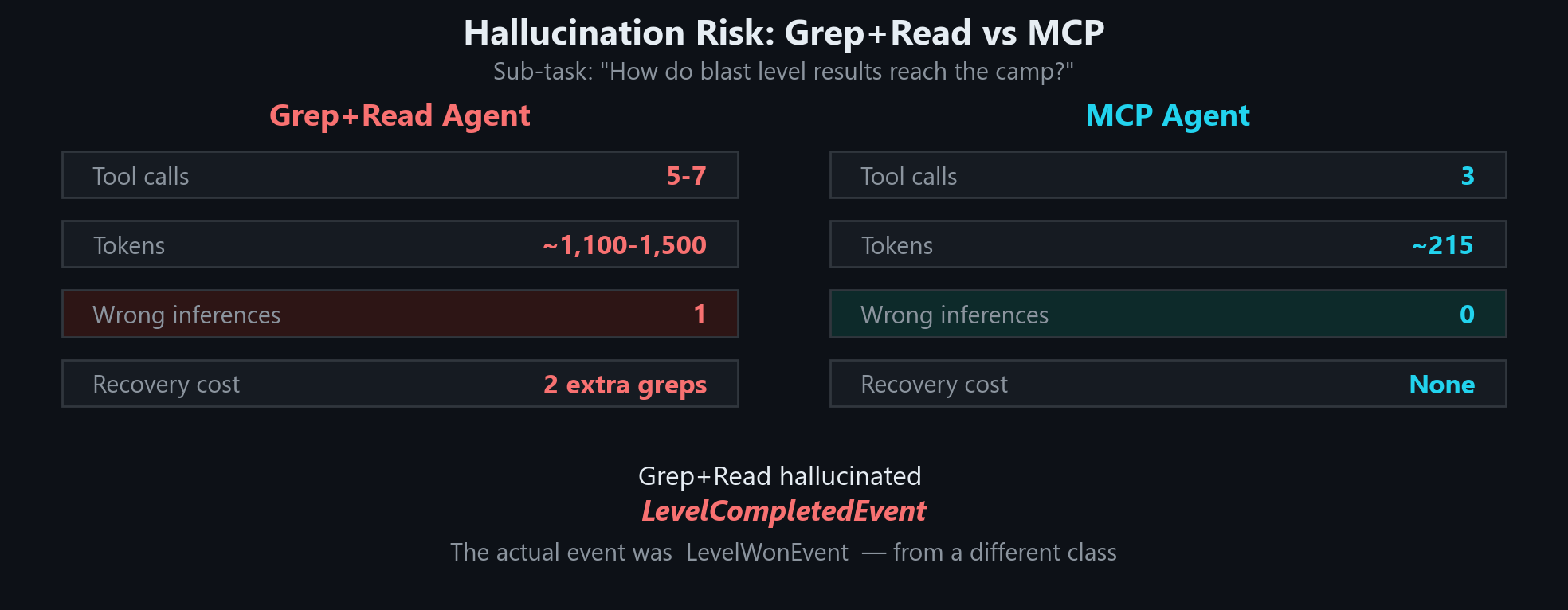
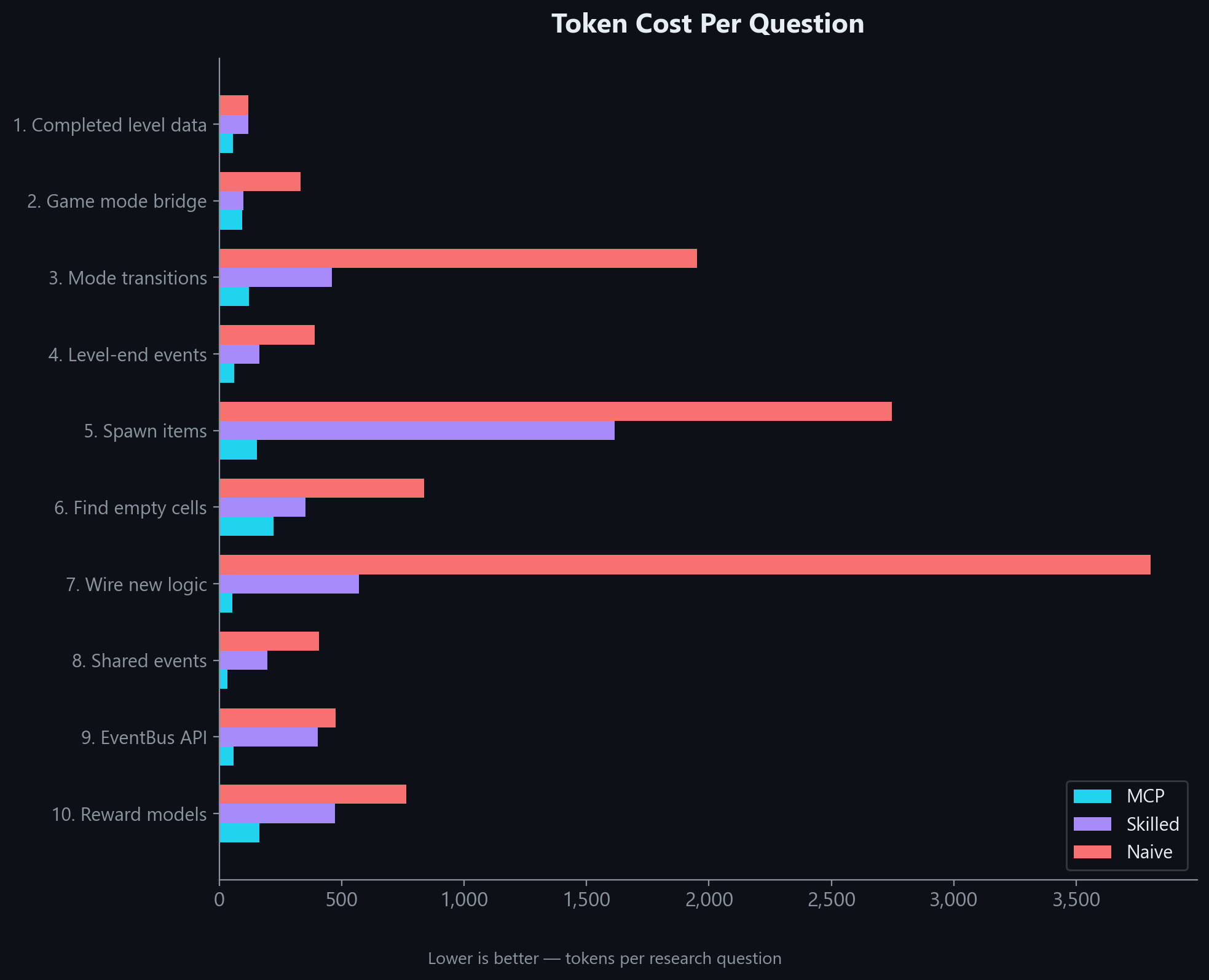
The gap holds across every question type. MCP wins on simple lookups and complex multi-part research alike:
Even in a realistic hybrid workflow where MCP results are followed up with targeted file reads, it still uses **54% fewer tokens** than a skilled agent working without MCP:
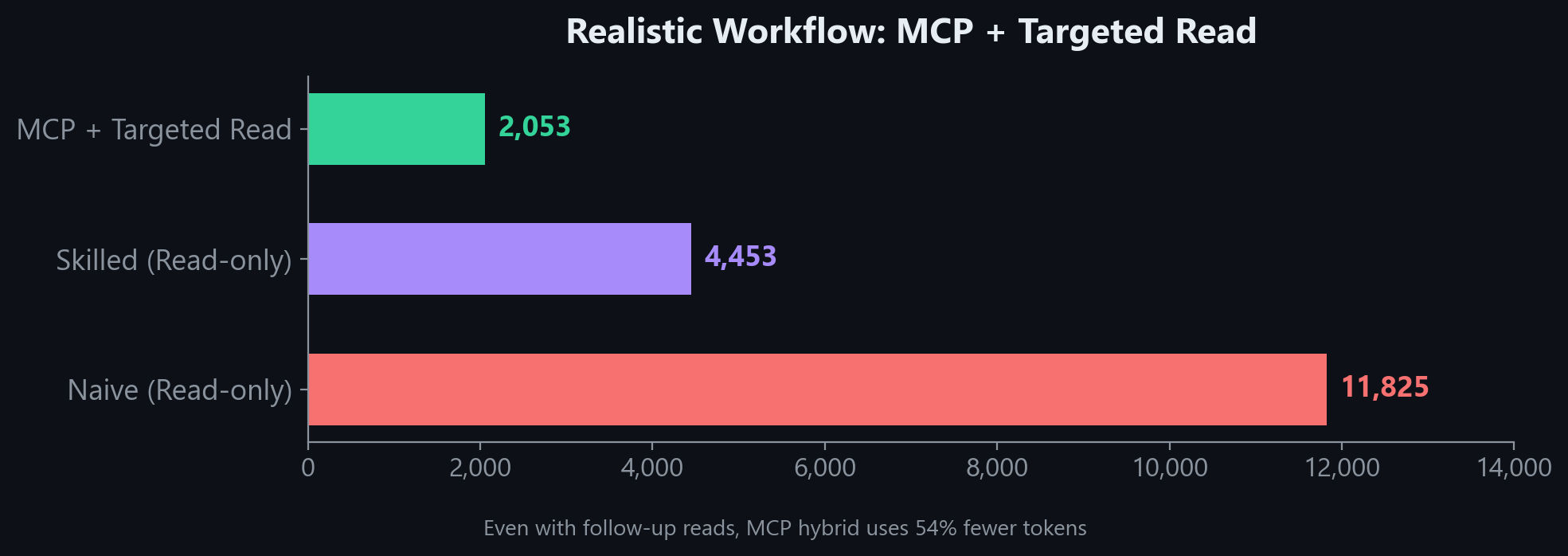
"Without MCP" estimates assume full file reads. A skilled agent with good tooling may use fewer tokens than shown. What MCP guarantees is a correct, structured answer in 1 call every time.
### Per-question breakdown
Accuracy
| Test | Result |
|------|--------|
| Search top-1 relevance (12 common queries) | 100% |
| Namespace resolution (6 key classes) | 100% |
| Key class coverage (17 common Unity classes) | 94% (16/17) |
Ranking uses BM25 with tuned column weights (member name 10x, class name 5x) plus core namespace boosting to ensure `Object.Instantiate` ranks above niche APIs like `InstantiationParameters.Instantiate`.
## CLAUDE.md Snippet
Add this to your project's `CLAUDE.md` (or equivalent instructions file). **This step is important.** Without it, the AI has the tools but won't know when to reach for them.
```markdown
## Unity API Lookup (unity-api MCP)
Use the `unity-api` MCP tools to verify Unity API usage instead of guessing. **Do not hallucinate signatures.**
| When | Tool | Example |
|------|------|---------|
| Unsure about a method's parameters or return type | `get_method_signature` | `get_method_signature("UnityEngine.Tilemaps.Tilemap.SetTile")` |
| Need the `using` directive for a type | `get_namespace` | `get_namespace("SceneManager")` |
| Want to see all members on a class | `get_class_reference` | `get_class_reference("InputAction")` |
| Searching for an API by keyword | `search_unity_api` | `search_unity_api("async load scene")` |
| Checking if an API is deprecated | `get_deprecation_warnings` | `get_deprecation_warnings("FindObjectOfType")` |
**Rules:**
- Before writing a Unity API call you haven't used in this conversation, verify the signature with `get_method_signature`
- Before adding a `using` directive, verify with `get_namespace` if unsure
- Covers: all UnityEngine/UnityEditor modules, Input System, Addressables
- Does NOT cover: DOTween, VContainer, Newtonsoft.Json (third-party)
```
## Setup Details
Auto-detect version from project path
Instead of setting `UNITY_VERSION`, you can point to your Unity project. The server reads `ProjectSettings/ProjectVersion.txt` automatically:
```json
{
"mcpServers": {
"unity-api": {
"command": "unity-api-mcp",
"args": [],
"env": {
"UNITY_PROJECT_PATH": "/path/to/your/unity-project"
}
}
}
}
```
Environment variables
| Variable | Purpose | Example |
|----------|---------|---------|
| `UNITY_VERSION` | Unity version to serve | `2022`, `2023`, `6`, or `6000.3.8f1` |
| `UNITY_PROJECT_PATH` | Auto-detect version from project | `F:/Unity Projects/my-project` |
| `UNITY_INSTALL_PATH` | Override Unity install path (for `ingest` only) | `D:/Unity/6000.3.8f1` |
Building databases locally
If you want to build a database from your own Unity installation instead of downloading:
```bash
# Install with ingest dependencies
pip install unity-api-mcp[ingest]
# Build for a specific version
python -m unity_api_mcp.ingest --unity-version 6 --unity-install "D:/Unity/6000.3.8f1" --project "F:/Unity Projects/MyProject"
python -m unity_api_mcp.ingest --unity-version 2022 --unity-install "D:/Unity/2022.3.62f1"
python -m unity_api_mcp.ingest --unity-version 2023 --unity-install "D:/Unity/2023.1.22f1"
```
Databases are written to `~/.unity-api-mcp/unity_docs_{version}.db` by default.
AI-Assisted Setup
If an AI agent is setting this up for you:
> Install `unity-api-mcp` via pip, add it to my MCP config with `UNITY_VERSION` set to match my project, append the CLAUDE.md snippet from the README, and verify with `get_namespace("SceneManager")`.
Project structure
```
unity-api-mcp/
├── src/unity_api_mcp/
│ ├── server.py # MCP server (5 tools)
│ ├── db.py # SQLite + FTS5 database layer
│ ├── version.py # Version detection + DB download
│ ├── xml_parser.py # Parse Unity XML IntelliSense files
│ ├── cs_doc_parser.py # Parse C# doc comments from package source
│ ├── unity_paths.py # Locate Unity install + package dirs
│ └── ingest.py # CLI ingestion pipeline
└── pyproject.toml
```
Databases are stored in `~/.unity-api-mcp/` (downloaded on first run).
## Troubleshooting
| Problem | Fix |
|---------|-----|
| "Could not download Unity X database" | Check internet connection. Or build locally: `python -m unity_api_mcp.ingest --unity-version 2022` |
| Wrong API version being served | Set `UNITY_VERSION` explicitly. Check stderr: `unity-api-mcp: serving Unity API docs` |
| Server won't start | Check `python --version` (needs 3.10+). Check path: `which unity-api-mcp` or `where unity-api-mcp` |
| Third-party packages return no results | DOTween, VContainer, Newtonsoft.Json are not indexed (third-party, not Unity packages) |
---
## See Also
**[unreal-api-mcp](https://github.com/Codeturion/unreal-api-mcp)** — Same concept for Unreal Engine (C++). Covers UE 5.5, 5.6, and 5.7.
## Contact
Need a custom MCP server for your engine or framework? I build MCP tools that cut token waste and prevent hallucinations for AI-assisted game development. If you want something similar for your team's stack, reach out.
fuatcankoseoglu@gmail.com
## License
MIT