https://github.com/coding/coding-sketch-toolkit
A series of sketch scripts for CODING designers
https://github.com/coding/coding-sketch-toolkit
Last synced: about 1 year ago
JSON representation
A series of sketch scripts for CODING designers
- Host: GitHub
- URL: https://github.com/coding/coding-sketch-toolkit
- Owner: coding
- Created: 2020-04-26T03:19:06.000Z (about 6 years ago)
- Default Branch: master
- Last Pushed: 2023-01-06T04:25:15.000Z (over 3 years ago)
- Last Synced: 2025-01-05T16:46:50.463Z (over 1 year ago)
- Language: JavaScript
- Size: 1.22 MB
- Stars: 2
- Watchers: 8
- Forks: 1
- Open Issues: 13
-
Metadata Files:
- Readme: README.md
Awesome Lists containing this project
README
# CODING Toolkit Sketch Plugin

## 插件命令
Dev Library 分类中的命令主要用于开发 Sketch Library 时使用。
### 1. Update Icon 升级图标
用于替换旧版 CODING Icon 至新版 CODING Icon,在设计稿中选中来自旧版 CODING Icon Library 的 symbol 然后执行此命令即可自动替换为对应的新版 CODING ICON,并且保留原来 icon 覆盖的颜色与尺寸。

### 2. Generate Icon Library Collection 生成图标合集
用于在 CODING Icon Library 文件中修改或添加 icon 后重新生成 icon 集合画板。执行此命令将会自动删除原 Page 1 中的 icon collection 画板然后重新生成新的画板。
更新 CODING Icon 的具体方法请查看此 [Wiki](https://codingcorp.coding.net/p/Design-Center/wiki/1495)

### 3. Create Symbol Instance 通过选中的 Symbol Master 创建 Instance
选中一个或多个 Symbol Master 后执行此命令,可自动在 Symbol Master 下方创建对应的 instance,用于快速预览和检查 Symbol Master 的使用效果与 Overrides 配置。
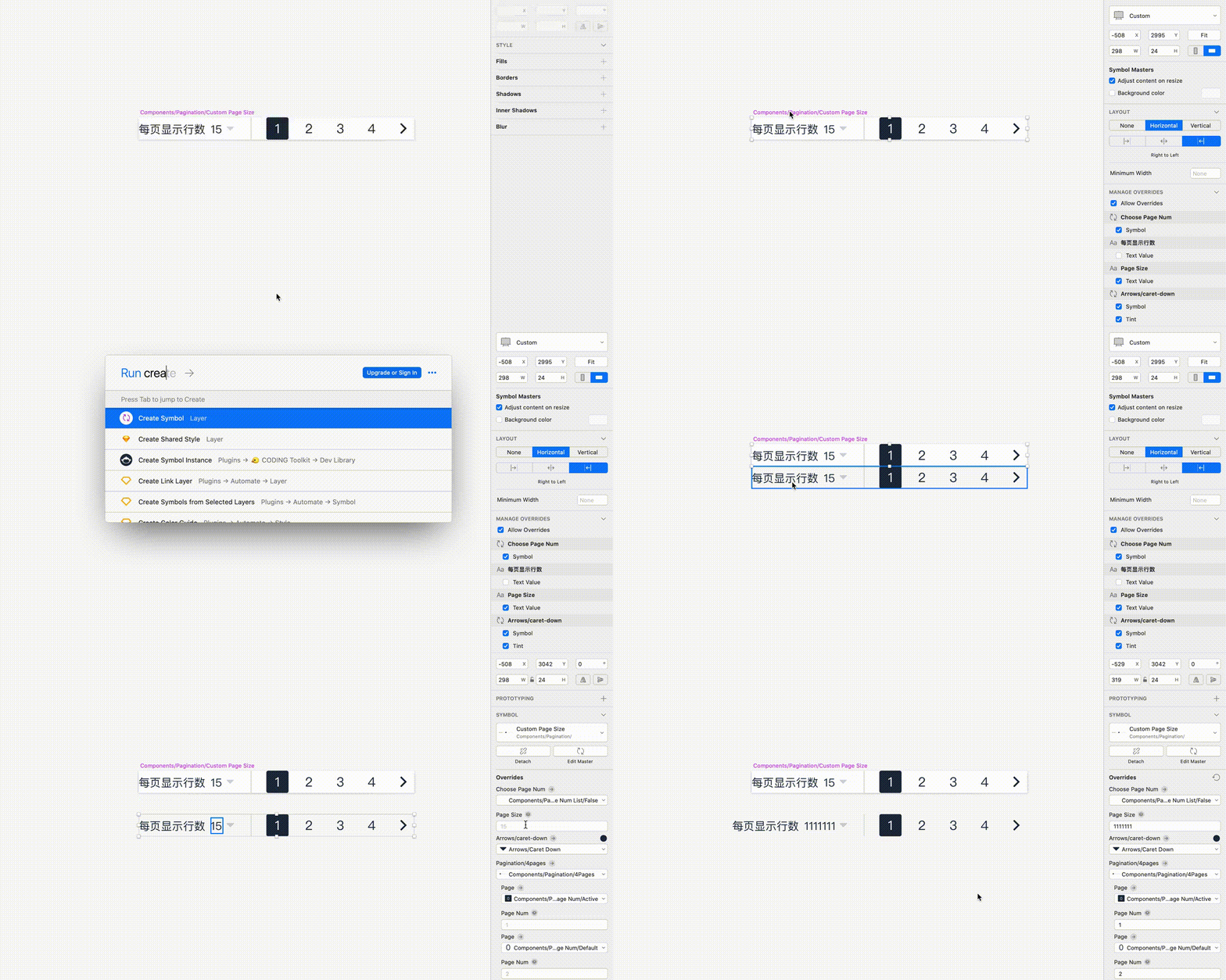
### 4. Publish New Icon To UIKit 发布新 icon 到 UIKit
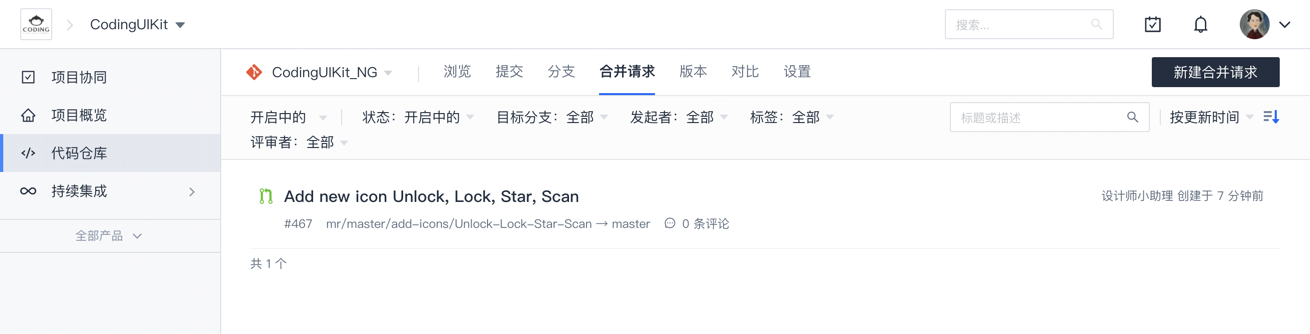
用于在 CODING Icon Library 文件中修改或添加 icon 后,将改动的 icon 自动发布到 CODING UIKit 代码仓库。选中一个或多个需要发布的 icon symbol 图层后执行此命令,icon 会被发送到 CODING CI,然后 CODING CI 自动将 icon 添加进 CODING UIKit 代码仓库并在企业微信群中通知维护者完成后续 UIKit 发版工作。
命令执行完后弹窗

自动创建的合并请求
企业微信通知(*通知里的动物 emoji 每次都不同,猜猜你添加 icon 时会是什么动物*)

## Data Supplier
目前支持随机填充以下 Text 内容:
- Project Name
- User Name
- Commit Id
- Commit Id - Sort
## Installation
### 1. Install with [Sketch Runner](https://sketchrunner.com)

### 2. Download from release
- [Download](https://github.com/Coding/coding-sketch-toolkit/releases/latest/download/coding-toolkit.sketchplugin.zip) the latest release of the plugin
- Un-zip
- Double-click on coding-toolkit.sketchplugin
## Development Guide
_This plugin was created using `skpm`. For a detailed explanation on how things work, checkout the [skpm Readme](https://github.com/skpm/skpm/blob/master/README.md)._
### Usage
Install the dependencies
```bash
npm install
```
Once the installation is done, you can run some commands inside the project folder:
```bash
npm run build
```
To watch for changes:
```bash
npm run watch
```
Additionally, if you wish to run the plugin every time it is built:
```bash
npm run start
```
### Debugging
To view the output of your `console.log`, you have a few different options:
- Use the [`sketch-dev-tools`](https://github.com/skpm/sketch-dev-tools)
- Run `skpm log` in your Terminal, with the optional `-f` argument (`skpm log -f`) which causes `skpm log` to not stop when the end of logs is reached, but rather to wait for additional data to be appended to the input
### Publishing your plugin
```bash
skpm publish
```
(where `bump` can be `patch`, `minor` or `major`)
`skpm publish` will create a new release on your GitHub repository and create an appcast file in order for Sketch users to be notified of the update.