https://github.com/codingitwrong/log2blog
Convert git logs to a blog post
https://github.com/codingitwrong/log2blog
Last synced: 3 months ago
JSON representation
Convert git logs to a blog post
- Host: GitHub
- URL: https://github.com/codingitwrong/log2blog
- Owner: CodingItWrong
- License: mit
- Created: 2016-01-05T15:15:01.000Z (over 10 years ago)
- Default Branch: master
- Last Pushed: 2016-07-28T10:26:06.000Z (almost 10 years ago)
- Last Synced: 2025-10-19T11:35:15.020Z (8 months ago)
- Language: Ruby
- Size: 86.9 KB
- Stars: 3
- Watchers: 0
- Forks: 0
- Open Issues: 0
-
Metadata Files:
- Readme: README.md
- License: LICENSE.txt
Awesome Lists containing this project
README
# log2blog
`log2blog` generates a Markdown version of your git commit history suitable for publishing as an article or blog post. This allows you to keep programming tutorial blog posts in sync with their corresponding git repo. If you have good descriptions of your steps in each commit message, you'll end up with a blog post with headings, file diffs, and descriptions matching your commits. Plus, you can regenerate the post any time your git log changes to ensure they're always in sync.
## Example
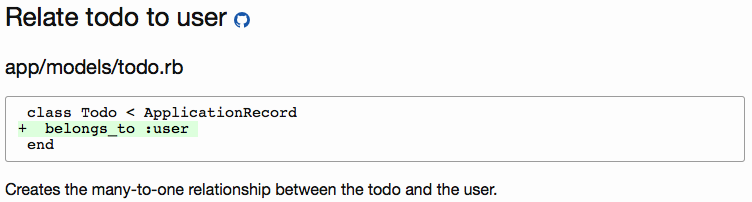
Say you're writing a blog post on how to create a todo list app in Rails. In a project repo, for each step you want to appear in the blog post, make a separate commit with those changes and a verbose commit message. For example, say you have one commit in your todo list app that adds the line `belongs_to :user` to the following file:
#### app/models/todo.rb
```ruby
class Todo < ApplicationRecord
belongs_to :user
end
```
With the commit message:
```
Relate todo to user
Creates the many-to-one relationship between the todo and the user.
```
When you're ready to generate a post from your git commit history, run:
`log2blog YourGitUserName/YourToDoListAppName`
This will output markdown corresponding to each commit, oldest to newest. It might render in a Jekyll blog, for example, as:
For a real-world example of an article generated via Log2Blog, see [learntdd.in/rails](http://learntdd.in/rails/).
## Installation
To install log2blog globally so you can run `log2blog` from anywhere, clone or download the repo from GitHub.
If you'd like to install `log2blog` locally in a Ruby project, add it to your Gemfile:
```ruby
gem "log2blog", github: "CodingItWrong/log2blog", branch: "master"
```
Then run `bundle install`.
If log2blog is installed locally, you can run it with `bundle exec log2blog`.
## Usage
To connect to GitHub you'll need a GitHub OAuth token. You can create one for your account on the [Personal Access Tokens page](https://github.com/settings/tokens).
To output the entire history of the repo converted to markdown:
```
bin/log2blog GITHUB_USERNAME/REPO_NAME --token GITHUB_OAUTH_TOKEN
```
You can also specify a commit hash to start from:
```
bin/log2blog GITHUB_USERNAME/REPO_NAME 4342fbec671ab2ce202aa4997e1388b8bcbb48a1 --token GITHUB_OAUTH_TOKEN
```
You can skip outputting files matching certain names in all commits:
```
bin/log2blog GITHUB_USERNAME/REPO_NAME 4342fbec671ab2ce202aa4997e1388b8bcbb48a1 --skip db/schema.rb --token GITHUB_OAUTH_TOKEN
```
## Contributing
Contributions to log2blog's code, tests, and documentation are welcome! To contribute:
1. Fork the project ( http://github.com/CodingItWrong/log2blog/fork )
2. Create your feature branch (git checkout -b my-new-feature)
3. Commit your changes (git commit -am 'Add some feature')
4. Push to the branch (git push origin my-new-feature)
5. Create a new Pull Request
## License
MIT. See `LICENSE.txt` for details.