https://github.com/codio/jeroo
https://github.com/codio/jeroo
Last synced: 5 months ago
JSON representation
- Host: GitHub
- URL: https://github.com/codio/jeroo
- Owner: codio
- License: agpl-3.0
- Created: 2021-03-05T09:09:17.000Z (over 5 years ago)
- Default Branch: master
- Last Pushed: 2025-08-28T08:26:18.000Z (10 months ago)
- Last Synced: 2025-08-28T15:36:11.861Z (10 months ago)
- Language: OCaml
- Size: 1.41 MB
- Stars: 0
- Watchers: 5
- Forks: 1
- Open Issues: 0
-
Metadata Files:
- Readme: README.md
- License: LICENSE
Awesome Lists containing this project
README
# Jeroo: A tool for learning Object-Oriented Programming
Play now! [jeroo.org/beta](https://www.jeroo.org/beta)
More info: [jeroo.org](https://www.jeroo.org)
## What is Jeroo?
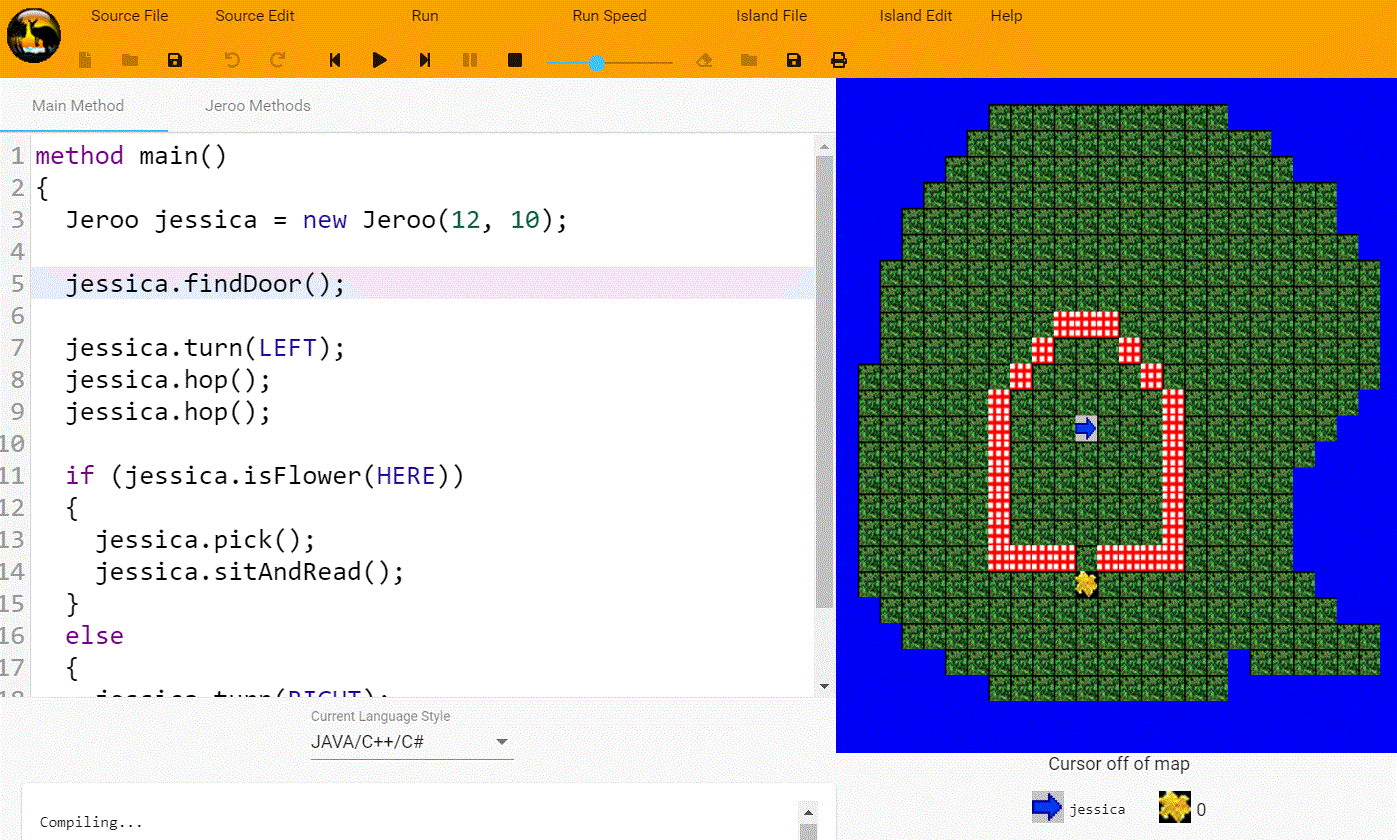
Jeroo is a text-based coding environment designed to help novices master the basic mechanics of object oriented programming. It features a limited syntax to emphasize basic computational thinking skills like problem decomposition (ie, breaking things down into subtasks), the semantics of control structures like loops and ifs, and use of objects and state to solve problems.
Solving problems involves writing a program that helps one or more kangaroo-like objects (ie, Jeroos) hop around an island while avoiding the nets set by animal collectors to achieve an objective. Along the way, Jeroos can pick up flowers growing on the island and use them to disarm nets. Jeroos must be careful to also stay out of the water, since they've never developed an ability to swim.
Jeroo has been used in high school and university classrooms for nearly 20 years, and many teachers find that it provides a great transition tool between the modern block-based systems like Scratch and a more general purpose programming language. The system allows learners to program using a variety of syntax styles to best align with the target programming language in a curriculum. In particular, you can choose between Java/C#, Python, or Visual Basic style syntaxes all within the same tool.
## Screenshots
## Resources for Teachers and Students
Our Introduction to Jeroo textbook provides an overview of how to program with Jeroo and gives more details about the system's backstory. Three different versions of the book are linked below, corresponding to the three language styles available. Pick the one that matches your target language. Note that the appendix materials showing screenshots of Jeroo are based on the stand-alone program, rather than the new web-based Jeroo--they're still a work in progress.
- [Java/C#/Javascript](https://www.jeroo.org/docs/JerooDocJava.pdf)
- [Python Syntax](https://www.jeroo.org/docs/JerooDocPython.pdf)
- [VB Syntax](https://www.jeroo.org/docs/JerooDocVB.pdf)
## The Team
- Ben Konz
- Caelan Bryan
- Thomas Connole
- John Adam
- Brian Dorn
The best way to contact us with questions, comments or feature requests, is to email support@jeroo.org.
## Building from source
Build tools:
- yarn
- opam (m4 required by opam)
### Building the compiler
Opam is experimental on Windows, so I would stick to
MacOS or Linux to build the compiler. Once the JerooCompiler.bc.js
has been created, any platform can build the rest of the site.
```text
cd src/compiler
opam switch create ./ ocaml-base-compiler.4.08.1
opam install --deps-only .
eval $(opam env)
dune build ./JerooCompiler.bc.js --profile release
dune runtest # optional, verify all compiler tests pass
```
The compiler JavaScript is located in `jeroo/src/compiler/_build/default/JerooCompiler.bc.js`
### Building the frontend
```text
# cd to project root
yarn install
yarn build --prod
yarn test # optional, run unit tests
yarn e2e # optional, run end-to-end tests (only works on Firefox)
```
The newly built site is located in `jeroo/dist/jeroo`
### Start locally
Server link changed in ```environments/environment.ts```
Port changed in ```angular.json``` ```projects.serve.options.port```
```text
yarn start
```