https://github.com/collab-uniba/developersinactivityanalysis
A collection of scripts to collect data from GitHub and analyze developers' breaks during their lifetime in a project and determine which of these breaks can be considered Sleepings, Hibernations or Deads.
https://github.com/collab-uniba/developersinactivityanalysis
abandonment github msr oss retention
Last synced: about 1 year ago
JSON representation
A collection of scripts to collect data from GitHub and analyze developers' breaks during their lifetime in a project and determine which of these breaks can be considered Sleepings, Hibernations or Deads.
- Host: GitHub
- URL: https://github.com/collab-uniba/developersinactivityanalysis
- Owner: collab-uniba
- License: gpl-3.0
- Created: 2019-04-23T12:35:52.000Z (about 7 years ago)
- Default Branch: main
- Last Pushed: 2024-10-15T22:42:38.000Z (over 1 year ago)
- Last Synced: 2025-04-05T13:11:15.569Z (over 1 year ago)
- Topics: abandonment, github, msr, oss, retention
- Language: Python
- Homepage:
- Size: 134 MB
- Stars: 1
- Watchers: 5
- Forks: 3
- Open Issues: 1
-
Metadata Files:
- Readme: README.md
- License: LICENSE
Awesome Lists containing this project
README
# Will you come back to contribute? Investigating the inactivity of OSS developers in GitHub
[](https://zenodo.org/badge/latestdoi/183011533)
### Setup
Use the `productivity` branch for the latest updates.
Add to the root a folder named `Resources/` with the following files:
- `repositories.txt` containing the list of projects (one per line) to be analyzed, in the following format `org/repo_name` (e.g., `atom/atom);
- `tokens.txt` (optional) containing the list of GH tokens to be used;
### Sampling of developers
#### Core Developers Selection
Refer to this [README.md](CoreSelection/README.md) file.
#### Truck-Factor Developer Selection
Refer to this [README.md](TruckFactor/README.md) file.
---
### CommitExtractor.py
#### Params
Uses the tokens defined in `Resources/tokens.txt` and the list of repository urls in `Resources/repositories.txt`, as defined in the `Settings.py` file.
- None.
#### Requirements
- Set files and folders names in the `Settings.py` file
#### Execution
`python CommitExtractor.py`
#### Output
- `logs/Commit_Extraction_organization.log`: log file
- `Organizations//[...]/`: Results folders
- For each repo folder:
- `commit_list.csv`: List of the commits in the format:
- `commit_history_table.csv`: Matrix of autors and dates. The cells contain the number of the commits of a developer in one day
- `pauses_duration_list.csv`: List of pauses durations in days for each developer in the format:
- `pauses_dates_list.csv`: List of pauses dates for each developer in the format:
- The same files are given after merging the commits of every organization's repo in the `Organizations//` folder.
if you came here from point 2 of core selection you can now perform step 3 following [(CoreSelection | Step 3)](CoreSelection/README.md#L18)
---
### ActivitiesExtractor.py
#### Params
- None
#### Requirements
- Set files and folders names in the `Settings.py` file
#### Execution
`python ActivitiesExtractor.py`
#### Output
- `logs/Commit_Extraction_organization.log`: log file
- `Organizations//[...]/Other_Activities/`: Results folders
- For each repo folder:
- `issues_comments_repo.csv`: List of the issue comments in the format:
- `issues_events_repo.csv`: List of the issue events in the format:
- `issues_prs_repo.csv`: List of the issue and pull request creations in the format:
- `pulls_comments_repo.csv`: List of the pull request comments in the format:
### PullRequestExtractor.py
### NonMergedCommitsExtractor.py
### MissingStuffCollector.py
### CodingTableBuilder.py
---
### BreaksIdentification.py
#### Params
- `mode`: enter one of following modes ['tf', 'a80', 'a80mod', 'a80api']
#### Requirements
- Set files and folders names in the `Settings.py` file
- Insert the list of the TF/core developers () in the right folder. Formatted as a list of . The path to save the file is set in the `Settings.py` file.
- Set the `window` size and the `shift` size in the `Settings.py` file
#### Execution
`python BreaksIdentification.py tf | a80 | a80mod | a80api`
#### Output
- `logs/Breaks_Identification.log`: log file
- `Organizations//Dev_Breaks/`: Results folders
- For each developer in the TF file:
- `_breaks.csv`: List of the breaks in the format:
#### Algorithm
Let **D** be a developer to analyze and let **life(D)** be the number of days between its first and last commits.
For each sliding *window* **W** in **life(D)** which slides of *shift* days. The values of variables *window* (default 90 days) and *shift* (default 7 days) are set in the `Settings.py` file).
The goal is to select all the *breaks* (*pauses* that are larger than usual) associated with the *Tfov* (Far-out-value threshold) of the first window where they have been found:
1. PAUSES SELECTION **STEP**
- In the list `win_pauses`, put all the pauses within **W** (only these pauses define the rythm of **D** in **W**).
- In the list `partially_included`, put all the pauses partially within **W** (i.e., pauses that start in **W** and end in the next window).
2. *Tfov* DEFINITION **STEP**
- If `win_pauses` contains >=4 *pauses* then the **W** is valid, then use `win_pauses` to calculate *Tfov*. If *Tfov* is valid (i.e., *IQR*>1), then proceed to the breaks identification step (go to STEP 3).
- Else, when `win_pauses` < 4 (i.e., *Tfov* cannot be calculated) or if *Tfov* is invalid (i.e., *IQR*<=1) for **W**, then:
- If a previous *Tfov* exists, then consider it as the current *Tfov* and proceed to the next step for breaks identification (go to STEP 3).
- Otherwise, save into the list `clear_breaks` all the *pauses* from `partially_included` that are larger than the window size and have not been considered yet, ignore the other *pauses* in `win_pauses`; move forward **W** by *shift* days and RESTART (go back to STEP 1).
(Note: The *pauses* that are larger than *shift* days will be considered in the next **W** and so on, whereas the smaller ones are not breaks and can be safely ignored).
3. BREAKS IDENTIFICATION **STEP**
- Select as *break* each couple *
* from the lists `win_pauses` and `partially_included` where *t* is *Tfov* and *p* is a *pause* > *Tfov*.
- Move forward **W** by *shift* days and RESTART (go back to STEP 1).
4. FINAL **STEP** (When there are no more **W**)
- Compute *Avg_Tfov* as the average of all the valid *Tfovs* found.
- Save the *pauses* in the list `clear_breaks` as *breaks* (*
* where *t* is *Avg_Tfov*, and *p* is a *pause* > *Avg_Tfov* as for list definition).
---
### BreaksLabeling.py
#### Params
- `mode`: choose one of following modes ['tf', 'a80', 'a80mod', 'a80api']
#### Requirements
- Make sure to have already executed the `BreaksIdentification.py` script to get the `_breaks.csv` files (one for each developer).
#### Execution
`python BreaksLabeling.py tf | a80 | a80mod | a80api`
#### Output
- `logs/Breaks_Labeling.log`: events log file
- `Organizations//Dev_Breaks/`: Results folders
- For each developer in the TF file:
- `_labeled_breaks.csv`: List of the breaks in the format:
#### Algorithm
1. Get a *break* from the `Breaks` list.
2. If there is not any other activity performed by the developer during the break, then label it `INACTIVE` if < 365 days; `GONE` otherwise.
3. If there are other activities in the period:
- Define `sub_breaks_list` as the list of the intervals between such activities (*sub_break*).
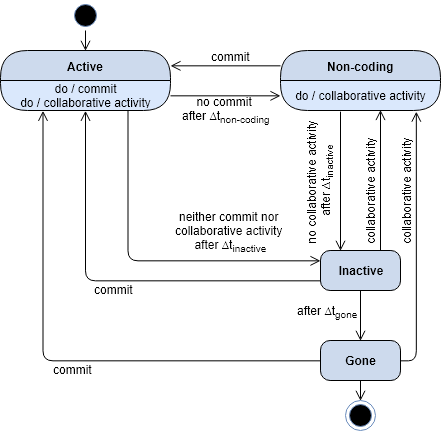
- Identify each *sub_break* > *Tfov* from the `sub_breaks_list` and label it based on the defined state diagram (∆t_inactive = ∆t_non-coding = Tfov).