https://github.com/collatzconjecture/nestjs-clean-architecture
A modular NestJS boilerplate with CQRS, Event Sourcing, DDD, and Clean Architecture. Built-in observability with Prometheus & Grafana, API docs via Swagger, and Dockerized deployment. Ideal for scalable, maintainable applications.
https://github.com/collatzconjecture/nestjs-clean-architecture
boilerplate boilerplate-template docker docker-compose event-driven-architecture grafana mongodb nestjs prometheus swagger typescript
Last synced: 3 months ago
JSON representation
A modular NestJS boilerplate with CQRS, Event Sourcing, DDD, and Clean Architecture. Built-in observability with Prometheus & Grafana, API docs via Swagger, and Dockerized deployment. Ideal for scalable, maintainable applications.
- Host: GitHub
- URL: https://github.com/collatzconjecture/nestjs-clean-architecture
- Owner: CollatzConjecture
- License: unlicense
- Created: 2025-06-12T13:55:52.000Z (about 1 year ago)
- Default Branch: main
- Last Pushed: 2025-06-21T10:38:19.000Z (about 1 year ago)
- Last Synced: 2025-06-21T11:28:34.942Z (about 1 year ago)
- Topics: boilerplate, boilerplate-template, docker, docker-compose, event-driven-architecture, grafana, mongodb, nestjs, prometheus, swagger, typescript
- Language: TypeScript
- Homepage:
- Size: 109 KB
- Stars: 0
- Watchers: 0
- Forks: 0
- Open Issues: 0
-
Metadata Files:
- Readme: README.md
- License: LICENSE
Awesome Lists containing this project
README
# NestJS Clean Architecture with DDD, CQRS & Event Sourcing
This is an advanced boilerplate project implementing **Domain-Driven Design (DDD)**, **Clean Architecture**, **CQRS (Command Query Responsibility Segregation)**, **Event Sourcing** and MongoDB with NestJS. It provides a robust foundation for building scalable and maintainable enterprise-level applications with **proper separation of concerns** and **clean dependency direction**.
If you want more documentation about NestJS, click here [Nest](https://github.com/nestjs/nest)
> **📝 Note:** This version uses **MongoDB** with **Mongoose**. If you prefer the **PostgreSQL** version with **TypeORM**, you can find it at the original repository: [https://github.com/CollatzConjecture/nestjs-clean-architecture-postgres](https://github.com/CollatzConjecture/nestjs-clean-architecture-postgres)
[A quick introduction to clean architecture](https://www.freecodecamp.org/news/a-quick-introduction-to-clean-architecture-990c014448d2/)
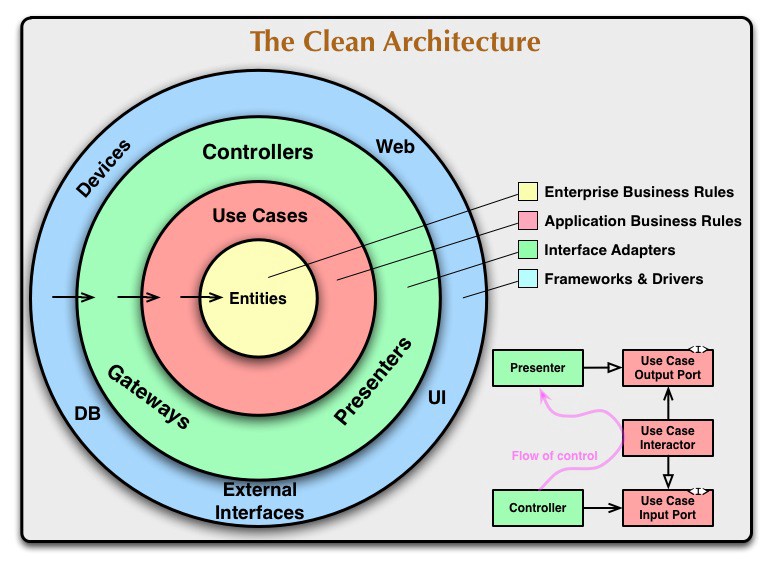
## 🚀 Features
### Core Architecture
- **Clean Architecture**: Enforces strict separation of concerns with proper dependency direction (Infrastructure → Application → Domain).
- **Domain-Driven Design (DDD)**: Pure business logic encapsulated in Domain Services, accessed through Repository Interfaces.
- **CQRS**: Segregates read (Queries) and write (Commands) operations for optimized performance and scalability.
- **Event Sourcing**: Uses an event-driven approach with sagas for orchestrating complex business processes.
- **Repository Pattern**: Clean interfaces defined in Domain layer, implemented in Infrastructure layer.
- **Dependency Inversion**: Domain layer depends only on abstractions, never on concrete implementations.
### Proper Layer Separation
- **Domain Layer**: Pure business logic, domain entities without framework dependencies, repository interfaces
- **Application Layer**: Business orchestration, application services, CQRS coordination, framework-agnostic services
- **API Layer**: HTTP controllers, DTOs, request/response handling, framework-specific HTTP concerns
- **Infrastructure Layer**: Database implementations, external API calls, concrete repository classes, global services
### Security & Authentication
- **JWT Authentication**: Implements secure, token-based authentication with refresh token rotation.
- **Google OAuth2 Integration**: Secure third-party authentication with Google accounts, including CSRF protection.
- **Role-Based Access Control (RBAC)**: Complete implementation with protected routes and role-based guards.
- **Secure Password Storage**: Hashes passwords using `bcrypt` with salt rounds.
- **Sensitive Data Encryption**: Encrypts sensitive fields (e.g., user emails) at rest in the database using AES-256-CBC.
- **Blind Indexing**: Allows for securely querying encrypted data without decrypting it first.
- **CSRF Protection**: OAuth flows protected against Cross-Site Request Forgery attacks using state parameters.
### Infrastructure & Operations
- **MongoDB Integration**: Utilizes Mongoose for structured data modeling with a NoSQL database.
- **Containerized Environment**: Full Docker and Docker Compose setup for development and production.
- **Health Checks**: Provides application health monitoring endpoints via Terminus.
- **Structured Logging**: Advanced logging system with business-context awareness and dependency injection.
- **Application Metrics**: Exposes performance metrics for Prometheus.
- **Data Visualization**: Comes with a pre-configured Grafana dashboard for visualizing metrics.
- **Request Throttling**: Built-in rate limiting to prevent abuse and ensure API stability.
### Testing
- **Unit & Integration Tests**: A suite of tests for domain, application, and infrastructure layers.
- **E2E Tests**: End-to-end tests to ensure API functionality from request to response.
- **High Test Coverage**: Configured to report and maintain high code coverage.
- **Mocking**: Clear patterns for mocking database and service dependencies.
## Getting Started
```bash
git clone https://github.com/CollatzConjecture/nestjs-clean-architecture
cd nestjs-clean-architecture
```
### 📁 Project Structure
```
.
├── doc/
│ ├── common.http # Common API requests
│ └── users.http # User-specific API requests
├── src/
│ ├── api/ # API Layer (HTTP Controllers & DTOs)
│ │ ├── controllers/
│ │ │ └── *.controller.ts # HTTP endpoints (auth, profile, hello)
│ │ ├── dto/
│ │ │ ├── auth/ # Authentication DTOs
│ │ │ │ └── *.dto.ts # Login & register DTOs
│ │ │ └── *.dto.ts # Profile management DTOs
│ │ └── api.module.ts # API module configuration
│ ├── application/ # Application Layer (Business Orchestration)
│ │ ├── __test__/
│ │ │ └── *.spec.ts # Application layer tests
│ │ ├── auth/
│ │ │ ├── command/ # Auth commands & handlers
│ │ │ │ ├── *.command.ts # Create/delete auth user commands
│ │ │ │ └── handler/
│ │ │ │ └── *.handler.ts # Command handlers
│ │ │ ├── events/ # Auth domain events
│ │ │ │ └── *.event.ts # User created/deleted events
│ │ │ ├── sagas/
│ │ │ │ └── *.saga.ts # Registration flow orchestration
│ │ │ ├── decorators/
│ │ │ │ └── *.decorator.ts # Custom decorators (roles)
│ │ │ ├── guards/
│ │ │ │ └── *.guard.ts # Authentication & authorization guards
│ │ │ ├── *.strategy.ts # Auth strategies (JWT, local, Google OAuth)
│ │ │ └── auth.module.ts # Auth module configuration
│ │ ├── decorators/
│ │ │ └── *.decorator.ts # Global decorators (current user)
│ │ ├── interfaces/
│ │ │ └── *.interface.ts # Application interfaces
│ │ ├── interceptors/
│ │ │ └── *.interceptor.ts # Request logging interceptors
│ │ ├── middlewere/
│ │ │ └── *.middleware.ts # HTTP middleware (logging)
│ │ ├── services/
│ │ │ └── *.service.ts # Application services (auth, profile, logger)
│ │ ├── profile/
│ │ │ ├── command/ # Profile commands & handlers
│ │ │ │ ├── *.command.ts # Profile commands
│ │ │ │ └── handler/
│ │ │ │ └── *.handler.ts # Command handlers
│ │ │ ├── events/ # Profile domain events
│ │ │ │ └── *.event.ts # Profile events
│ │ │ └── profile.module.ts # Profile module configuration
│ │ └── application.module.ts # Application module aggregator
│ ├── domain/ # Domain Layer (Pure Business Logic)
│ │ ├── __test__/
│ │ │ └── *.spec.ts # Domain layer tests
│ │ ├── aggregates/ # Domain aggregates
│ │ ├── entities/
│ │ │ ├── *.ts # Pure domain entities (Auth, Profile)
│ │ │ └── enums/ # Domain enums
│ │ │ └── *.enum.ts # Role enums, etc.
│ │ ├── interfaces/
│ │ │ └── repositories/ # Repository contracts defined by domain
│ │ │ └── *.interface.ts # Repository interfaces
│ │ └── services/
│ │ └── *.service.ts # Pure business logic services
│ ├── infrastructure/ # Infrastructure Layer (External Concerns)
│ │ ├── database/
│ │ │ ├── database.module.ts # Database configuration
│ │ │ └── database.providers.ts # Database providers
│ │ ├── health/
│ │ │ └── *.check.ts # Health check configurations
│ │ ├── logger/
│ │ │ └── logger.module.ts # Global logger module
│ │ ├── models/
│ │ │ ├── *.model.ts # MongoDB models (auth, profile)
│ │ │ └── index.ts # Model exports
│ │ └── repository/
│ │ └── *.repository.ts # Repository implementations
│ ├── main.ts # Application entry point
│ ├── app.module.ts # Root application module
│ └── constants.ts # Application constants
├── test/
│ ├── *.e2e-spec.ts # End-to-end tests
│ ├── jest-e2e.json # E2E test configuration
│ └── setup-e2e.ts # E2E test setup
├── prometheus/
│ └── prometheus.yml # Prometheus configuration
├── docker-compose*.yml # Docker Compose configurations (dev, prod)
└── Dockerfile # Container definition
```
## 🏗️ Architecture Overview
### Layer Architecture
This project follows a strict 4-layer architecture:
1. **API Layer** (`src/api/`): HTTP controllers, DTOs, and request/response handling
2. **Application Layer** (`src/application/`): Business orchestration, CQRS coordination, and application services
3. **Domain Layer** (`src/domain/`): Pure business logic, entities, and domain services
4. **Infrastructure Layer** (`src/infrastructure/`): Database, external services, and technical implementations
### Module Structure
- **ApiModule**: Aggregates all HTTP controllers and imports ApplicationModule
- **ApplicationModule**: Central orchestrator that imports and exports feature modules
- **AuthModule**: Self-contained authentication feature with all its dependencies
- **ProfileModule**: Self-contained profile management feature with all its dependencies
- **LoggerModule**: Global infrastructure service for application-wide logging
### CQRS Implementation
- **Commands**: Handle write operations (Create, Update, Delete). Located in `src/application/*/command`.
- **Queries**: Handle read operations (Find, Get). Located in `src/application/*/query`.
- **Handlers**: Process commands and queries separately with proper business-context logging.
- **Events**: Publish domain events for side effects and inter-module communication.
### Event-Driven Flow
1. **User Registration**:
```
API Controller → Application Service → Domain Service (validation) →
RegisterCommand → CreateAuthUser → AuthUserCreated Event →
RegistrationSaga → CreateProfile → ProfileCreated
```
2. **Authentication**:
```
API Controller → Application Service → Domain Service (email validation) →
LoginCommand → ValidateUser → JWT Token Generation
```
3. **Google OAuth Flow**:
```
/auth/google → Google OAuth → /auth/google/redirect →
Domain Service (validation) → FindOrCreateUser → JWT Token Generation
```
4. **Error Handling**:
```
ProfileCreationFailed Event → RegistrationSaga →
DeleteAuthUser (Compensating Transaction)
```
### Dependency Injection & Module Boundaries
- **Feature Modules**: Each feature (Auth, Profile) manages its own dependencies
- **Domain Services**: Injected via factories to maintain Clean Architecture principles
- **Repository Pattern**: Interfaces defined in domain, implementations in infrastructure
- **Global Services**: Logger provided globally via `@Global()` decorator
## 📋 Prerequisites
- Node.js 20+
- Docker and Docker Compose
- MongoDB (included in Docker Compose)
- Google OAuth2 credentials (for Google login functionality)
## 🐳 Running with Docker Compose
The project is configured to run seamlessly with Docker. Use the pnpm scripts from `package.json` for convenience.
```bash
# Build and start containers in detached mode for development
$ pnpm run docker:dev
# Build and start containers for production
$ pnpm run docker:prod
# View logs for the API service
$ pnpm run docker:logs
# Stop all running containers
$ pnpm run docker:down
# Restart the development environment
$ pnpm run docker:restart
```
### 🌐 Service Access
- **Application**: http://localhost:4000
- **API Documentation (Swagger)**: http://localhost:4000/api
- **MongoDB**: localhost:27017
- **Prometheus**: http://localhost:9090
- **Grafana**: http://localhost:3000 (admin/admin)
## 📦 Installation
```bash
$ pnpm install
```
## 🚀 Running the Application
```bash
# Development
$ pnpm run start
# Watch mode (recommended for development)
$ pnpm run start:dev
# Production mode
$ pnpm run start:prod
# Debug mode
$ pnpm run start:debug
```
## 🧪 Testing
```bash
# Unit tests
$ pnpm run test
# E2E tests
$ pnpm run test:e2e
# Test coverage
$ pnpm run test:cov
# Watch mode
$ pnpm run test:watch
```
## 🧹 Linting
```bash
# Check code style
$ pnpm run lint
# Auto-fix issues where possible
$ pnpm run lint:fix
```
## 🧪 API Testing
You can import this [Postman collection](./NestJS%20CA-DDD.postman_collection.json) to test the API endpoints.
The collection includes:
- **Authentication endpoints**: Register, login, logout, Google OAuth
- **Profile management**: Create, read, update profile data
- **Protected routes**: Examples with JWT token authentication
- **Admin endpoints**: Role-based access control examples
- **Environment variables**: Pre-configured for localhost development
### Using the Postman Collection
1. **Import the collection**: Download and import `NestJS CA-DDD.postman_collection.json` into Postman
2. **Set environment variables**: Configure the following variables in Postman:
- `localhost`: `http://localhost` (or your host)
- `port`: `4000` (or your configured port)
- `Authorization`: `Bearer ` (set after login)
3. **Test the flow**:
- Start with user registration
- Login to get JWT token
- Use the token for protected endpoints
## 🔐 API Endpoints
### Authentication
```http
POST /auth/register # User registration
POST /auth/login # User login
POST /auth/logout # User logout (Protected)
POST /auth/refresh-token # Token refresh (Protected)
GET /auth/google # Initiate Google OAuth login
GET /auth/google/redirect # Google OAuth callback
GET /auth/:id # Get user by auth ID (Protected)
DELETE /auth/:id # Delete user by auth ID (Protected)
```
### Profile Management (Protected)
```http
GET /profile/all # Get all user profiles (Admin only)
GET /profile/admins # Get all admin users (Admin only)
GET /profile/:id # Get user profile by ID
POST /profile # Create a new profile
```
### Health & Monitoring
```http
GET /hello # Health check endpoint
GET /health # Detailed health check
GET /metrics # Prometheus metrics
```
### Example Usage
#### Traditional Registration & Login
```bash
# Register a new user
curl -X POST http://localhost:4000/auth/register \
-H "Content-Type: application/json" \
-d '{
"name": "John",
"lastname": "Doe",
"age": 30,
"email": "john@example.com",
"password": "securePassword123"
}'
# Login
curl -X POST http://localhost:4000/auth/login \
-H "Content-Type: application/json" \
-d '{
"email": "john@example.com",
"password": "securePassword123"
}'
```
#### Google OAuth Login
```bash
# Initiate Google login (redirects to Google)
curl -X GET http://localhost:4000/auth/google
# The callback is handled automatically after Google authentication
# Returns JWT token upon successful authentication
```
#### Protected Routes
```bash
# Access protected route
curl -X GET http://localhost:4000/profile/123 \
-H "Authorization: Bearer YOUR_JWT_TOKEN"
# Admin-only route
curl -X GET http://localhost:4000/profile/all \
-H "Authorization: Bearer YOUR_ADMIN_JWT_TOKEN"
```
## 🛠️ Built With
### Core Framework
- **[NestJS](https://nestjs.com/)** - Progressive Node.js framework
- **[TypeScript](https://www.typescriptlang.org/)** - Type-safe JavaScript
### Architecture & Patterns
- **[@nestjs/cqrs](https://docs.nestjs.com/recipes/cqrs)** - CQRS implementation
- **[@nestjs/event-emitter](https://docs.nestjs.com/techniques/events)** - Event handling
### Authentication & Security
- **[@nestjs/jwt](https://docs.nestjs.com/security/authentication)** - JWT implementation
- **[@nestjs/passport](https://docs.nestjs.com/security/authentication)** - Authentication strategies
- **[@nestjs/throttler](https://docs.nestjs.com/security/rate-limiting)** - Rate limiting
- **[bcrypt](https://www.npmjs.com/package/bcrypt)** - Password hashing
- **[cookie-parser](https://www.npmjs.com/package/cookie-parser)** - Cookie handling for OAuth state
### Database & Storage
- **[Mongoose](https://mongoosejs.com/)** - MongoDB object modeling
- **[MongoDB](https://www.mongodb.com/)** - Document database
### Monitoring & Health
- **[@nestjs/terminus](https://docs.nestjs.com/recipes/terminus)** - Health checks
- **[Prometheus](https://prometheus.io/)** - Metrics collection
- **[Grafana](https://grafana.com/)** - Metrics visualization
### Testing
- **[Jest](https://jestjs.io/)** - Testing framework
- **[Supertest](https://www.npmjs.com/package/supertest)** - HTTP assertion library
### Development Tools
- **[Nodemon](https://nodemon.io/)** - Development server
- **[Docker](https://www.docker.com/)** - Containerization
## 🏛️ Domain-Driven Design
### Bounded Contexts
- **Authentication Context**: User login, registration, tokens, OAuth integration
- **Profile Context**: User profile management, personal data
### Aggregates
- **UserAggregate**: Manages user lifecycle and events across auth and profile contexts
### Domain Events
- `AuthUserCreatedEvent`: Triggered after successful user creation
- `AuthUserDeletedEvent`: Triggered when user is deleted (compensating action)
- `ProfileCreationFailedEvent`: Triggered when profile creation fails
### Sagas
- **RegistrationSaga**: Orchestrates user registration process
- Handles profile creation after auth user creation
- Implements compensating transactions for failures
- Supports both traditional and OAuth registration flows
## 📈 Monitoring & Observability
### Structured Logging
- **Business-Context Logging**: Logs focus on business events rather than technical execution
- **Dependency Injection**: Logger service is injected throughout the application
- **Consistent Format**: All logs include module, method, and timestamp information
- **Security Audit Trail**: Comprehensive logging of authentication attempts and outcomes
### Health Checks
- Database connectivity
- Memory usage
- Disk space
### Metrics (Prometheus)
- HTTP request duration
- Request count by endpoint
- Error rates
- Database connection pool
- Authentication success/failure rates
### Dashboards (Grafana)
- Application performance metrics
- Database statistics
- Error tracking
- Response time analysis
- Authentication analytics
## ⚙️ Configuration
1. **Clone the repository:**
```bash
git clone https://github.com/CollatzConjecture/nestjs-clean-architecture
cd nestjs-clean-architecture
```
2. **Create an environment file:**
Create a file named `.env` in the root of the project by copying the example file.
```bash
cp .env.example .env
```
3. **Generate Secrets:**
Your `.env` file requires several secret keys to run securely. Use the following command to generate a cryptographically strong secret:
```bash
node -e "console.log(require('crypto').randomBytes(32).toString('hex'))"
```
Run this command for each of the following variables in your `.env` file and paste the result:
- `JWT_SECRET`
- `JWT_REFRESH_SECRET`
- `EMAIL_ENCRYPTION_KEY`
- `EMAIL_BLIND_INDEX_SECRET`
**Do not use the same value for different keys.**
4. **Configure Google OAuth2 (Optional):**
To enable Google login functionality, you'll need to:
a. Go to the [Google Cloud Console](https://console.cloud.google.com/)
b. Create a new project or select an existing one
c. Enable the Google+ API
d. Create OAuth 2.0 credentials (Web application type)
e. Add your redirect URI: `http://localhost:4000/auth/google/redirect`
f. Add the following to your `.env` file:
```env
GOOGLE_CLIENT_ID=your_google_client_id_here
GOOGLE_CLIENT_SECRET=your_google_client_secret_here
GOOGLE_CALLBACK_URL=http://localhost:4000/auth/google/redirect
```
## 🔒 Security Features
### Authentication Security
- **JWT with Refresh Tokens**: Secure token-based authentication with automatic refresh
- **Password Security**: Bcrypt hashing with configurable salt rounds
- **OAuth2 Security**: CSRF protection using state parameters in OAuth flows
- **Rate Limiting**: Configurable throttling on sensitive endpoints
### Data Protection
- **Encryption at Rest**: Sensitive data encrypted using AES-256-CBC
- **Blind Indexing**: Secure querying of encrypted data
- **Input Validation**: Comprehensive DTO validation using class-validator
- **SQL Injection Prevention**: MongoDB with Mongoose provides built-in protection
- **Automatic Timestamps**: All models include `createdAt` and `updatedAt` for audit trails
### Access Control
- **Role-Based Authorization**: Complete RBAC implementation with guards
- **Route Protection**: JWT guards on sensitive endpoints
- **Admin Controls**: Separate endpoints for administrative functions
## 👨💻 Authors
- **Jerry Lucas** - _Current Maintainer_ - [GitHub](https://github.com/CollatzConjecture)
## 📄 License
This project is licensed under the MIT License - see the [LICENSE](LICENSE) file for details.
## 🙏 Acknowledgments
- **Edwin Caminero** - Inspiration for this project
- Clean Architecture principles by Robert C. Martin
- Domain-Driven Design concepts by Eric Evans
- CQRS and Event Sourcing patterns
- NestJS framework and community
## 📚 Further Reading
- [Clean Architecture](https://blog.cleancoder.com/uncle-bob/2012/08/13/the-clean-architecture.html)
- [Domain-Driven Design](https://martinfowler.com/bliki/DomainDrivenDesign.html)
- [CQRS Pattern](https://martinfowler.com/bliki/CQRS.html)
- [Event Sourcing](https://martinfowler.com/eaaDev/EventSourcing.html)
- [NestJS Documentation](https://docs.nestjs.com/)
- [OAuth 2.0 Security Best Practices](https://datatracker.ietf.org/doc/html/draft-ietf-oauth-security-topics)
- [Repository Pattern](https://martinfowler.com/eaaCatalog/repository.html)
- [Dependency Inversion Principle](https://blog.cleancoder.com/uncle-bob/2016/01/04/ALittleArchitecture.html)