https://github.com/commercetools/commercetools-donut
Store template for subscription based ecommerce business model
https://github.com/commercetools/commercetools-donut
Last synced: 7 months ago
JSON representation
Store template for subscription based ecommerce business model
- Host: GitHub
- URL: https://github.com/commercetools/commercetools-donut
- Owner: commercetools
- License: other
- Created: 2013-11-14T16:06:14.000Z (over 12 years ago)
- Default Branch: master
- Last Pushed: 2017-04-11T11:18:16.000Z (about 9 years ago)
- Last Synced: 2025-04-20T15:17:54.669Z (about 1 year ago)
- Language: Java
- Size: 3.13 MB
- Stars: 11
- Watchers: 97
- Forks: 8
- Open Issues: 16
-
Metadata Files:
- Readme: README.md
- License: LICENSE.md
Awesome Lists containing this project
README
commercetools Donut Store
=====================
[](https://travis-ci.org/commercetools/commercetools-donut)
[](https://ct-donut-prod.herokuapp.com/)
This is not a real **donut** store. This is a _free template_ for subscription ecommerce sites and it's built on top of the APIs of [commercetools platform](http://commercetools.com), [Pactas](http://www.pactas.com) and [Paymill](https://www.paymill.com).
This template is based on the [SPHERE JVM SDK](https://github.com/commercetools/commercetools-jvm-sdk).
If you are looking for a regular web-shop template using the SPHERE JVM SDK, please have a look at [Sunrise](https://github.com/commercetools/commercetools-sunrise-java) instead.
## Live demo
Visit a live demo of SPHERE-DONUT store at [iwantdonuts.com](http://www.iwantdonuts.com).
## Getting started
### Set it up
- Install [Play 2.4.3](http://www.playframework.com/documentation/2.4.x/Installing).
- [Clone](http://git-scm.com/book/en/Git-Basics-Getting-a-Git-Repository#Cloning-an-Existing-Repository) sphere-donut project from GitHub, or download it as [zip file](https://github.com/commercetools/commercetools-donut/archive/master.zip).
- Run `sbt run` command in root project directory.
- Open your browser and point it to [http://localhost:9000](http://localhost:9000).
### Product import
There is a flag named `fixtures.import.enabled` in the configuration file `conf/application.conf`, which allows an initial import of the required JSON-based product model
into the commercetools-platform. After a successful initial import, this flag can be set to `false` to improve the startup time of the application.
If you don't perform an initial import, you have to provide the product model (see `conf/data`) in your platform project, or the application will raise a `ProductNotFoundException` on application startup.
### Configure it
#### SPHERE.IO data
- Point to [SPHERE Login](https://admin.sphere.io/login) or register a new account with [SPHERE Signup](https://admin.sphere.io/signup).
- Go to `Developers -> API Clients` to retrieve your project data.
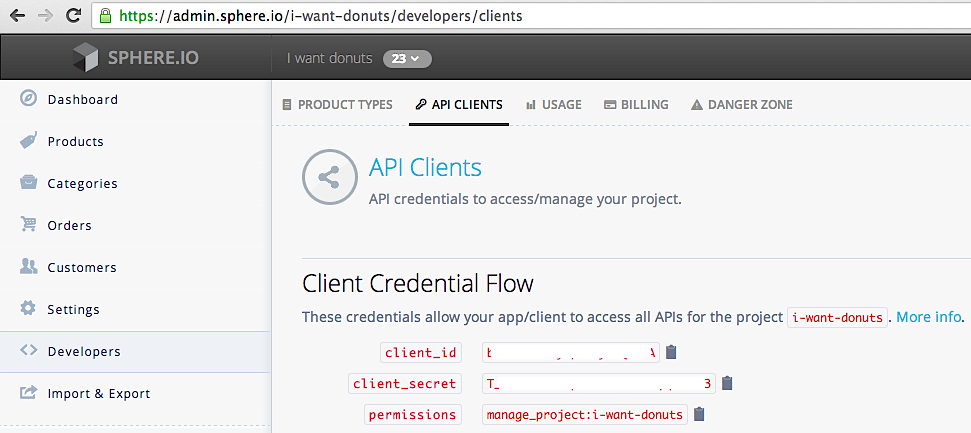
- To use your SPHERE.IO project, modify `sphere.project`, `sphere.clientId` and `sphere.clientSecret` in `conf/application.conf`.
More about the ecommerce PaaS SPHERE.IO at [http://sphere.io](http://sphere.io).
#### Pactas keys
- [Login to the Pactas sandbox](https://sandbox.pactas.com) or [create a new Pactas sandbox account](https://sandbox.pactas.com/#/signup).
- Go to `Settings -> Pactas Apps -> My Apps` and create a new OAuth client. Make sure to select "Confidential" for the client type.

- Copy the newly created client id and secret to `pactas.clientId` and `pactas.clientSecret` in `conf/application.conf`.
More about recurring billing with Pactas at http://www.pactas.com.
#### PAYMILL keys
- [Register at PAYMILL](https://app.paymill.com/en-gb/auth/register) to get the (test) API keys.
- Go to `PAYMILL Dashboard -> Development -> API keys` to retrieve your keys.
- In your Pactas backend, head to `Settings -> Payment Settings -> Payment Providers` and edit the Paymill settings. Enter your public and private PAYMILL keys and hit 'Save'.
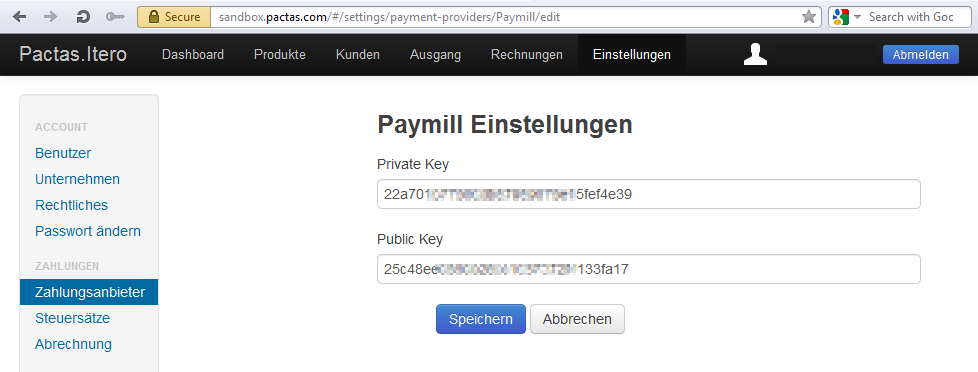
More information about doing payments with PAYMILL at http://www.paymill.com.
### Deploy it
#### heroku
To run this SPHERE.IO example web shop on [heroku](https://www.heroku.com) just click the button:

### Develop it
- Install your favourite IDE (preferably IntelliJ, Eclipse or Netbeans).
- Import the project into your chosen IDE, following [these instructions](http://www.playframework.com/documentation/2.4.x/IDE).
- Run `sbt clean test` command in root project directory for compiling and testing it.
> This app is a [Play Framework](http://www.playframework.com/documentation/2.4.x/Home) app and uses the [SPHERE JVM SDK](https://github.com/commercetools/commercetools-jvm-sdk).
Have fun!