https://github.com/commonloon102/regexfilesearcher
Cross-platform regex file searching tool in .NET 5
https://github.com/commonloon102/regexfilesearcher
cross-platform-gui dotnet eto file-search linux net5 regex regexes regular-expressions
Last synced: 6 months ago
JSON representation
Cross-platform regex file searching tool in .NET 5
- Host: GitHub
- URL: https://github.com/commonloon102/regexfilesearcher
- Owner: CommonLoon102
- License: gpl-3.0
- Created: 2020-03-01T22:46:13.000Z (over 6 years ago)
- Default Branch: master
- Last Pushed: 2024-09-03T21:04:31.000Z (almost 2 years ago)
- Last Synced: 2025-05-19T10:19:32.132Z (about 1 year ago)
- Topics: cross-platform-gui, dotnet, eto, file-search, linux, net5, regex, regexes, regular-expressions
- Language: C#
- Homepage:
- Size: 497 KB
- Stars: 19
- Watchers: 1
- Forks: 6
- Open Issues: 2
-
Metadata Files:
- Readme: README.md
- License: LICENSE
Awesome Lists containing this project
README
RegexFileSearcher
=================
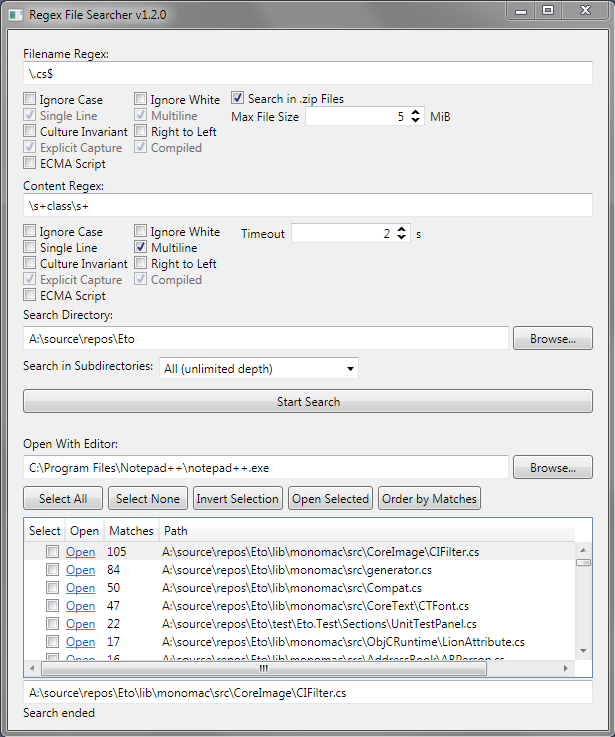
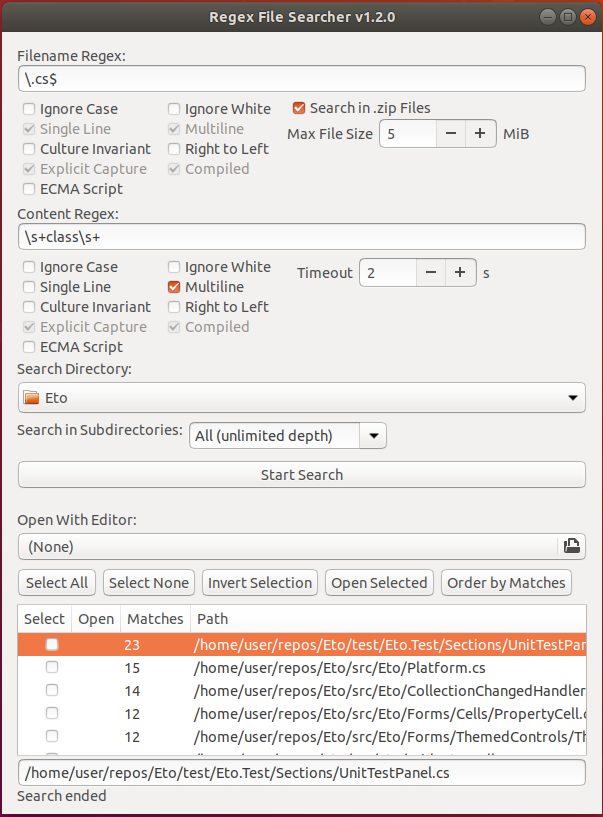
Cross-platform regex file searching tool in .NET 5.
**Protip**: use the [RegexTestBench](https://github.com/CommonLoon102/RegexTestBench) to test your regexes before using them in this tool.
Running
-------
### Windows
- Start the app with `RegexFileSearcher.Wpf.exe`
### Linux
- Start the app from the terminal with `./RegexFileSearcher.Gtk`
### Mac
- Complete compiling steps below, which will create the file `RegexFileSearcher/RegexFileSearcher.Mac/bin/Release/net5.0/osx-x64/osx-x64/RegexFileSearcher.Mac.app`
- Start the app from the terminal with `open RegexFileSearcher/RegexFileSearcher.Mac/bin/Release/net5.0/osx-x64/osx-x64/RegexFileSearcher.Mac.app`
- Start the app from Finder by double-clicking `RegexFileSearch.Mac` (the `.app` file extension will be hidden by default)
Compiling
---------
### Windows
- Download and open the repo in Visual Studio 2019
- Publish `RegexFileSearcher.Wpf`
### Linux
- Install the .NET 5 SDK
- You need to have GTK3 installed too
- Git clone
- Publish with `dotnet publish RegexFileSearcher/RegexFileSearcher.Gtk/RegexFileSearcher.Gtk.csproj --configuration Release --output publish --self-contained true -p:PublishSingleFile=true --runtime linux-x64 --framework net5.0`
### Mac
- Install Visual Studio 2019 for Mac
- Git clone
- Publish with `dotnet publish RegexFileSearcher/RegexFileSearcher.Mac/RegexFileSearcher.Mac.csproj --configuration Release --output publish --self-contained true -p:PublishSingleFile=true --runtime osx-x64 --framework net5.0`
Debugging
---------
### Windows
- With `Visual Studio 2019 Community`
- Set `RegexFileSearcher.Wpf` as startup project
- Or with `Visual Studio Code`
### Linux
- With `Visual Studio Code`
`launch.json`:
```json
{
// Use IntelliSense to learn about possible attributes.
// Hover to view descriptions of existing attributes.
// For more information, visit: https://go.microsoft.com/fwlink/?linkid=830387
"version": "0.2.0",
"configurations": [
{
"name": "Debug on Linux",
"type": "coreclr",
"request": "launch",
"preLaunchTask": "build",
"program": "dotnet",
"args": ["${workspaceFolder}/RegexFileSearcher/RegexFileSearcher.Gtk/bin/Debug/net5.0/RegexFileSearcher.Gtk.dll"],
"cwd": "${workspaceFolder}",
"stopAtEntry": false,
"console": "internalConsole"
}]
}
```
`tasks.json`
```json
{
"version": "2.0.0",
"tasks": [
{
"label": "build",
"command": "dotnet",
"type": "process",
"args": [
"build",
"${workspaceFolder}/RegexFileSearcher/RegexFileSearcher.Gtk/RegexFileSearcher.Gtk.csproj",
"/property:GenerateFullPaths=true",
"/consoleloggerparameters:NoSummary"
],
"problemMatcher": "$msCompile"
},
{
"label": "publish",
"command": "dotnet",
"type": "process",
"args": [
"publish",
"${workspaceFolder}/RegexFileSearcher/RegexFileSearcher.Gtk/RegexFileSearcher.Gtk.csproj",
"/property:GenerateFullPaths=true",
"/consoleloggerparameters:NoSummary"
],
"problemMatcher": "$msCompile"
},
{
"label": "watch",
"command": "dotnet",
"type": "process",
"args": [
"watch",
"run",
"${workspaceFolder}/RegexFileSearcher/RegexFileSearcher.Gtk/RegexFileSearcher.Gtk.csproj",
"/property:GenerateFullPaths=true",
"/consoleloggerparameters:NoSummary"
],
"problemMatcher": "$msCompile"
}
]
}
```
### Mac
- With `Visual Studio 2019 for Mac`, I guess