https://github.com/compulim/vscode-closetag
Quickly close last opened HTML/XML tag in Visual Studio Code
https://github.com/compulim/vscode-closetag
Last synced: over 1 year ago
JSON representation
Quickly close last opened HTML/XML tag in Visual Studio Code
- Host: GitHub
- URL: https://github.com/compulim/vscode-closetag
- Owner: compulim
- Created: 2016-02-06T16:20:01.000Z (over 10 years ago)
- Default Branch: master
- Last Pushed: 2018-06-10T05:46:35.000Z (about 8 years ago)
- Last Synced: 2025-03-24T16:02:57.684Z (over 1 year ago)
- Language: JavaScript
- Size: 253 KB
- Stars: 14
- Watchers: 3
- Forks: 5
- Open Issues: 13
-
Metadata Files:
- Readme: README.md
- Changelog: CHANGELOG.md
Awesome Lists containing this project
README
# Close tag keyboard shortcut
[](https://marketplace.visualstudio.com/items?itemName=Compulim.compulim-vscode-closetag) [](https://travis-ci.org/compulim/vscode-closetag)
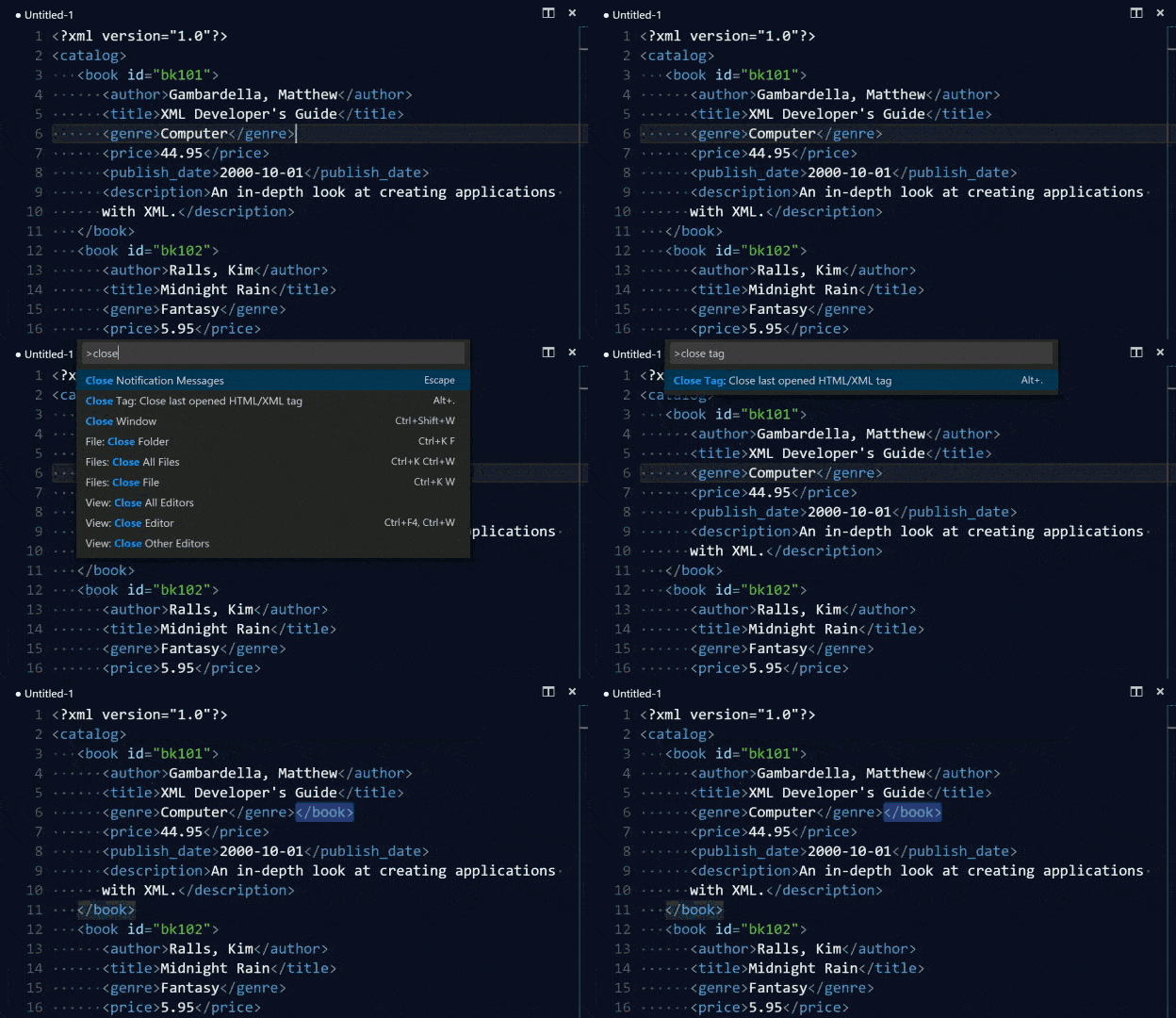
Closes last opened HTML or XML tag with `Alt+.`
## Usage
By default, close tag is bound to `Alt+.`. You can still run it thru Command Palette.
* Bring up Command Palette (`F1`, or `Ctrl+Shift+P` on Windows and Linux, or `Shift+CMD+P` on OSX)
* Type or select "Close Tag: Close last opened HTML/XML tag"
To close tags without moving cursors or selections, press `Alt+Shift+.` or `closeTag.closeHTMLTagInPlace` command.
You can also modify keyboard shortcut with JSON below.
```
{
"key": "alt+.",
"command": "closeTag.closeHTMLTag",
"when": "editorTextFocus"
},
{
"key": "alt+shift+.",
"command": "closeTag.closeHTMLTagInPlace",
"when": "editorTextFocus"
}
```
## Change log
You can look at the change log [here](CHANGELOG.md).
## Contributions
Love this extension? [Star](https://github.com/compulim/vscode-closetag/stargazers) us!
Want to make this extension even more awesome? [Send us your wish](https://github.com/compulim/vscode-closetag/issues/new/).
Hate how it is working? [File an issue](https://github.com/compulim/vscode-closetag/issues/new/) to us.