https://github.com/compvis/adaptive-style-transfer
source code for the ECCV18 paper A Style-Aware Content Loss for Real-time HD Style Transfer
https://github.com/compvis/adaptive-style-transfer
Last synced: over 1 year ago
JSON representation
source code for the ECCV18 paper A Style-Aware Content Loss for Real-time HD Style Transfer
- Host: GitHub
- URL: https://github.com/compvis/adaptive-style-transfer
- Owner: CompVis
- License: gpl-3.0
- Created: 2018-07-26T01:59:16.000Z (about 8 years ago)
- Default Branch: master
- Last Pushed: 2021-01-11T12:05:30.000Z (over 5 years ago)
- Last Synced: 2025-03-28T20:07:55.827Z (over 1 year ago)
- Language: Python
- Homepage: https://compvis.github.io/adaptive-style-transfer/
- Size: 177 MB
- Stars: 737
- Watchers: 39
- Forks: 140
- Open Issues: 20
-
Metadata Files:
- Readme: README.md
- License: LICENSE
Awesome Lists containing this project
README
# A Style-Aware Content Loss for Real-time HD Style Transfer
***Artsiom Sanakoyeu\*, Dmytro Kotovenko\*, Sabine Lang, Björn Ommer*, In ECCV 2018 (Oral)**
**Website**: https://compvis.github.io/adaptive-style-transfer
**Paper**: https://arxiv.org/abs/1807.10201
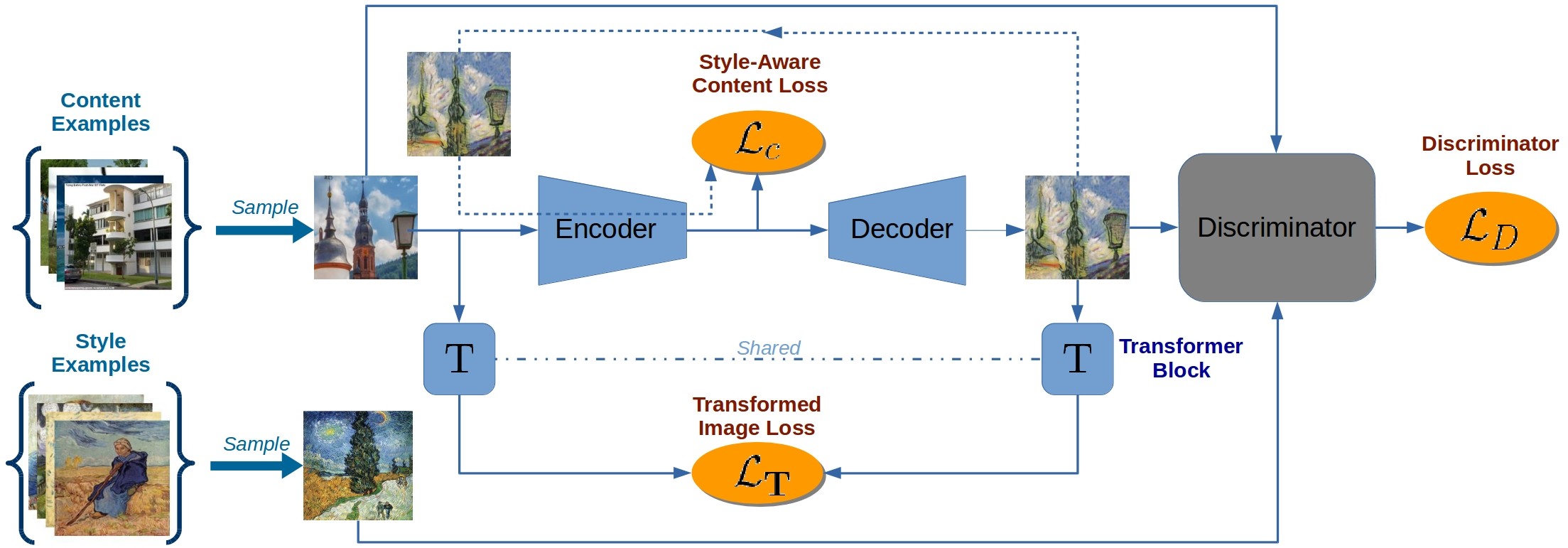
[](https://compvis.github.io/adaptive-style-transfer/images/adaptive-style-transfer_chart.jpg)
Please click on the image for a [high-res version](https://compvis.github.io/adaptive-style-transfer/images/adaptive-style-transfer_chart.jpg).
## Requirements
- python 2.7
- tensorflow 1.2.
- PIL, numpy, scipy
- tqdm
*Also tested in `python3.6 + tensorflow 1.12.0`*
## Inference
#### Simplest van Gogh example
To launch the inference on van Gogh style:
1. Download the pretrained model [model_van-gogh_ckpt.tar.gz](https://drive.google.com/file/d/1JDLRlCsiEt4wrV1eGUkeq_j89WasilvR/view?usp=sharing)
2. Download sample [photographs](https://drive.google.com/file/d/1BqTzKKCCJ3W778hPddiv8_4WyELChzxo/view?usp=sharing).
3. Extract the model to `./models/` folder and sample photographs to `./data/` folder.
4. Run the following command:
```
CUDA_VISIBLE_DEVICES=0 python main.py \
--model_name=model_van-gogh \
--phase=inference \
--image_size=1280
```
Stylized photographs are stored in the folder `./models/model_van-gogh/inference_ckpt300000_sz1280/`
#### Additional settings
- `--ii_dir INPUT_DIR` - path to the folder containing target content images.
You can specify multiple folders separated with commas (don't use spaces!).
- `--image_size SIZE` - resolution of the images to generate.
- `--save_dir SAVE_DIR` - path to the output dir where the generated images will be saved.
- `--model_name NAME` - the name of the model (all model should as subfolders in `./models/`).
Usage example (inference):
```
CUDA_VISIBLE_DEVICES=0 python main.py \
--model_name=model_van-gogh \
--phase=inference \
--image_size=1280 \
--ii_dir ../my_photographs1/,../my_photographs2/ \
--save_dir=../save_processed_images_here/
```
If your GPU memory is not large enough, set the variable `CUDA_VISIBLE_DEVICES=""` to use CPU.
### Pretrained models
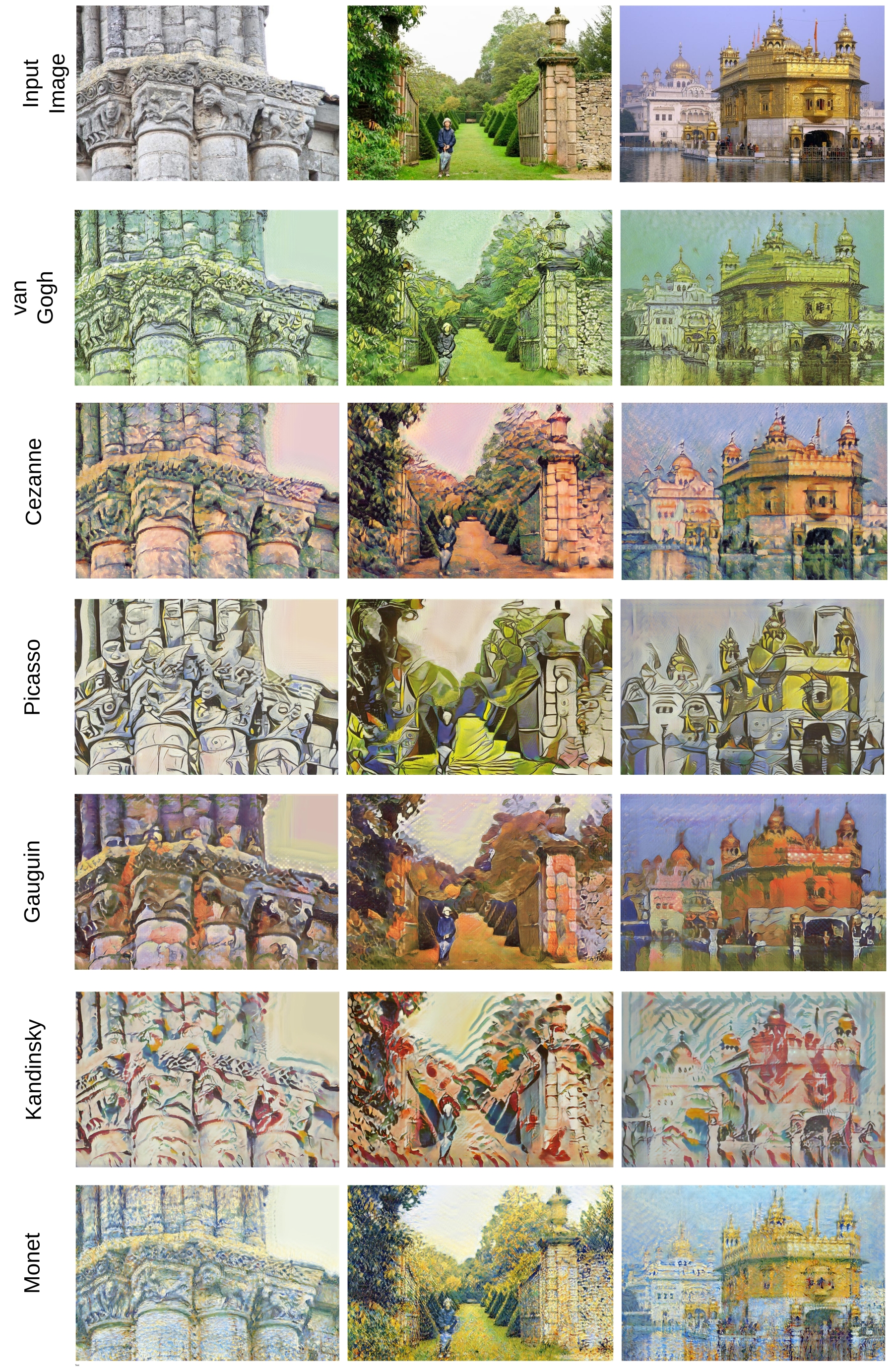
We provide pretrained models for the following artists:
Paul Cezanne,
El-Greco,
Paul Gauguin,
Wassily Kandinsky (_Василий Кандинский_),
Ernst Ludwig Kirchner,
Claude Monet,
Berthe Morisot,
Edvard Munch,
Samuel Peploe,
Pablo Picasso,
Jackson Pollock,
Nicholal Roerich (_Николай Рерих_),
Vincent van Gogh.
**Download pretrained models:** [link](https://drive.google.com/drive/folders/1SrWcmpZXXZ2gh821a0MUApNKO8Rm69ku?usp=sharing).
Extract models to the folder `./models/`.
## Training
Content images used for training: [Places365-Standard high-res train mages (105GB)](http://data.csail.mit.edu/places/places365/train_large_places365standard.tar).
Style images used for training the aforementioned models: [download link](https://
cloud.iwr.uni-heidelberg.de/index.php/s/NcJj2oLBTYuT1tf).
Query style examples used to collect style images: [query_style_images.tar.gz](https://yadi.sk/d/5sormJouqyuI4A).
- For example, Vincent van Gogh style: [vincent-van-gogh_road-with-cypresses-1890.tar.gz](https://drive.google.com/file/d/1Ld-Xwx7qZpB1MHuLgnx8SD13gDdmZqnD/view?usp=sharing).
This is the dataset representing a particular artistic period of Vincent van Gogh and was automatically collected using "Road with Cypress and Star, 1890" painting as query.
1. Download and extract style archives in folder `./data`.
2. Download and extract content images.
3. Launch the training process (for example, on van Gogh):
```
CUDA_VISIBLE_DEVICES=1 python main.py \
--model_name=model_van-gogh_new \
--batch_size=1 \
--phase=train \
--image_size=768 \
--lr=0.0002 \
--dsr=0.8 \
--ptcd=/path/to/Places2/data_large \
--ptad=./data/vincent-van-gogh_road-with-cypresses-1890
```
## Evaluation
How to calculate **Deception Score** and where to download artist classification model is described in [evaluation](evaluation).
## Video stylization
To stylize a video you can use the following script:
```
# split video on a set of frames
ffmpeg -i myvideo.mp4 -r 25 -f image2 image-%04d.png
CUDA_VISIBLE_DEVICES=0 python main.py \
--model_name=model_van-gogh \
--phase=inference \
--image_size=1280 \
--ii_dir=input \
--save_dir=output
# reassemble the video back from frames:
ffmpeg -i image-%04d_stylized.jpg kktie-out.mp4
```
## Reference
If you use this code or data, please cite the paper:
```
@inproceedings{sanakoyeu2018styleaware,
title={A Style-Aware Content Loss for Real-time HD Style Transfer},
author={Sanakoyeu, Artsiom and Kotovenko, Dmytro and Lang, Sabine and Ommer, Bj{\"o}rn},
booktitle={Proceedings of the European Conference on Computer Vision (ECCV)},
pages={698--714},
month = 10,
year={2018}
}
```
### Copyright
```
Adaptive Style Transfer
Copyright (C) 2018 Artsiom Sanakoyeu, Dmytro Kotovenko
Adaptive Style Transfer is free software: you can redistribute it and/or modify
it under the terms of the GNU General Public License as published by
the Free Software Foundation, either version 3 of the License, or
(at your option) any later version.
This program is distributed in the hope that it will be useful,
but WITHOUT ANY WARRANTY; without even the implied warranty of
MERCHANTABILITY or FITNESS FOR A PARTICULAR PURPOSE. See the
GNU General Public License for more details.
You should have received a copy of the GNU General Public License
along with this program. If not, see .
```