https://github.com/concrete18/spell-slot-tracker
Tabletop Spell Slot Tracker for Spontaneous Casters
https://github.com/concrete18/spell-slot-tracker
caster dnd interface magic pathfinder spontaneous
Last synced: 6 months ago
JSON representation
Tabletop Spell Slot Tracker for Spontaneous Casters
- Host: GitHub
- URL: https://github.com/concrete18/spell-slot-tracker
- Owner: Concrete18
- Created: 2020-02-28T03:33:33.000Z (over 6 years ago)
- Default Branch: master
- Last Pushed: 2021-06-30T17:24:16.000Z (about 5 years ago)
- Last Synced: 2023-10-09T06:26:34.658Z (almost 3 years ago)
- Topics: caster, dnd, interface, magic, pathfinder, spontaneous
- Language: Python
- Homepage:
- Size: 104 KB
- Stars: 1
- Watchers: 1
- Forks: 1
- Open Issues: 0
-
Metadata Files:
- Readme: README.md
Awesome Lists containing this project
README
# Spell Slot Tracker
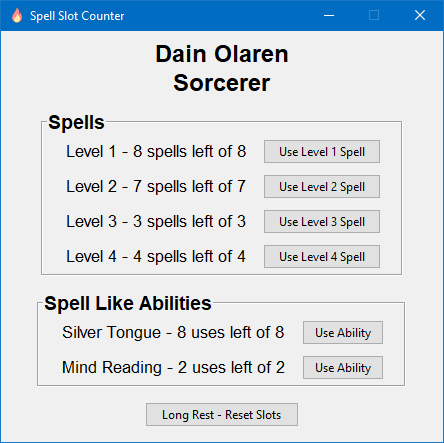
My Pathfinder Spell Slot Tracker for Spontaneous Casters.
## Why
I created this to learn Tkinter and json reading and writing.
I also use for my pathfinder Roll20 games as well. It saves to the .json after every button press.
## Features
* Full Spell Slot Tracking from all levels known.
* Save Selector that will auto choose the single save if no others are there.
## Save Method
This saves per action to a .json which stores info such as character name, spells per day, spells left for the day and highest spell known. All that info is used to properly display all information in an interactable way.
## How to use it
Install Python3 (I used Version 3.8)
Make sure all the files are in the same main folder otherwise it will not work. That includes the .ico, .json and .pyw files.
Next fill out the .json with your character information to its current state in order to make the interface set perfectly for you.
These are located in Saves folder. You can have multiple characters in that folder. A Save picker opens first that allows you to pick which you load.
The following json example had level 3 through 9 removed so it is not too long.
```json
{
"settings": {
"character_name": "Leonah Ventris",
"character_class": "Unchained Summoner",
"spell_level_range": 2,
"folder": "D:/Google Drive/Games/Pathfinder/Pathfinder - Second Sunday"
},
"spells": {
"level_1": {
"spells_per_day": 8,
"spells_left": 8
},
"level_2": {
"spells_per_day": 7,
"spells_left": 7
}
}
},
"spell_like": {
"Silver Tongue": {
"per_day": 8,
"uses_left": 8
},
"Mind Reading": {
"per_day": 2,
"uses_left": 2
}
}
}
```
Once the .json is filled out, proceed to click the Use Spell buttons for the spell level you just used and click the Rest - Reset when you want everything to reset to your configured Spells per day per spell level as if after a rest.
### Thanks
[rellissc](https://github.com/rellissc) helped with some of the methods used.