https://github.com/configcat/dart-sdk
ConfigCat SDK for Dart (Flutter). ConfigCat is a hosted feature flag service: https://configcat.com. Manage feature toggles across frontend, backend, mobile, desktop apps. Alternative to LaunchDarkly. Management app + feature flag SDKs.
https://github.com/configcat/dart-sdk
configcat configcat-sdk dart feature-flag feature-flagging feature-flags feature-toggle feature-toggles flutter
Last synced: over 1 year ago
JSON representation
ConfigCat SDK for Dart (Flutter). ConfigCat is a hosted feature flag service: https://configcat.com. Manage feature toggles across frontend, backend, mobile, desktop apps. Alternative to LaunchDarkly. Management app + feature flag SDKs.
- Host: GitHub
- URL: https://github.com/configcat/dart-sdk
- Owner: configcat
- License: mit
- Created: 2021-07-16T07:51:17.000Z (about 5 years ago)
- Default Branch: main
- Last Pushed: 2024-11-18T15:33:38.000Z (over 1 year ago)
- Last Synced: 2025-04-13T12:28:33.268Z (over 1 year ago)
- Topics: configcat, configcat-sdk, dart, feature-flag, feature-flagging, feature-flags, feature-toggle, feature-toggles, flutter
- Language: Dart
- Homepage: https://configcat.com/docs/sdk-reference/dart
- Size: 354 KB
- Stars: 14
- Watchers: 6
- Forks: 5
- Open Issues: 0
-
Metadata Files:
- Readme: README.md
- Changelog: CHANGELOG.md
- Contributing: CONTRIBUTING.md
- License: LICENSE
- Codeowners: .github/CODEOWNERS
Awesome Lists containing this project
README
# ConfigCat SDK for Dart (Flutter)
[](https://pub.dev/packages/configcat_client)
[](https://github.com/configcat/dart-sdk/actions/workflows/dart-ci.yml)
ConfigCat SDK for Dart provides easy integration for your application to [ConfigCat](https://configcat.com).
## Getting started
### 1. Install the ConfigCat SDK
With Dart:
```bash
dart pub add configcat_client
```
With Flutter:
```bash
flutter pub add configcat_client
```
Or put the following directly to your `pubspec.yml` and run `dart pub get` or `flutter pub get`.
```yaml
dependencies:
configcat_client: ^4.0.0
```
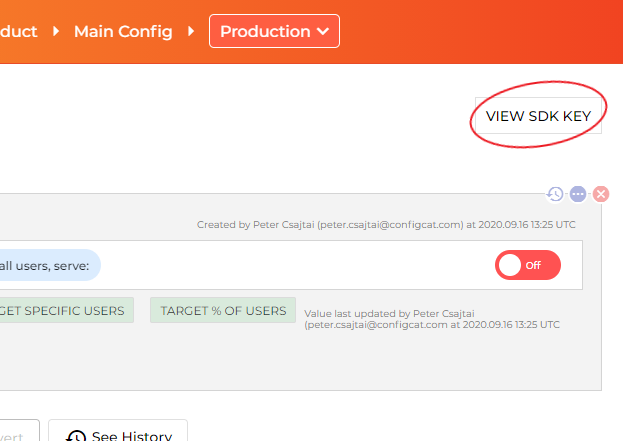
### 2. Go to the ConfigCat Dashboard to get your *SDK Key*:
### 3. Import the *configcat_client* package in your application code
```dart
import 'package:configcat_client/configcat_client.dart';
```
### 4. Create a *ConfigCat* client instance
```dart
final client = ConfigCatClient.get(sdkKey: '#YOUR-SDK-KEY#');
```
### 5. (Optional) Set up Flutter caching
If you're using the SDK in a Flutter application, we recommend to use our [Flutter Preferences Cache](https://github.com/configcat/flutter-preferences-cache) for caching. It's based on the [shared_preferences](https://pub.dev/packages/shared_preferences) package.
```dart
final client = ConfigCatClient.get(
sdkKey: '#YOUR-SDK-KEY#',
options: ConfigCatOptions(cache: ConfigCatPreferencesCache()));
```
### 6. Get your setting value
```dart
final isMyAwesomeFeatureEnabled = await client.getValue(key: 'isMyAwesomeFeatureEnabled', defaultValue: false);
if (isMyAwesomeFeatureEnabled) {
doTheNewThing();
} else {
doTheOldThing();
}
```
### 7. Close the client on application exit
```dart
client.close();
```
## Getting user-specific setting values with Targeting
Using this feature, you will be able to get different setting values for different users in your application by passing a `User Object` to the `getValue()` function.
Read more about Targeting [here](https://configcat.com/docs/advanced/targeting/).
## User Object
Percentage and targeted rollouts are calculated by the user object passed to the configuration requests.
The user object must be created with a **mandatory** identifier parameter which uniquely identifies each user:
```dart
final user = ConfigCatUser(identifier: '#USER-IDENTIFIER#');
final isMyAwesomeFeatureEnabled = await client.getValue(key: 'isMyAwesomeFeatureEnabled', defaultValue: false, user: user);
if (isMyAwesomeFeatureEnabled) {
doTheNewThing();
} else {
doTheOldThing();
}
```
## Sample/Demo app
* [Sample Console app](https://github.com/ConfigCat/dart-sdk/tree/main/example/lib)
* [Sample Flutter app](https://github.com/ConfigCat/dart-sdk/tree/main/example/flutter)
## Polling Modes
The ConfigCat SDK supports three different polling mechanisms to acquire the setting values from ConfigCat. After the latest setting values are downloaded, they are stored in an internal cache . After that, all requests are served from the cache. Read more about Polling Modes and how to use them at [ConfigCat Dart Docs](https://configcat.com/docs/sdk-reference/dart/).
## Support
If you need help using this SDK, feel free to contact the ConfigCat Staff at [https://configcat.com](https://configcat.com). We're happy to help.
## Contributing
Contributions are welcome. For more info please read the [Contribution Guideline](CONTRIBUTING.md).
## Contributors
Special thanks to [@augustorsouza](https://github.com/augustorsouza), [@miguelspe](https://github.com/miguelspe), and [@mugbug](https://github.com/mugbug) from [@quintoandar](https://github.com/quintoandar) who made available the initial project.
## About ConfigCat
ConfigCat is a feature flag and configuration management service that lets you separate feature releases from code deployments. You can turn features ON/OFF using the ConfigCat Dashboard even after they are deployed. ConfigCat lets you target specific groups of users based on region, email, or any other custom user attribute.
ConfigCat is a hosted feature flag service that lets you manage feature toggles across frontend, backend, mobile, and desktop apps. Alternative to LaunchDarkly. Management app + feature flag SDKs.
- [Official ConfigCat SDKs for other platforms](https://github.com/configcat)
- [Documentation](https://configcat.com/docs)
- [Blog](https://configcat.com/blog)