https://github.com/configcat/scan-repository
ConfigCat's repository scanner GitHub Action. ConfigCat is a hosted feature flag service: https://configcat.com. Manage feature toggles across frontend, backend, mobile, desktop apps. Alternative to LaunchDarkly. Management app + feature flag SDKs.
https://github.com/configcat/scan-repository
code-analysis configcat feature-flag feature-toggle
Last synced: over 1 year ago
JSON representation
ConfigCat's repository scanner GitHub Action. ConfigCat is a hosted feature flag service: https://configcat.com. Manage feature toggles across frontend, backend, mobile, desktop apps. Alternative to LaunchDarkly. Management app + feature flag SDKs.
- Host: GitHub
- URL: https://github.com/configcat/scan-repository
- Owner: configcat
- Created: 2021-10-20T16:17:58.000Z (over 4 years ago)
- Default Branch: main
- Last Pushed: 2024-07-26T10:59:17.000Z (almost 2 years ago)
- Last Synced: 2024-09-26T16:45:17.639Z (almost 2 years ago)
- Topics: code-analysis, configcat, feature-flag, feature-toggle
- Language: Shell
- Homepage: https://configcat.com
- Size: 107 KB
- Stars: 4
- Watchers: 5
- Forks: 2
- Open Issues: 0
-
Metadata Files:
- Readme: README.md
- Codeowners: .github/CODEOWNERS
Awesome Lists containing this project
README
# ConfigCat Scan Repository & Feature Flag Sync Action
This [GitHub Action](https://github.com/features/actions) helps you get rid of technical debt by scanning the source code and highlighting the feature flag usages for each feature flag on the [ConfigCat Dashboard](https://app.configcat.com).
For more information about repository scanning, see our [documentation](https://configcat.com/docs/advanced/code-references/overview).
[ConfigCat](https://configcat.com) is a hosted service for feature flag and configuration management. It enables you to decouple feature releases from code deployments.
## Setup
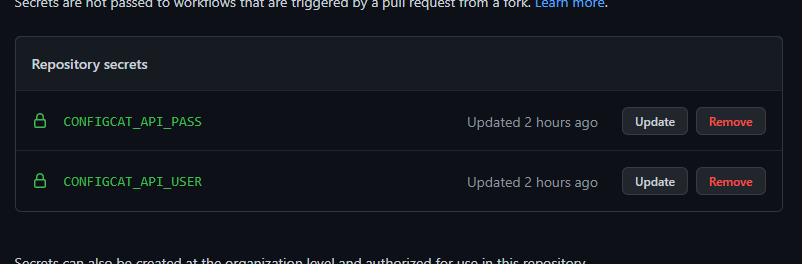
1. Create a new [ConfigCat Management API credential](https://app.configcat.com/my-account/public-api-credentials) and store its values in [GitHub Secrets](https://docs.github.com/en/actions/security-guides/encrypted-secrets#creating-encrypted-secrets-for-a-repository) with the following names: `CONFIGCAT_API_USER`, `CONFIGCAT_API_PASS`.
2. [Get the ID of your ConfigCat Config](https://configcat.com/docs/advanced/code-references/overview#config-id) that you want to associate with your repository. The scanner will use this ID to determine which feature flags & settings to search for in your source code.
3. Create a new Actions workflow in your GitHub repository under the `.github/workflows` folder, and put the following snippet into it.
Don't forget to replace the `PASTE-YOUR-CONFIG-ID-HERE` value with your actual Config ID.
```yaml
on: [push]
name: Code references
jobs:
scan-repo:
runs-on: ubuntu-latest
name: Scan repository for code references
steps:
- name: Checkout
uses: actions/checkout@v4
- name: Scan & upload
uses: configcat/scan-repository@v2
with:
api-user: ${{ secrets.CONFIGCAT_API_USER }}
api-pass: ${{ secrets.CONFIGCAT_API_PASS }}
config-id: PASTE-YOUR-CONFIG-ID-HERE
# line-count: 5 # optional
# sub-folder: src # optional
# exclude-keys: > # optional
# flag_key_to_exclue_1
# flag_key_to_exclue_2
# alias-patterns: (\w+) = :CC_KEY,const (\w+) = feature_flags\.enabled\(:CC_KEY\) # optional, comma delimited alias patterns
# usage-patterns: feature_flags\.enabled\(:CC_KEY\) # optional, comma delimited flag key usage patterns
# verbose: true # optional
```
4. Commit & push your action.
The above example configures a workflow that executes the scan and code references upload on every git `push` event.
Scan reports are uploaded for each branch of your repository that triggers the workflow.
## Available Options
| Parameter | Description | Required | Default |
| ---------------- | -------------------------------------------------------------------------- | ---------- | ------------------- |
| `api-host` | ConfigCat Management API host. | ☑ | `api.configcat.com` |
| `api-user` | [ConfigCat Management API basic authentication username](https://app.configcat.com/my-account/public-api-credentials). | ☑ | |
| `api-pass` | [ConfigCat Management API basic authentication password](https://app.configcat.com/my-account/public-api-credentials). | ☑ | |
| `config-id` | ID of the ConfigCat config to scan against. | ☑ | |
| `line-count` | Context line count before and after the reference line. (min: 1, max: 10) | | 4 |
| `sub-folder` | Sub-folder to scan, relative to the repository root folder. | | |
| `exclude-keys` | List of feature flag keys that must be excluded from the scan report. | | |
| `alias-patterns` | Comma delimited list of custom regex patterns used to search for additional aliases. | | |
| `usage-patterns` | Comma delimited list of custom regex patterns that describe additional feature flag key usages. | | |
| `verbose` | Turns on detailed logging. | | false |