https://github.com/connffuused/unitycommandline
simple plugin to enhance command line arguments in both UnityEditor and Windows Standalone.
https://github.com/connffuused/unitycommandline
commandline editor tool unity unity3d
Last synced: about 1 month ago
JSON representation
simple plugin to enhance command line arguments in both UnityEditor and Windows Standalone.
- Host: GitHub
- URL: https://github.com/connffuused/unitycommandline
- Owner: connffuused
- Created: 2021-10-01T06:01:51.000Z (over 4 years ago)
- Default Branch: main
- Last Pushed: 2021-10-02T01:41:05.000Z (over 4 years ago)
- Last Synced: 2025-07-20T20:51:37.827Z (11 months ago)
- Topics: commandline, editor, tool, unity, unity3d
- Language: C#
- Homepage:
- Size: 14.6 KB
- Stars: 1
- Watchers: 1
- Forks: 0
- Open Issues: 0
-
Metadata Files:
- Readme: README.md
Awesome Lists containing this project
README
# Unity CommandLine
## Install
[](https://npmjs.org/package/com.calci.commandline)
- scope : `com.calci`
- package name : `com.calci.commandline`
## Editor
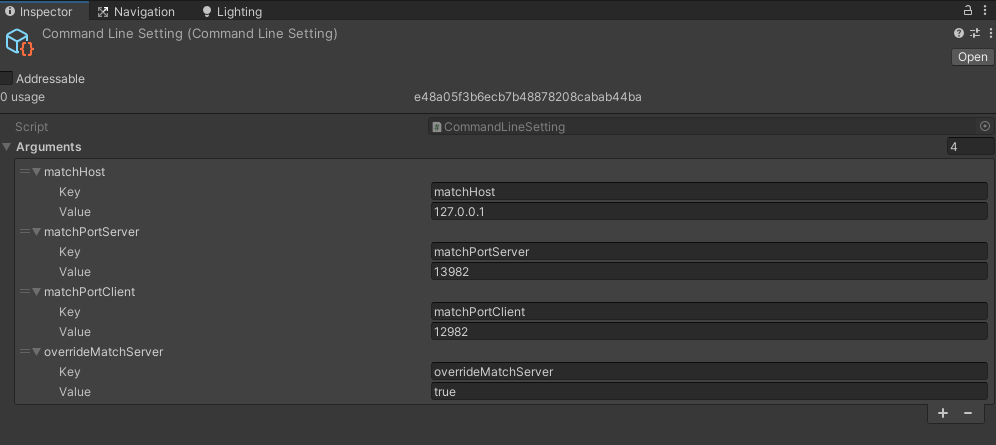
the setting for editor is stored at `Assets/Editor Default Resources/CommandLine Setting.asset`.
also, you can modify the setting in `Project Settings/Command Line`.
this should not be included in standalone build.
## Standalone
`Uber\AutoChessFramework.exe --server=true --address=127.0.0.1 --port=29401 --serverPort=29320 --matchHost=127.0.0.1 --matchPortServer=13982 --matchPortClient=12982 --overrideMatchServer=true --width=1600 --height=900 --fullScreen=false`
## Code
```csharp
///
/// Parse overriding commandlines.
///
private IEnumerator ParseArgument()
{
if (CommandLineParser.GetBool("overrideMatchServer"))
{
matchmakingServerHost = CommandLineParser.GetString("matchHost", "127.0.0.1");
matchmakingServerPort = CommandLineParser.GetInt("matchPortServer");
matchmakingServerParsed = true;
}
else
{
// Download from CDN
yield return Registry.Get();
matchmakingServerHost = Registry.Host;
matchmakingServerPort = Registry.Port + 1000;
ServerLog.Verbose(L("MM Host : ") + matchmakingServerHost);
ServerLog.Verbose(L("MM Port : ") + matchmakingServerPort);
}
}
```
## API
API will return default values when there is no valid key.
You can specify default value for the situation.
- `CommandLineParser.HasKey`
- `CommandLineParser.GetBool`
- `CommandLineParser.GetString`
- `CommandLineParser.GetInt`
- `CommandLineParser.GetFloat`