https://github.com/connorslade/easyminecraftdeploy
🕹 Easy way to start a Minecraft server!
https://github.com/connorslade/easyminecraftdeploy
cmake console console-application cplusplus cpp easy-to-use minecraft minecraft-server sigma76
Last synced: 9 months ago
JSON representation
🕹 Easy way to start a Minecraft server!
- Host: GitHub
- URL: https://github.com/connorslade/easyminecraftdeploy
- Owner: connorslade
- License: gpl-3.0
- Created: 2021-03-12T14:34:46.000Z (over 5 years ago)
- Default Branch: main
- Last Pushed: 2021-04-05T15:45:09.000Z (about 5 years ago)
- Last Synced: 2025-04-05T05:45:20.215Z (about 1 year ago)
- Topics: cmake, console, console-application, cplusplus, cpp, easy-to-use, minecraft, minecraft-server, sigma76
- Language: C++
- Homepage:
- Size: 267 KB
- Stars: 1
- Watchers: 1
- Forks: 0
- Open Issues: 0
-
Metadata Files:
- Readme: README.md
- License: LICENSE
Awesome Lists containing this project
README
[](https://github.com/Basicprogrammer10/EasyMinecraftDeploy/releases/tag/0.2.0)
[](https://www.youtube.com/watch?v=QkDG95H77I4)

[](#usage)

EasyMinecraftDeploy
The easy way to make your own Minecraft Server!
Report Bug
·
Youtube Video
·
Request Feature
Table of Contents
## About The Project
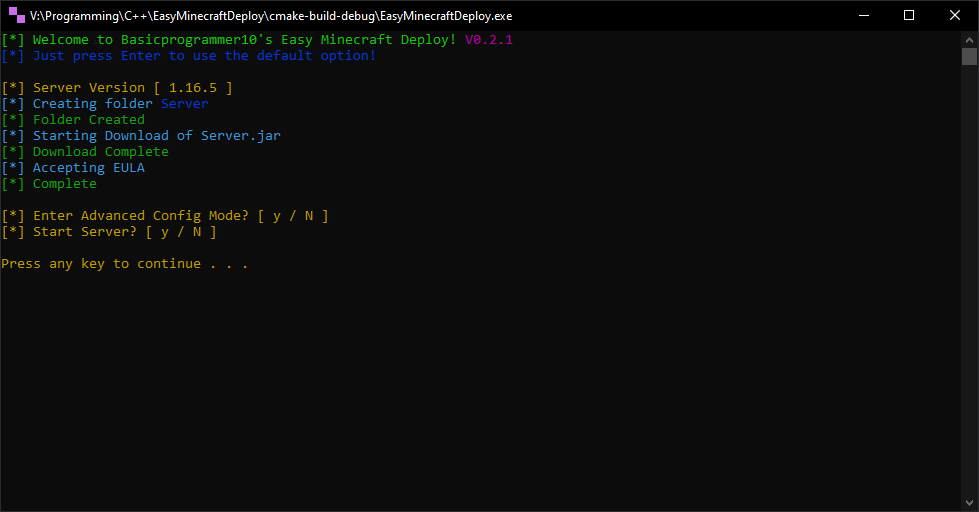
The UI ⬆
### Built With
* [C++](https://isocpp.org/)
* [CMake](https://cmake.org/)
## Getting Started
To get a local copy up and running follow these simple steps.
### Prerequisites
* [CMake](https://cmake.org/)
### Installation
1. Git Clone the Repo (`git clone https://github.com/Basicprogrammer10/EasyMinecraftDeploy.git`)
2. Go into the folder (`cd EasyMinecraftDeploy`)
3. Build! `cmake --build`
## Contributing
Contributions are what make the open source community such an amazing place to be learn, inspire, and create. Any contributions you make are **greatly appreciated**.
1. Fork the Project
2. Create your Feature Branch (`git checkout -b feature/AmazingFeature`)
3. Commit your Changes (`git commit -m 'Add some AmazingFeature'`)
4. Push to the Branch (`git push origin feature/AmazingFeature`)
5. Open a Pull Request
## License
Distributed under the GNU General Public License v3.0. See [`LICENSE`](https://github.com/Basicprogrammer10/EasyMinecraftDeploy/blob/main/LICENSE) for more information.
## Usage
1. First download the latest version from [here](https://github.com/Basicprogrammer10/EasyMinecraftDeploy/releases).
2. Run the EXE
3. It will ask for Server Version, you can enter any valid version or just press enter to use the default (The newest version)
4. Now It will download the server.jar
5. It will prompt you to Enter Advanced Config Mode, enter `y` if you want to set up the settings shown [here](https://minecraft.gamepedia.com/Server.properties)
6. Now it's done! Enter `Y` to run the server now.
7. With the default config you can connect to your Minecraft server with `localhost` as the server URL!
8. When you are done make sure to stop the server with the `stop` command to safely shut it down
9. To start the server again you can just run the EXE again
## Contact
Discord - `Sigma#8214`
Email - `connor@connorcode.com`
Project Link: [`https://github.com/Basicprogrammer10/EasyMinecraftDeploy`](https://github.com/Basicprogrammer10/EasyMinecraftDeploy)