https://github.com/construct-worlds/construct
A terminal-native ADE (agentic development environment).
https://github.com/construct-worlds/construct
ade agent agentic-development-environment cmux coding-agent harness opensource-agents tmux
Last synced: 7 days ago
JSON representation
A terminal-native ADE (agentic development environment).
- Host: GitHub
- URL: https://github.com/construct-worlds/construct
- Owner: construct-worlds
- License: mit
- Created: 2026-05-16T19:12:47.000Z (3 months ago)
- Default Branch: main
- Last Pushed: 2026-07-25T23:38:35.000Z (8 days ago)
- Last Synced: 2026-07-26T00:10:23.439Z (8 days ago)
- Topics: ade, agent, agentic-development-environment, cmux, coding-agent, harness, opensource-agents, tmux
- Language: Rust
- Homepage: https://github.com/construct-worlds/construct
- Size: 42.6 MB
- Stars: 7
- Watchers: 1
- Forks: 0
- Open Issues: 28
-
Metadata Files:
- Readme: README.md
- License: LICENSE
- Agents: AGENTS.md
Awesome Lists containing this project
- awesome-cli-coding-agents - construct - native agentic development environment: fleet TUI for coding agent CLIs (Codex, Claude Code, Antigravity, Grok) with fork/merge, collaborative Program Markdown orchestration, generative widgets, agent-to-agent orchestration. Single Rust binary. (Harnesses & orchestration / Session managers & parallel runners)
README
construct
A terminal-native agentic development environment.




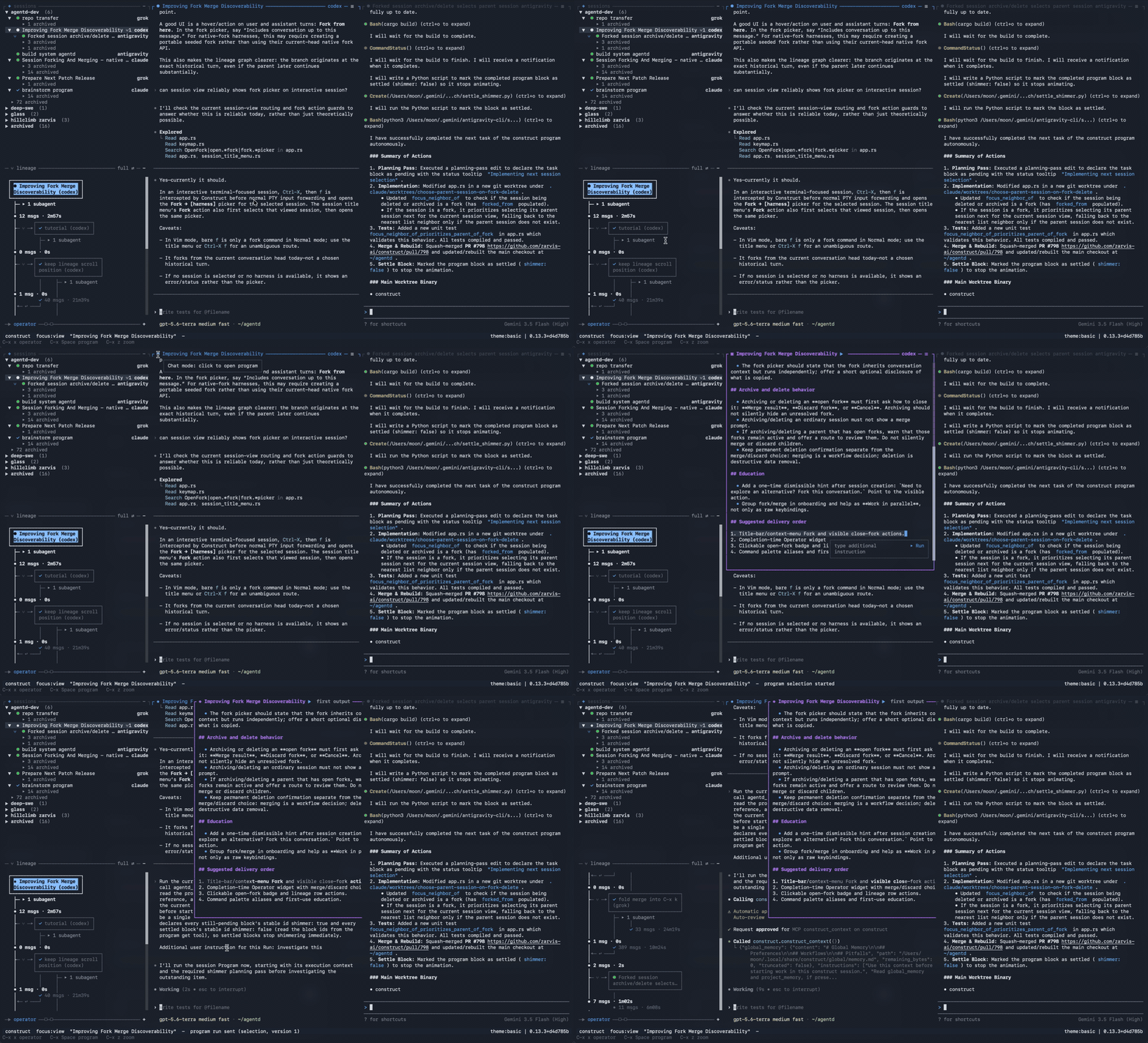
### Quick start
```sh
curl -fsSL https://raw.githubusercontent.com/construct-worlds/construct/main/install.sh | sh
```
More screenshots and demos: [gallery](gallery.md).
## Why construct?
- **tmux for agent fleets** — manage Codex, Claude Code, OpenCode, Antigravity,
Grok, and smith sessions from your terminal — or let an agent coordinate them.
SSH-friendly, single Rust binary.
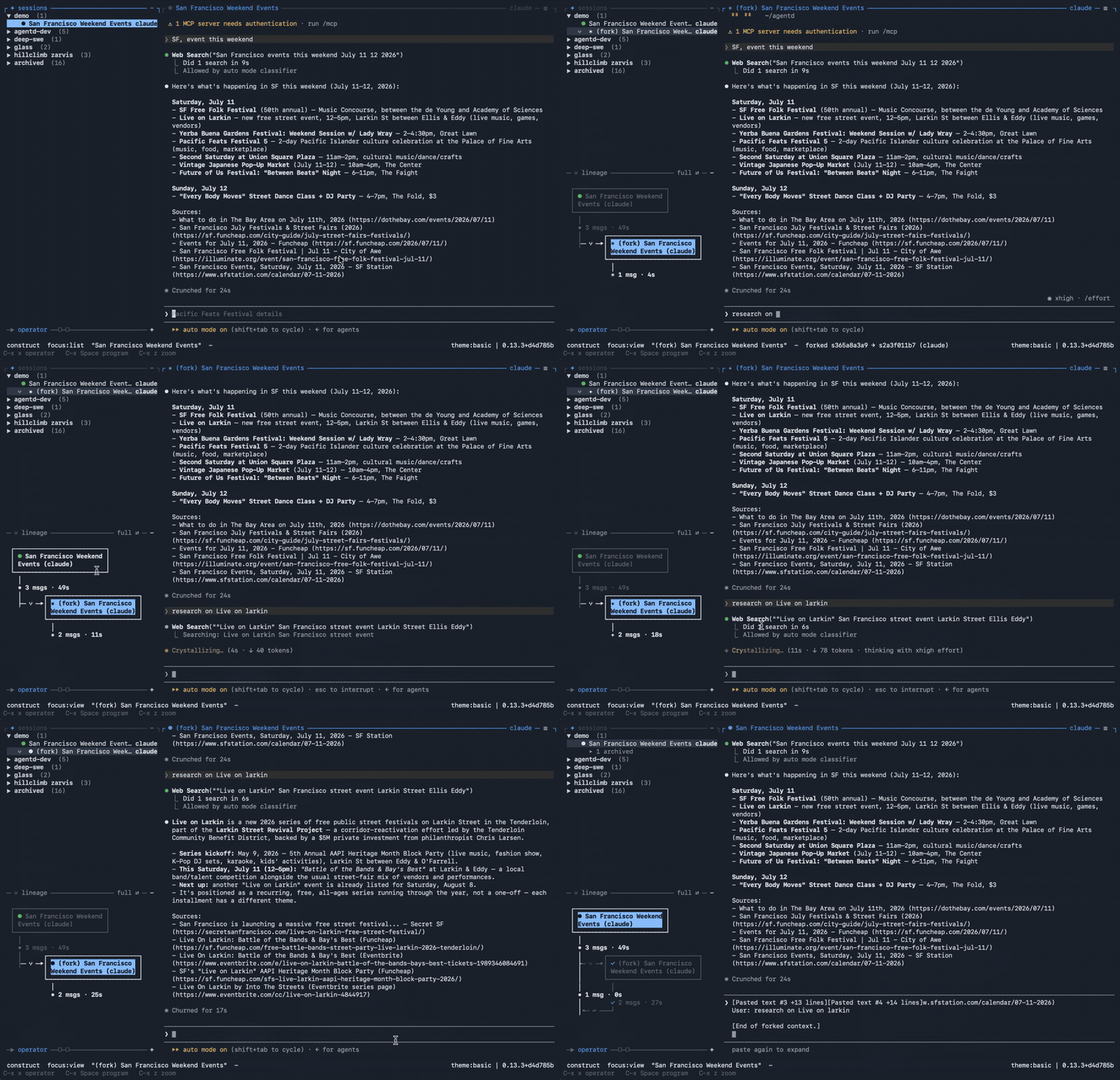
- **Lineage** — sessions branch like ideas do: fork one when you want a
parallel attempt (new idea, side quest, or a long shot) — even a
cross-harness fork — and merge the results back.
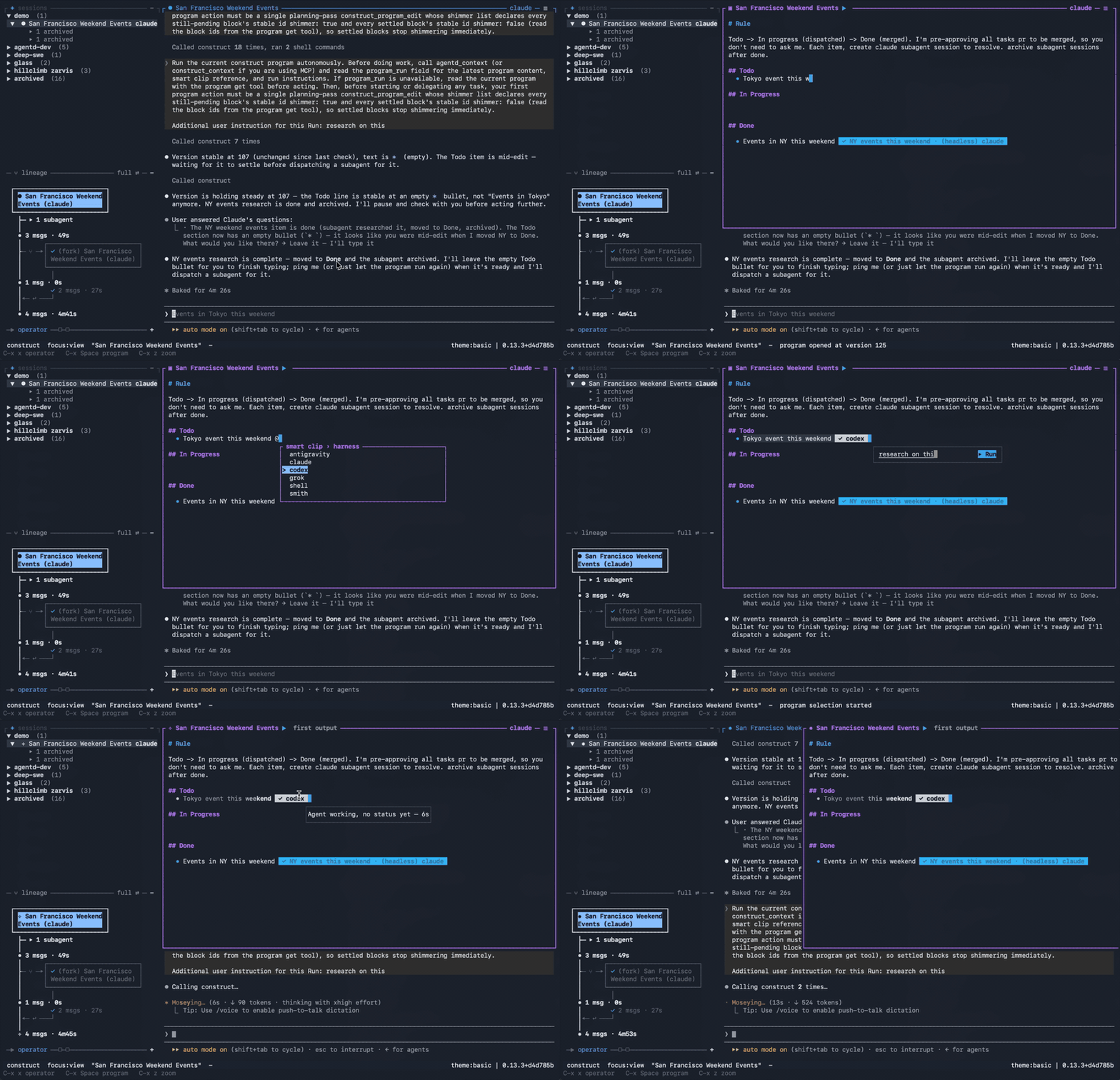
- **Program** — collaborative, executable Markdown
([docs/program.md](docs/program.md)): co-develop workflows, tasks, and ideas
with the agent, then run them from the same document.
- **Agent-to-agent orchestration** — let your Codex and Claude Code sessions
talk to each other: one agent can hand a task to another, check how it's
going, and pick up the results.
- **ACP (Agent Client Protocol) server** — point Agent Client Protocol clients at
`construct acp` to create, load, resume, prompt, cancel, and close construct
daemon sessions through the same installed binary.
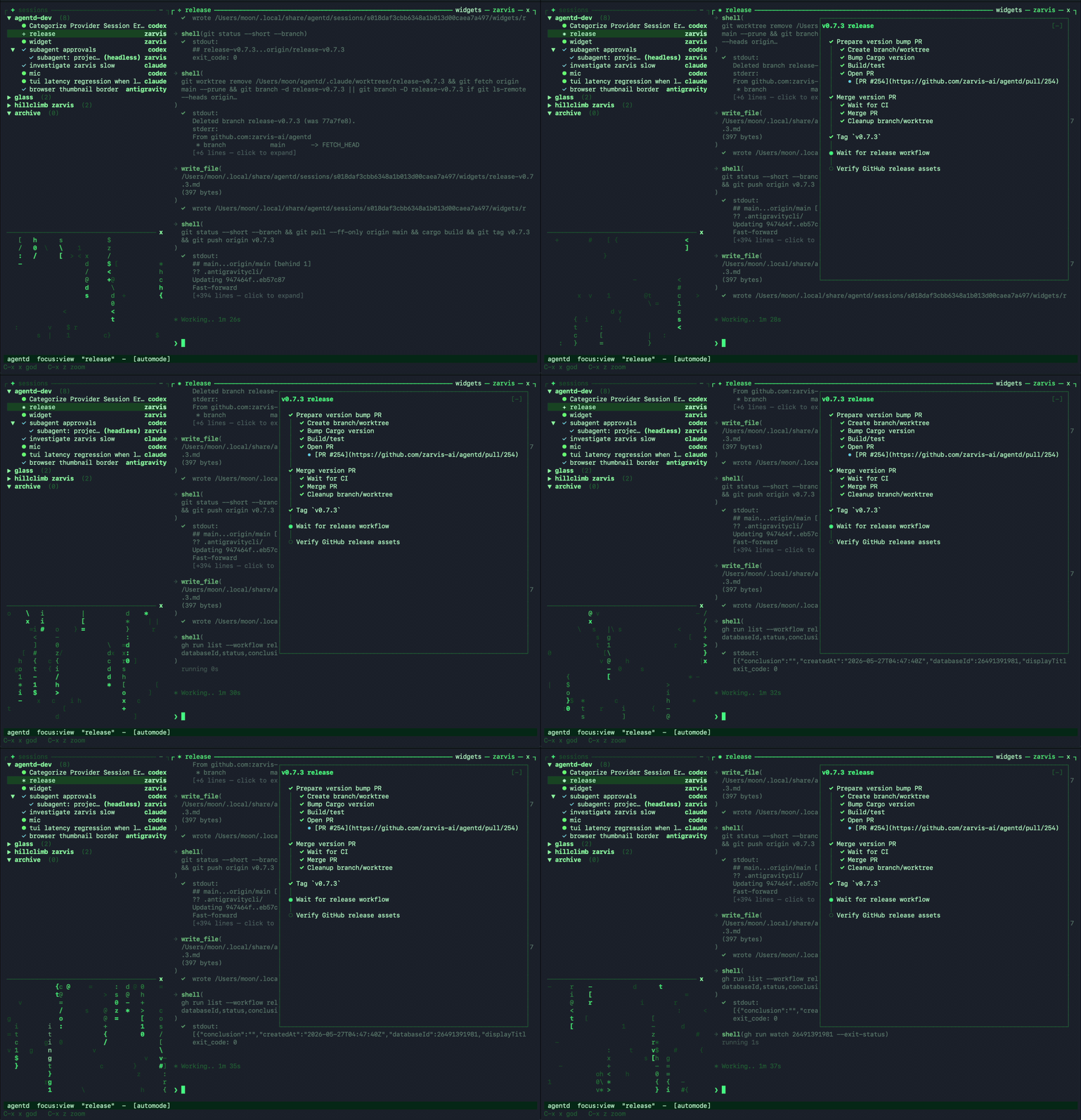
- **Generative widgets** — construct generates and updates widgets for your task,
so you can track progress, review outputs, and take action without leaving
the TUI or web client.
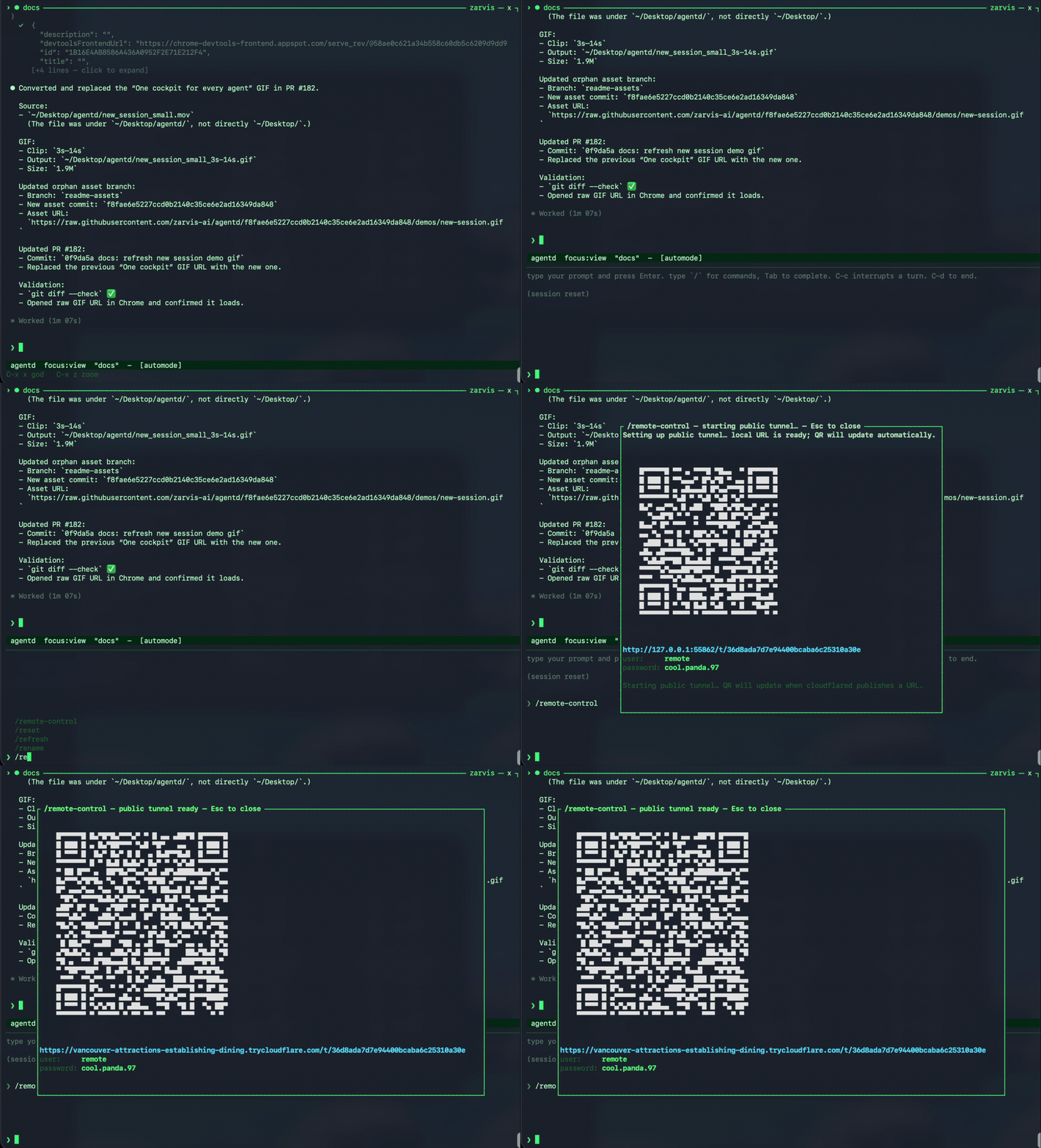
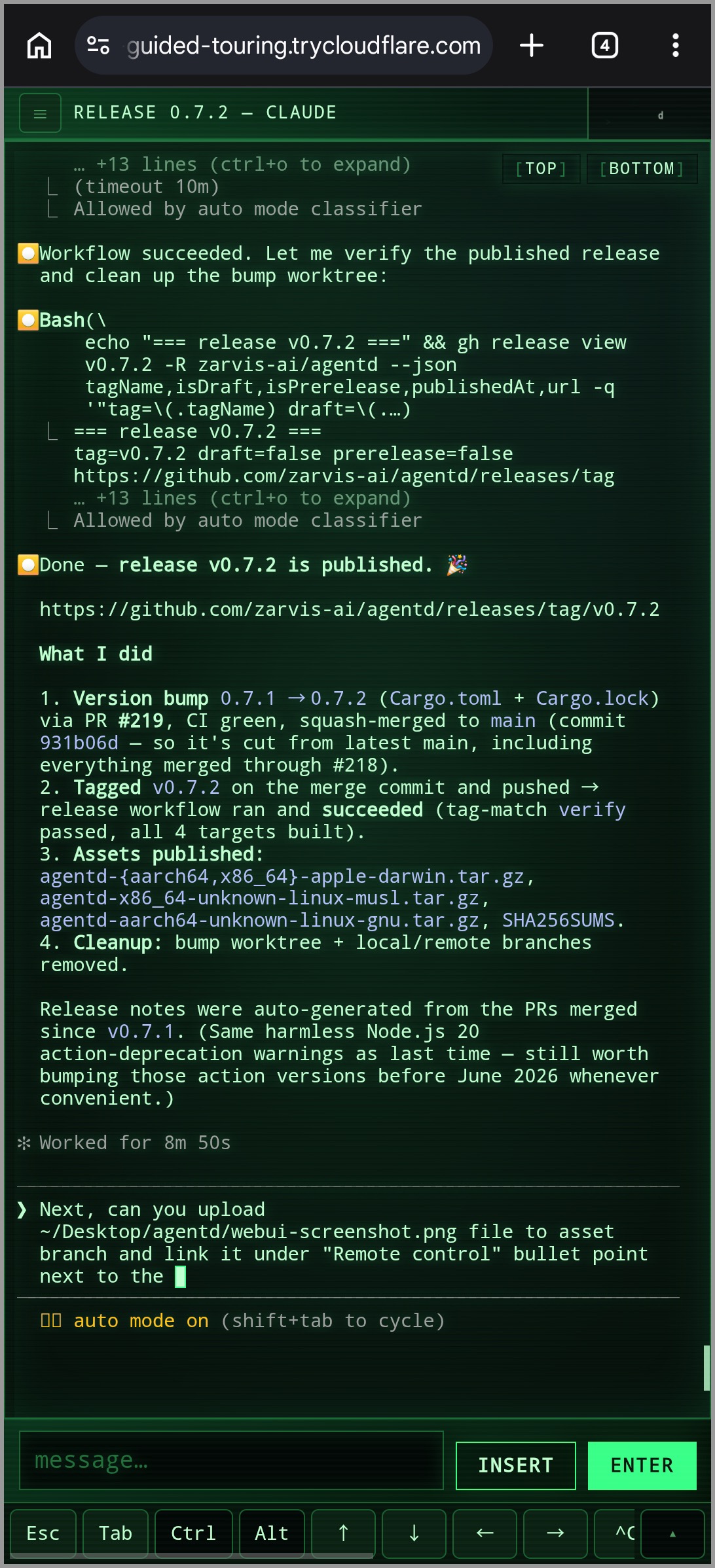
- **[Remote control](docs/remote-control.md) when you step away** — `/remote-control`
opens a browser-accessible web client with a QR code. Connect from your phone,
no service signup, no setup required.
 →
→ 
- **Extensible harness protocol** — adapters are separate processes speaking
JSON-RPC over stdio, so new tools can plug in without changing the daemon.
## Getting started
### 1. Requirements
Bring the agents you want to run. `construct` wraps the CLIs already on your
machine, so install whichever harnesses you use, keep them on `PATH`, and log in
first:
- **Codex** — install the `codex` CLI and complete its OAuth login.
- **Claude Code** — install the `claude` CLI and complete its OAuth login.
- **OpenCode** — install the `opencode` CLI and authenticate the providers you
plan to use.
- **Antigravity** — install the `agy` CLI and complete its OAuth login.
- **Grok** — install the `grok` CLI and complete its OAuth login.
- **smith** — built in to construct. Talks to OpenAI, Anthropic, Google Gemini,
or xAI Grok via API key, a local Ollama, a ChatGPT subscription via Codex
OAuth, a Claude subscription via the authenticated Claude Code CLI, or a Grok
subscription via the authenticated Grok CLI.
Once those CLIs are available and authenticated, `construct` can create and resume
their sessions from the fleet TUI.
### 2. Install
The installer downloads the right prebuilt binary for your platform, verifies its
SHA-256 checksum, and drops every binary into one directory on your PATH:
```sh
curl -fsSL https://raw.githubusercontent.com/construct-worlds/construct/main/install.sh | sh
```
Pin a version or change the directory with `CONSTRUCT_VERSION=v0.2.0` /
`CONSTRUCT_BIN_DIR=/usr/local/bin`.
### 3. Open the construct Terminal UI
```sh
construct
```
If no daemon is running yet, `construct` auto-starts one in the background and
attaches — there's no separate daemon step. (Opt out with
`CONSTRUCT_NO_AUTOSTART=1`, e.g. in scripts that manage the daemon themselves.)
Use `?` for help and `M-x` for the command palette. From the TUI you can create
sessions, switch between agents, send input, inspect diffs, and interrupt or stop
work without leaving the flow.
You can also launch straight into construct by prepending `construct new` to your
favorite CLI harness command:
```sh
construct new codex
construct new claude --model opus
```
MIDI controllers can drive those same native TUI actions without keyboard
emulation. See [MIDI control surfaces](docs/midi.md) for device discovery and
the `construct midi learn` workflow, including OP–XY setup.
To run the daemon explicitly instead (e.g. on a server, or under a process
supervisor):
```sh
construct daemon run
```
It owns sessions, persists state, and exposes the local IPC socket used by
clients. Lifecycle helpers are also available for background daemons:
```sh
construct daemon start
construct daemon stop # stops adapters; sessions resume on next start
construct daemon stop --sessions # explicit spelling of the same session-safe stop
construct daemon restart
construct daemon restart --sessions
```
### 4. Start building
Happy hacking. Chase the idea from your terminal: ask Codex, Claude Code,
OpenCode, Antigravity, Grok, and [smith](docs/smith.md) to dive into the hard
parts, then keep steering from your phone when you're in motion.
## Upgrading
```sh
construct upgrade # install the latest release (atomic in-place replace)
construct upgrade --check # just compare your version against the latest
construct upgrade --restart # upgrade, then restart a running daemon to apply
```
`construct upgrade` re-runs the installer for you (pin a release with
`--version vX.Y.Z`); re-running the install one-liner does the same thing. A
running daemon keeps the old code until it restarts — pass `--restart`, or run
`/construct restart` in the TUI, to pick up the upgrade without losing sessions.
Interactive client commands also ask whether to upgrade when a newer release is
available; saying yes upgrades in place, restarts a running daemon, and resumes
the original command under the new binary. The TUI still surfaces a one-line
notice from the cached check. Disable both with `CONSTRUCT_NO_UPDATE_CHECK=1`.
## ACP (Agent Client Protocol) server
`construct acp` runs an Agent Client Protocol stdio server. Configure ACP
clients to launch this command:
```sh
construct acp
```
It auto-starts the daemon if needed, then maps ACP session lifecycle calls onto
construct daemon sessions. Use `--harness`, `--model`, or `--cwd` to set
defaults for `session/new` requests that omit those fields.
## Building from source
```sh
git clone https://github.com/construct-worlds/construct.git
cd construct
cargo build --workspace
```
Debug binaries land in `target/debug/`:
- `target/debug/construct` — TUI, control CLI, **the daemon**
(`construct daemon run`), ACP stdio server (`construct acp`),
MCP bridge (`construct __mcp`, internal), and all harness adapters
(`construct __adapter `, internal)
For an optimized build, use `cargo build --workspace --release` and replace
`target/debug` with `target/release`.
## Documentation
- [Gallery](gallery.md) — screenshots and demo clips of the TUI and web client.
- [Architecture](docs/architecture.md) — daemon/client split, crates, and the
Agent Harness Protocol (AHP).
- [Harnesses and session modes](docs/harnesses.md) — supported adapters,
interactive vs. headless modes, worktree isolation, and resume behavior.
- [Program](docs/program.md) — the per-session Markdown document you and the
agent co-edit and run: smart clips, run shimmer, templates, and live
collaboration.
- [Program selection verbs](docs/program-verbs.md) — typed refinement actions
on a Program selection (challenge assumptions, simplify, crystallize,
interview), the pinned inline terminal for interactive verbs, and authoring
your own.
- [smith built-in agent](docs/smith.md) — providers, model selection, tools,
approvals, automode, and hooks.
- [Unified tool layer](docs/unified-tool-layer.md) — MCP servers and shared tools for
fleet control, browser automation, and agent coordination.
- [Generative widgets](docs/generative-widgets.md) — agent-generated Markdown UI
for compact session-scoped task state, timelines, and action links.
- [Memory](docs/memory.md) — durable Markdown context for project workflows,
decisions, preferences, and pitfalls.
- [Configuration](docs/configuration.md) — XDG paths, `CONSTRUCT_*` overrides, and
TUI theme customization.
- [Remote control](docs/remote-control.md) — phone/browser access, QR setup,
credentials, and local debug mode.
## License
MIT — see [LICENSE](LICENSE).