https://github.com/containercraft/100daysofhomelab
~~ Begins Summer 2024 ~~
https://github.com/containercraft/100daysofhomelab
Last synced: over 1 year ago
JSON representation
~~ Begins Summer 2024 ~~
- Host: GitHub
- URL: https://github.com/containercraft/100daysofhomelab
- Owner: ContainerCraft
- License: gpl-3.0
- Created: 2021-07-25T04:36:54.000Z (almost 5 years ago)
- Default Branch: main
- Last Pushed: 2024-11-22T19:11:56.000Z (over 1 year ago)
- Last Synced: 2025-02-25T10:55:15.883Z (over 1 year ago)
- Homepage:
- Size: 1.76 MB
- Stars: 19
- Watchers: 4
- Forks: 1
- Open Issues: 0
-
Metadata Files:
- Readme: README.md
- License: LICENSE
Awesome Lists containing this project
README
# 100DaysOfHomelab | Getting Started
## Join the ContainerCraft [CodeCtl Slack](https://join.slack.com/t/codectl/shared_invite/zt-szwjvpmc-RH_iObGnwSg1BVpXu79dAA)
### Hardware
1. [Bare Metal](docs/hardware/README.md)
2. [Install Ubuntu](docs/hardware/Ubuntu.md)
> ###### [Ensure you created br0 network interface](./docs/hardware/Manual_br0.md)
## Platform
0. [Pre-reqs](docs/platform/prereqs.md)
1. [Kubernetes Deploy](docs/platform/kubernetes.md)
2. [Cluster Storage](docs/platform/storage.md)
3. [Kargo Hypervisor](docs/platform/kargo.md)
4. [Deploy Virtual Machines](docs/platform/test.md)
5. [ClusterAPI tenant k8s](docs/platform/capi.md)
## Infrastructure
- [ ] Overlay Networks
- [ ] Virtual Machines
- [ ] VDI or Virtual Desktop / RDP Remote Host
- [ ] Ubuntu
- [ ] Fedora
- [ ] Windows
- [ ] Windows Server
- [ ] Virtual [VyOS](https://vyos.io/) Gateway / Firewall
- [ ] Network Services
- [ ] DHCP
- [ ] DNS
- [ ] PROXY
- [ ] VPN
- [ ] VPC
> ###### A VPC is a logically isolated Virtual Private Cloud created on shared resources *[example](https://aws.amazon.com/vpc/)
### Middleware
- [ ] [Gitea](https://docs.gitea.io/en-us/install-on-kubernetes)
- [ ] [ddclient](https://docs.linuxserver.io/images/docker-ddclient)
- [ ] [Guacamole](https://docs.linuxserver.io/images/docker-guacd)
- [ ] [The Lounge](https://docs.linuxserver.io/images/docker-thelounge)
- [ ] [Netboot.xyz](https://docs.linuxserver.io/images/docker-netbootxyz)
- [ ] [Unifi Controller](https://docs.linuxserver.io/images/docker-unifi-controller)
- [ ] [Pull through image registry cache](https://docs.docker.com/registry/recipes/mirror)
### Applications
- [ ] [Heimdall](https://docs.linuxserver.io/images/docker-heimdall)
- [ ] [Snapdrop](https://docs.linuxserver.io/images/docker-snapdrop)
- [ ] [VSCode](https://docs.linuxserver.io/images/docker-code-server)
- [ ] [Jitsi Meet](https://github.com/jitsi-contrib/jitsi-helm)
- [ ] [JupyterHub](https://jupyterhub.readthedocs.io/en/0.7.2/getting-started.html)
#### [*and more to come](https://github.com/awesome-selfhosted/awesome-selfhosted)
----------------
## Physical Architecture
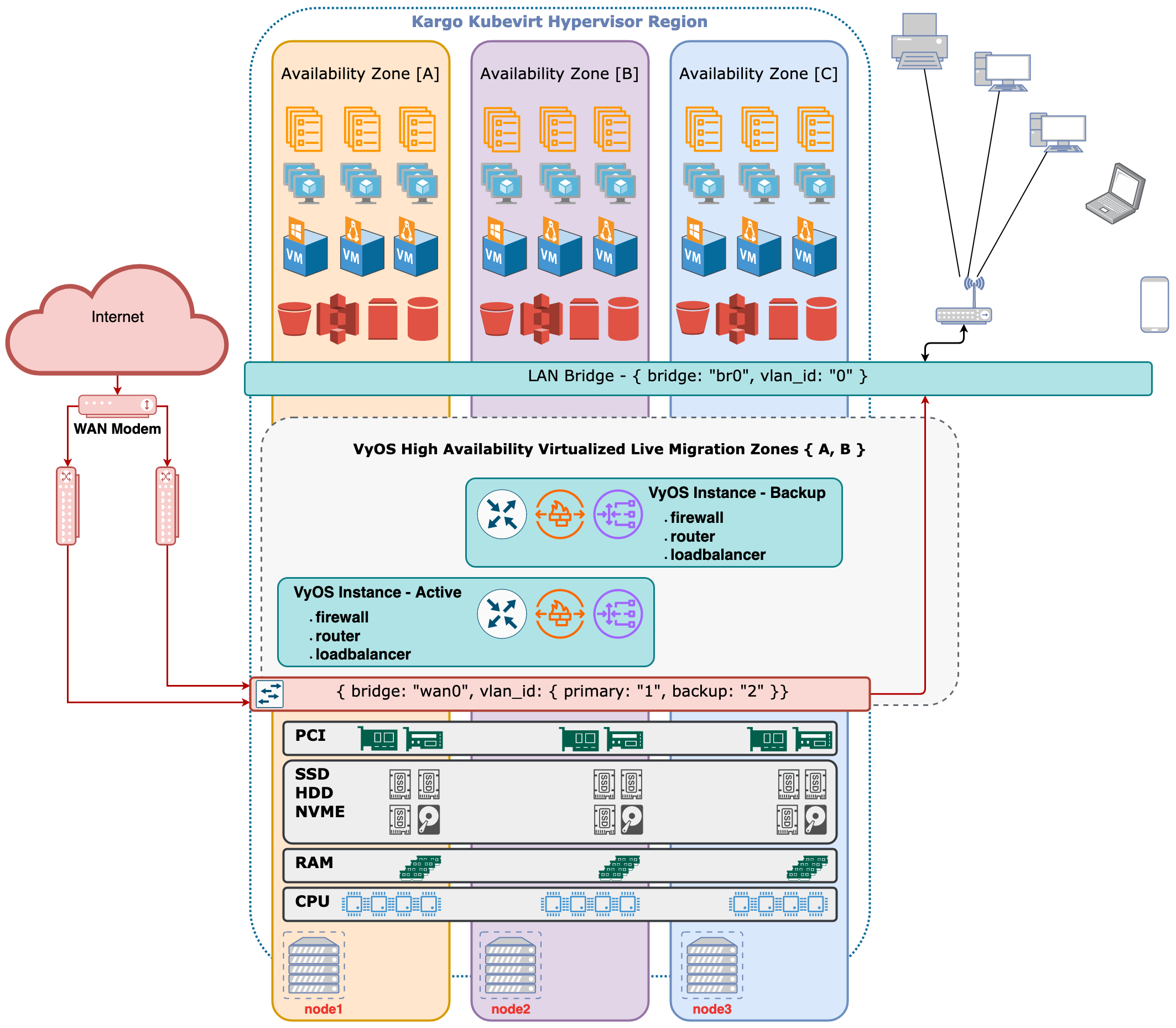
## What is it?
Intended for both the new hobbiest and experienced DevOps professional. This set of guides & build tools is intended for the local comodity Nuc/Laptop/Desktop cluster "HomeLab" paradigm and can be expanded upon once the core fundamentals are understood.
The original inspiration for this project came from endless hours of testing different
virtual network and virtual machine building tools and strategies in search of a paradigm
that meets a number of criteria included in the following criteria. All of this time spent
resulted in distractions from core goals of building locally self hosted "cloud" services.
## Purpose:
This tooling provides a common platform to quickly and seamlessly build, share, and colaborate on declarative infrastructure and applications.
By following these guides you will be able to:
1. Demostrate the significant potential of modest hardware
2. Improve your understandng and fluency in fitting common commercially relevant Open Source Software components together
3. Overcome barriers in consuming automation tools to improve your workflow beyond the burden of menial tasks
4. Enjoy locally hosted "cloud" services from your own hardware under your own control
5. Be part of a community with shared fundamental infrastructure architecture
## Criteria:
#### The tooling should be consistent across hardware platforms including:
+ Raspberry Pi
+ Client Laptops
+ Client Desktops
+ Low cost Home Labs
+ 100% Virtual Tenants
+ Operations Pre-prod & Test Environments
#### Easy end-user management and setup:
+ Easy to setup
+ Easy to manage
+ Logical to comprehend
+ Capable of multi-host clustering
+ Capable of nesting multiple layers of networks
#### Simple integration of technologies including:
+ Linux Containers
+ Kubernetes
+ OpenStack
+ KVM / Libvirt
+ Bare Metal Hosts
+ Physical Switching Gear