https://github.com/containersolutions/ha-redis-kubernetes
Manual Redis HA in Kubernetes with Zero Downtime updates and upgrades
https://github.com/containersolutions/ha-redis-kubernetes
Last synced: 10 months ago
JSON representation
Manual Redis HA in Kubernetes with Zero Downtime updates and upgrades
- Host: GitHub
- URL: https://github.com/containersolutions/ha-redis-kubernetes
- Owner: ContainerSolutions
- License: apache-2.0
- Created: 2021-09-05T13:00:07.000Z (almost 5 years ago)
- Default Branch: main
- Last Pushed: 2021-09-06T09:29:13.000Z (almost 5 years ago)
- Last Synced: 2025-07-02T20:44:33.965Z (about 1 year ago)
- Language: Python
- Size: 27.3 KB
- Stars: 5
- Watchers: 5
- Forks: 3
- Open Issues: 0
-
Metadata Files:
- Readme: README.md
Awesome Lists containing this project
README
# Redis clustering in Kubernetes
This repo serves as an example of how to manage HA Redis (Masters only for now),
including zero downtime upgrades, persistence, monitoring, scaling and rebalancing.
This repo is intended primarily for learning.
If you need a production setup for this, have a look at our [Redis Operator].
It manages Redis Cluster in very much the same way as this repository,
except automatically through the use of CRDs.
## Overview
The installation creates a
* Redis Cluster with persistence for each node
* Redis Metrics Exporter for Prometheus
* Prometheus Operator configurations
* Redis CLI debugging pod
* Redis consistency checker pod
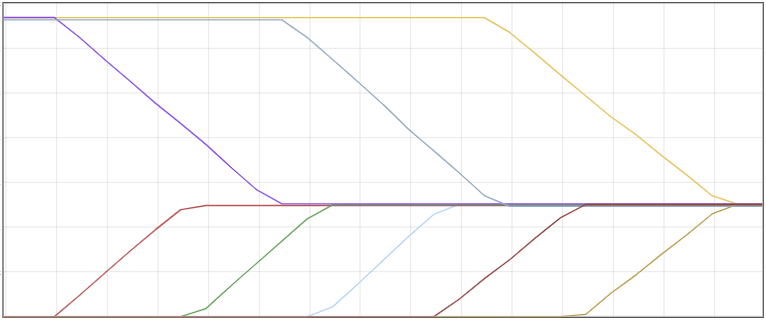
When scaling up the scripts will
* Increase the replica count and apply
* Create a PVC for the node to store it's AOF file
* Wait for the Redis replica to be ready
* Run CLUSTER MEET to join the node to the cluster
* Run --cluster rebalance to rebalance all the slots across the nodes
Here is what the key distribution among nodes looks like when scaling up
When scaling down by X the scripts will
* Find the IDs of the Redis nodes with the top most ordinals of the statefulset
* Run --cluster rebalance with cluster weight set to 0 for all the IDs above
* Run --cluster del-node for all the IDs
* scale down the statefulset by X
* Delete any dangling PVC to make space for future scaling up
Here is what the key distribution among nodes looks like when scaling down

When Upgrading the Redis cluster the scripts will
* Set the partition for staged upgrade higher than the replica count
* If the replicas are fewer than the current, move slots off the overage of pods, then remove from the Redis cluster
* Update Statefulset to propogate any replica changes up or down. (This will not update pods as partition is set higher)
* If the replicas are higher than the current (pods will be running because of apply above), add them to the Redis cluster
* Rebalance the entire cluster
* Check whether there are changes which constitue an upgrade procedure
* If not, skip upgrade
* If there are constituting changes
* Loop through pods which existed before apply (new ones will already be upgraded), in reverse ordinal order
* Rebalance the cluster away from current pod
* Lower the partition value for teh Statefulset by 1, and let Kubernetes propogate the changes to the pod
* Move onto the next pod
* Finally run a last rebalance to make sure the cluster is in a good state
Here is what the key distribution looks like when upgrading the image for each node
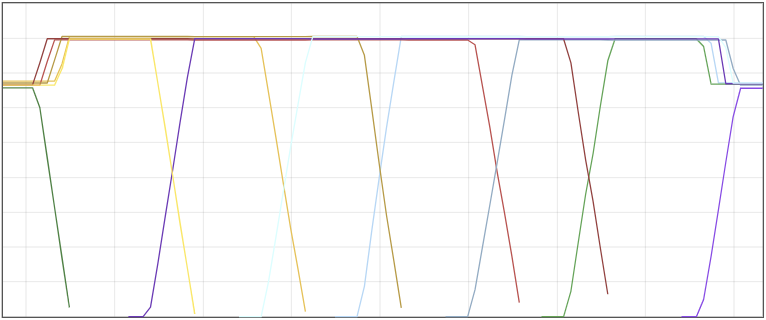
You'll notice that whenever we remove keys from a node, they get rebalanced onto the new node, hance the X shapes.
## Deploying the Prometheus Operator
This set does not install the Prometheus Operator itself.
If you do not have an instance of the Prometheus Operator running, you can install it by running
```
kubectl apply -f https://raw.githubusercontent.com/prometheus-operator/prometheus-operator/master/bundle.yaml
```
## Deploying the stack
```
kustomize build . | kubectl apply -f -
```
## Creating the Redis cluster
Once the statefulset pods are all in a running state, you can create the Redis cluster itself.
```
./bin/create-cluster.py
```
## Updating the cluster
You will need to use this whenever making changes to the Redis Statefulset,
as simply applying the manifests will update the pods,
but not the Redis Cluster itself.
This script will run a update procedure to move the Redis cluster towards a stable updated state.
```
./bin/update-cluster.py
```
## Checking the cluster health
```
./bin/cli.py --cluster check
```
## Monitoring the cluster
Cluster monitoring is included in the base stack.
To view the metrics, you need to port-forward the prometheus admin interface, and then open it in your browser
```
kubectl port-forward svc/prometheus-operated 9090:9090
```
You can now open up [This dashboard][1] to see a graph of how the consistency checker is inserting keys and using memory.
## Running the consistency checker
Once the Redis cluster is up, you can immediately run this.
The consistency checker will start inserting keys into Redis, and then read them back to make sure Redis in consistent in SET and GET.
Keep this running while sacling up / down or updating the Redis image, to see whether keys are lost during changes to the Redis cluster.
```
kubectl exec -it deploy/redis-consistency-checker -- ruby consistency-checker.rb redis-0.redis 6379
```
## Benchmarking the Redis Cluster
You can run the redis-benchmark tool in the current setup as well.
You can run this during updates to check how much performance dips when you start making changes.
```
kubectl exec -it redis-cli-0 -- redis-benchmark -h redis-0.redis -p 6379 -t get,set -c 100 -d 2048
```
## Utilities
As Redis commands need to be run against the Redis instances for cluster create etc.
there are some utility scripts to ease up some of the boilerplate for you,
and you can easily run command in the Kubernetes Redis instances.
### Running Redis Commands
You can run Redis commands with the redis cli pod by using the `./bin/cli.py` utility
```
./bin/cli.py --cluster check
```
The final command which is run, is actually `kubectl exec -it redis-cli-o -- redis-cli --cluster check {redis-0-ip}:6379`
The `./bin/cli.py` utility just fills in the boilerplate for the command
### Running Commands against subset of instances
You can run Redis commands against multiple Redis Server by using the `./bin/multi-cli.py` utility
It takes a list of ordinals of the pod, and runs the command against each of them.
```
./bin/multi-cli.py 0,1,2 CLUSTER MYID
```
[Redis Operator]: https://github.com/ContainerSolutions/redis-operator
[1]: http://localhost:9090/graph?g0.expr=redis_db_keys&g0.tab=0&g0.stacked=0&g0.show_exemplars=1&g0.range_input=1h&g1.expr=redis_keyspace_hits_total&g1.tab=0&g1.stacked=0&g1.show_exemplars=0&g1.range_input=1h&g2.expr=redis_keyspace_misses_total&g2.tab=0&g2.stacked=0&g2.show_exemplars=0&g2.range_input=1h&g3.expr=redis_memory_used_bytes&g3.tab=0&g3.stacked=0&g3.show_exemplars=0&g3.range_input=1h&g4.expr=redis_mem_clients_normal&g4.tab=0&g4.stacked=0&g4.show_exemplars=0&g4.range_input=1h&g5.expr=redis_last_slow_execution_duration_seconds&g5.tab=0&g5.stacked=0&g5.show_exemplars=0&g5.range_input=1h