https://github.com/coollabsio/jean
A dev environment for AI agents.
https://github.com/coollabsio/jean
agent ai claude-code git parallel worktree
Last synced: 27 days ago
JSON representation
A dev environment for AI agents.
- Host: GitHub
- URL: https://github.com/coollabsio/jean
- Owner: coollabsio
- License: apache-2.0
- Created: 2026-01-23T07:59:41.000Z (6 months ago)
- Default Branch: main
- Last Pushed: 2026-06-25T10:10:48.000Z (29 days ago)
- Last Synced: 2026-06-25T12:06:39.764Z (29 days ago)
- Topics: agent, ai, claude-code, git, parallel, worktree
- Language: TypeScript
- Homepage: https://jean.build
- Size: 15.5 MB
- Stars: 1,077
- Watchers: 5
- Forks: 120
- Open Issues: 124
-
Metadata Files:
- Readme: README.md
- Contributing: CONTRIBUTING.md
- Funding: .github/FUNDING.yaml
- License: LICENSE.md
- Security: docs/SECURITY.md
- Agents: AGENTS.md
Awesome Lists containing this project
- awesome-agent-orchestrators - jean - Desktop & web app for orchestrating coding agents (Claude, Codex, OpenCode) across projects and git worktrees. (Parallel Agent Runners)
- awesome-cli-coding-agents - jean
- awesome-ai-dev-tools - jean - Desktop & web app for orchestrating coding agents (Claude, Codex, OpenCode) across projects and git worktrees. (📚 Tools / 🌟 What You'll Find Here:)
README
# Jean
A desktop AI assistant for managing multiple projects, worktrees, and chat sessions with Claude CLI, Codex CLI, Cursor CLI, and OpenCode.
Tauri v2 · React 19 · Rust · TypeScript · Tailwind CSS v4 · shadcn/ui v4 · Zustand v5 · TanStack Query · CodeMirror 6 · xterm.js
## About the Project
Jean is an opinionated native desktop app built with Tauri that gives you a powerful interface for working with Claude CLI, Codex CLI, Cursor CLI, and OpenCode across multiple projects. It has strong opinions about how AI-assisted development should work — managing git worktrees, chat sessions, terminals, GitHub and Linear integrations in one cohesive workflow.
No vendor lock-in. Everything runs locally on your machine with your own Claude CLI, Codex CLI, Cursor CLI, or OpenCode installation.
For more information, take a look at [jean.build](https://jean.build).
## Screenshots


## Features
- **Project & Worktree Management** — Multi-project support, linked projects for cross-project context, git worktree automation (create, archive, restore, delete), custom project avatars
- **Session Management** — Multiple sessions per worktree, execution modes (Plan, Build, Yolo) with plan approval flows, session recap/digest, saved contexts with AI summarization, archiving with retention settings, recovery, auto-naming, canvas views
- **AI Chat (Claude CLI, Codex CLI, Cursor CLI, OpenCode)** — Model selection (Opus 4.5, Opus 4.6, Opus 4.6 1M, Sonnet 4.6, Haiku), thinking/effort levels with per-mode overrides, MCP server support, Codex multi-agent collaboration, file picker & image attachments, chat search, notification sounds, custom system prompts, custom CLI profiles
- **Magic Commands** — Investigate issues/PRs/workflows, code review with finding tracking, AI commit messages, PR content generation, merge conflict resolution, release notes generation, customizable per-prompt model/backend/effort selection
- **GitHub Integration** — Dashboard with Issues, PRs, Security Alerts, and Advisories tabs, Dependabot investigation, checkout PRs as worktrees, auto-archive on PR merge, workflow investigation
- **Linear Integration** — Issue investigation, context loading, per-project API key and team configuration
- **Developer Tools** — Multi-dock terminal (floating, left, right, bottom), command palette, open in editor (Zed, VS Code, Cursor, Xcode, IntelliJ), git operations (status, stash, revert, fetch/merge with conflict detection), diff viewer (unified & side-by-side), file tree with preview, debug panel with token usage tracking
- **Remote Access** — Built-in HTTP server with WebSocket support, token-based auth, web browser access
- **Customization** — Themes (light/dark/system), custom fonts, customizable AI prompts, configurable keybindings, mobile swipe gestures
## Installation
Download the latest version from the [GitHub Releases](https://github.com/coollabsio/jean/releases) page or visit [jean.build](https://jean.build).
### Homebrew (macOS)
```bash
brew tap coollabsio/jean
brew install --cask jean
```
### Building from Source
Prerequisites:
- [Node.js](https://nodejs.org/)
- [Rust](https://www.rust-lang.org/tools/install)
- **Windows only**: In the Visual Studio Installer, ensure the **"Desktop development with C++"** workload is selected, which includes:
- MSVC C++ build tools
- Windows SDK (provides `kernel32.lib` and other system libraries required by Rust)
See [CONTRIBUTING.md](CONTRIBUTING.md) for full development setup and guidelines.
## Platform Support
- **macOS**: Tested
- **Windows**: Not fully tested
- **Linux**: Community tested (Arch Linux + Hyprland/Wayland)
## Headless Web Access
Run Jean without the desktop window and expose the web UI over HTTP:
```bash
jean --headless --host 127.0.0.1 --port 3456
```
`--host` accepts `localhost` or an IP address. Passing a specific address such
as your Tailscale IP binds Jean only to that interface.
## Roadmap
- Enhance remote web access
## Contributing
See [CONTRIBUTING.md](CONTRIBUTING.md) for development setup and guidelines.
## Core Maintainer
| Andras Bacsai |
| :------------------------------------------------------------------------------------------------------------------------------------------------------------------------------------------------------------------------------------------------------------------------------------------------------------------------------------------------------------------: |
|  |
|
| 

 |
|
## Philosophy
Learn more about our approach: [Philosophy](https://coollabs.io/philosophy/)
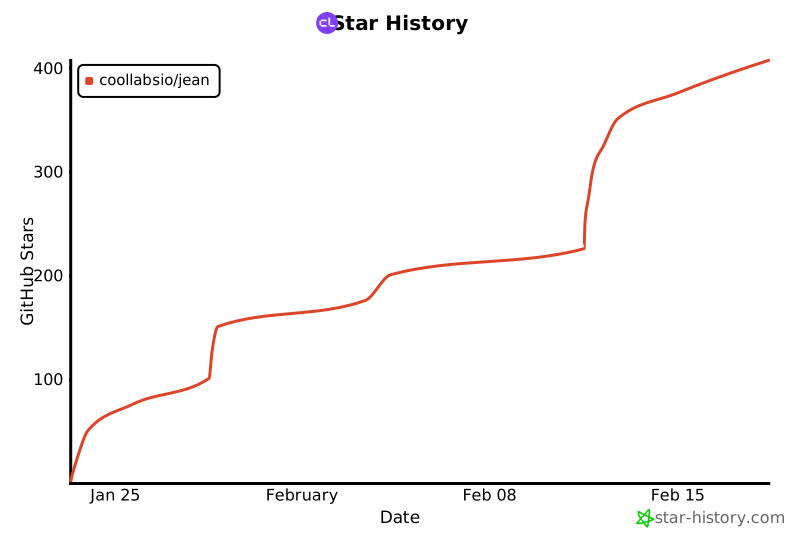
## Star History
[](https://star-history.com/#coollabsio/jean&Date)