https://github.com/corgi-in-tights/poster-generator
A flexible Python library for building and rendering graphics with support for layers, custom objects, and YAML-based templates.
https://github.com/corgi-in-tights/poster-generator
python rendering yaml
Last synced: 12 days ago
JSON representation
A flexible Python library for building and rendering graphics with support for layers, custom objects, and YAML-based templates.
- Host: GitHub
- URL: https://github.com/corgi-in-tights/poster-generator
- Owner: corgi-in-tights
- License: mit
- Created: 2025-11-17T02:36:12.000Z (7 months ago)
- Default Branch: main
- Last Pushed: 2025-11-30T03:30:55.000Z (7 months ago)
- Last Synced: 2025-12-01T12:50:08.971Z (7 months ago)
- Topics: python, rendering, yaml
- Language: Python
- Homepage:
- Size: 5.58 MB
- Stars: 0
- Watchers: 0
- Forks: 0
- Open Issues: 2
-
Metadata Files:
- Readme: README.md
- License: LICENSE
Awesome Lists containing this project
README
# Poster Generator
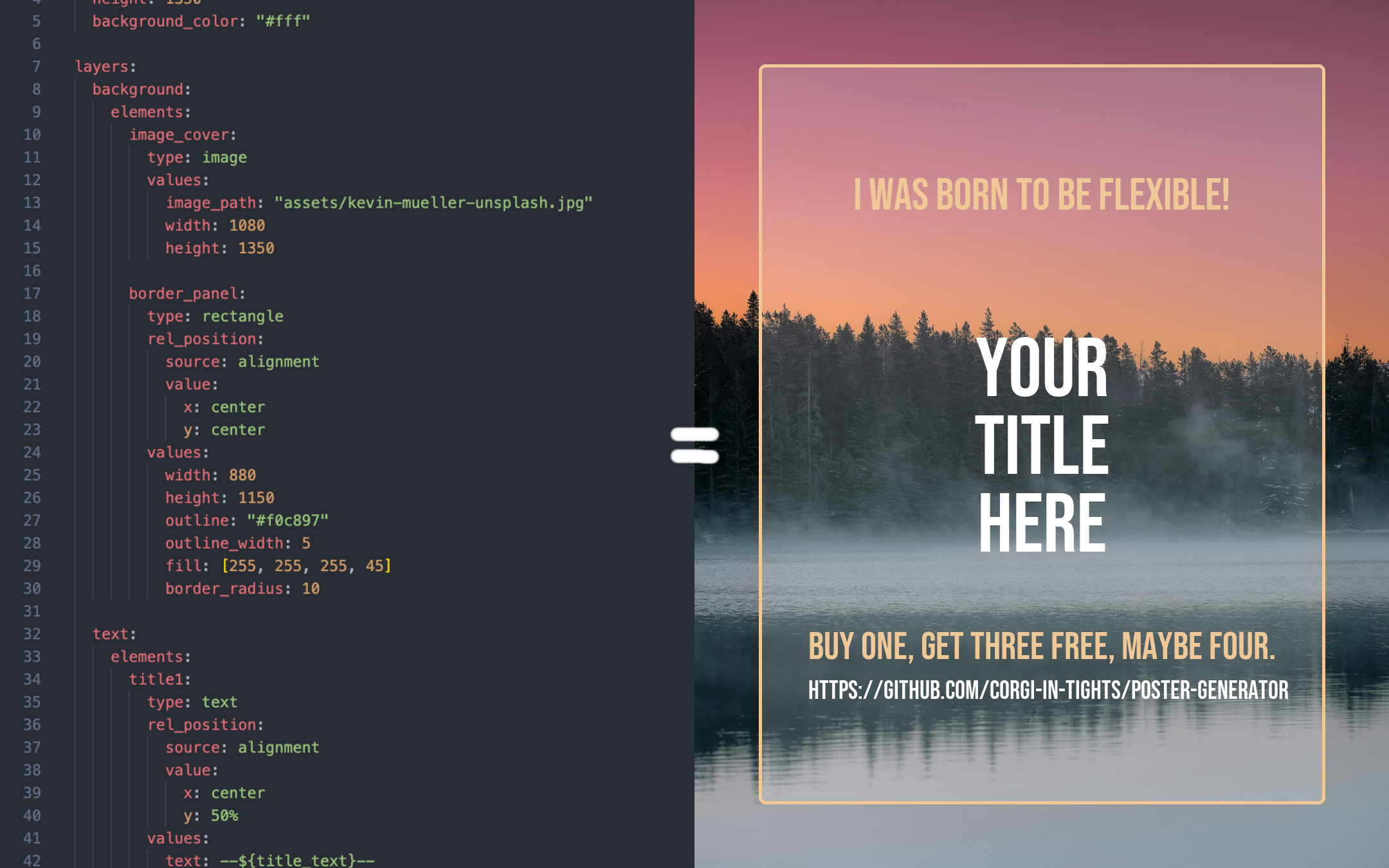
A flexible Python library for building and rendering posters/infomatics with focus on text templates and dynamic usage.
[](https://www.python.org/downloads/)
[](LICENSE)
## Features
• 🧱 Element and layer system with blend settings leveraging Pillow
• 🗂️ Canvas element querying, grouping, deserialization and composites
• 📄 YAML/JSON template loaders with variable substitution for reusable layouts
• 🎯 'Canva' snapping-inspired relative positioning for quick template development
• 🔌 Extensible, format-agnostic registry for every inheritable class
• 🛠️ Function-driven operations (e.g., hue shifting, scaling, transforms)
• 📣 Designed for automated poster and social media post generation
⸻
## Installation
### Using Poetry (recommended)
```bash
poetry add poster-generator
```
### Using pip
```bash
pip install poster-generator
```
### From source
```bash
git clone https://github.com/corgi-in-tights/poster-generator.git
cd poster-generator
poetry install
```
## Requirements
- Python >= 3.13
- Pillow >= 12.0.0
- PyYAML >= 6.0.3
## Quick Start
Check out the `examples/` directory for concrete examples and [TEMPLATES.md](https://github.com/corgi-in-tights/poster-generator/blob/main/TEMPLATES.md) for a reference on the in-built template format.
## Reference
### Elements
Elements are the basic pieces you use to build a poster.
The library comes with a few ready-to-use ones:
- **TextElement** (`text`) – Regular text with custom fonts, wrapping, alignment, and opacity.
- **ImageElement** (`image`) – Shows an image from a file path and lets you resize it however you need.
- **RectangleElement** (`rectangle`) – A simple box shape with size, corner radius, fill, and opacity options.
- **EllipseElement** (`ellipse`) – Like a rectangle, but drawn as an oval/circle instead.
To learn how to register custom elements for templates, please see [TEMPLATES.md](https://github.com/corgi-in-tights/poster-generator/blob/main/TEMPLATES.md).
```python
canvas = Canvas(width=500, height=500)
image = ImageElement(
image_path="image.png",
width=500,
height=500
) # position defaults to (0, 0)
canvas.add_element("background", image, layer="background")
text = TextElement(
position=(100, 100),
text="Hello World",
font_size=48,
color="#000000",
font_family="Open Sans" # See FontManager.get_font_families() for a full list!
)
canvas.add_element("my_text_id", text, groups="titles")
image = canvas.render()
image.show()
```
#### Layers
Layers help organize elements and control rendering order:
```python
canvas.add_element("bg", background, layer="background")
canvas.add_element("title", text, layer="foreground")
```
#### Groups
Groups allow you to manage related elements:
```python
canvas.add_element("title", text, groups=["headers", "top-section"])
canvas.add_element("subtitle", subtitle, groups=["headers", "top-section"])
# Query elements by group
headers = canvas.get_elements(groups="headers")
```
### Operations
Apply transformations to elements:
```python
from poster_generator.operations import apply_hue_shift, set_hue_from_hex
# Hue shift
element.apply_operation(apply_hue_shift, degrees=45)
```
To learn how to register custom operations for templates, please see [TEMPLATES.md](https://github.com/corgi-in-tights/poster-generator/blob/main/TEMPLATES.md).
### Element Queries
Query elements by identifier, group, or layer:
```python
# Get specific elements
elements = canvas.get_first_element(identifier="my_subtitle")
# Combine filters (requires all to match by default)
specific = canvas.get_elements(
groups="images",
layers="background",
# require_all=True,
)
```
There are a few other methods, mostly to do with drawing, removing elements, cropping, etc. I recommend taking a look to see if any are useful to you :)
## Contributing & Issues
Contributions are welcome! Please feel free to submit a PR. I am open to significant design changes if they match the project's intention.
If any critical bugs come up, please open a GitHub issue, feature requests are fine but a PR would be much preferred :p
## License
This project is licensed under the MIT License - see the [LICENSE](LICENSE) file for details.
## Acknowledgments
- Built with [Pillow](https://python-pillow.org/) for image processing (a Pillow wrapper really)
- Uses [PyYAML](https://pyyaml.org/) for template parsing (by default)
- This README and parts of the code were partially generated by an LLM, Claude Sonnet 4.5