https://github.com/corndogit/qrispy
A GUI and CLI program for making and decoding QR codes
https://github.com/corndogit/qrispy
gui qrcode qrcode-generator
Last synced: about 1 year ago
JSON representation
A GUI and CLI program for making and decoding QR codes
- Host: GitHub
- URL: https://github.com/corndogit/qrispy
- Owner: corndogit
- License: gpl-3.0
- Created: 2022-04-20T10:03:06.000Z (about 4 years ago)
- Default Branch: master
- Last Pushed: 2022-06-04T13:58:04.000Z (about 4 years ago)
- Last Synced: 2025-05-16T11:09:20.163Z (about 1 year ago)
- Topics: gui, qrcode, qrcode-generator
- Language: Python
- Homepage:
- Size: 52.7 KB
- Stars: 1
- Watchers: 1
- Forks: 0
- Open Issues: 0
-
Metadata Files:
- Readme: README.md
- License: LICENSE
Awesome Lists containing this project
README
# QRispy
A GUI interface that uses qrcode and pyzbar libraries to encode/decode QR codes in Python.
## Usage
QRispy can be used as either with a GUI or in CLI
### Requirements
* Python 3.9 or later
* The qrcodes, pyzbar and pillow packages
### GUI
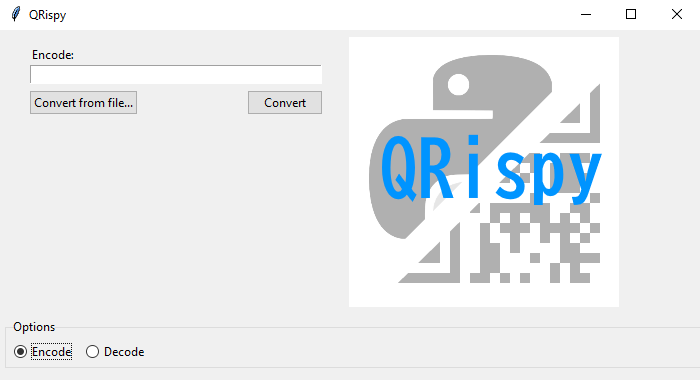
Currently, generating and decoding QR codes is supported in the GUI version. You can either enter some text directly into the entry box or select a plaintext file to read text from. The generated QR code is saved automatically as 'output.png'.
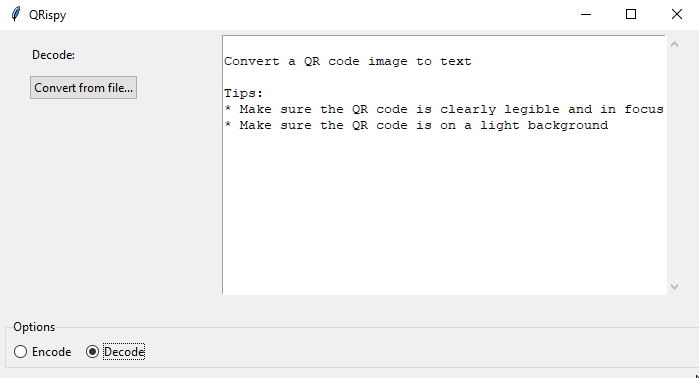
QR codes can be decoded from images or screenshots where clearly visible and on a light background, although this hasn't been tested with camera photos. The decoded contents are displayed and saved to 'output.txt'.
### Terminal
The qr_codec library can be run directly with the following parameters:
`qr_codec.py `
* For `encode`, `input_data` would be a string and outputs QR code to output.png.
* For `decode`, `input_data` would be path to an image file containing QR code to read.
## Examples
### Encoding a string to QR code

This QR code contains the word 'Test'. QR codes are automatically scaled relative to the length of bytes.
### Decoding a QR code
Calling `decode_qr_code()` on the image path returns a list object containing the QR code data (in bytes) and metadata. By calling the `data.decode()` method we can encode it with UTF-8 or ASCII.
#### Todo
* Write first-time setup script for installing dependencies
* Implement style options for QR code supported by the qrcode library
* Add format options for saving (.PNG or .SVG)
#### Known bugs
* `qrcode.exceptions.DataOverflowError` thrown when a text file with too many characters is selected.