https://github.com/cosmicjs/react-news-app
A minimal news blog boilerplate powered by React and the Cosmic API.
https://github.com/cosmicjs/react-news-app
api cms cosmicjs news react
Last synced: 12 months ago
JSON representation
A minimal news blog boilerplate powered by React and the Cosmic API.
- Host: GitHub
- URL: https://github.com/cosmicjs/react-news-app
- Owner: cosmicjs
- Created: 2017-12-17T17:32:34.000Z (over 8 years ago)
- Default Branch: master
- Last Pushed: 2017-12-18T03:58:38.000Z (over 8 years ago)
- Last Synced: 2025-05-30T16:16:18.474Z (about 1 year ago)
- Topics: api, cms, cosmicjs, news, react
- Language: JavaScript
- Homepage: https://cosmicjs.com/apps/react-news-app
- Size: 75.2 KB
- Stars: 13
- Watchers: 3
- Forks: 6
- Open Issues: 0
-
Metadata Files:
- Readme: README.md
Awesome Lists containing this project
README
# React News App
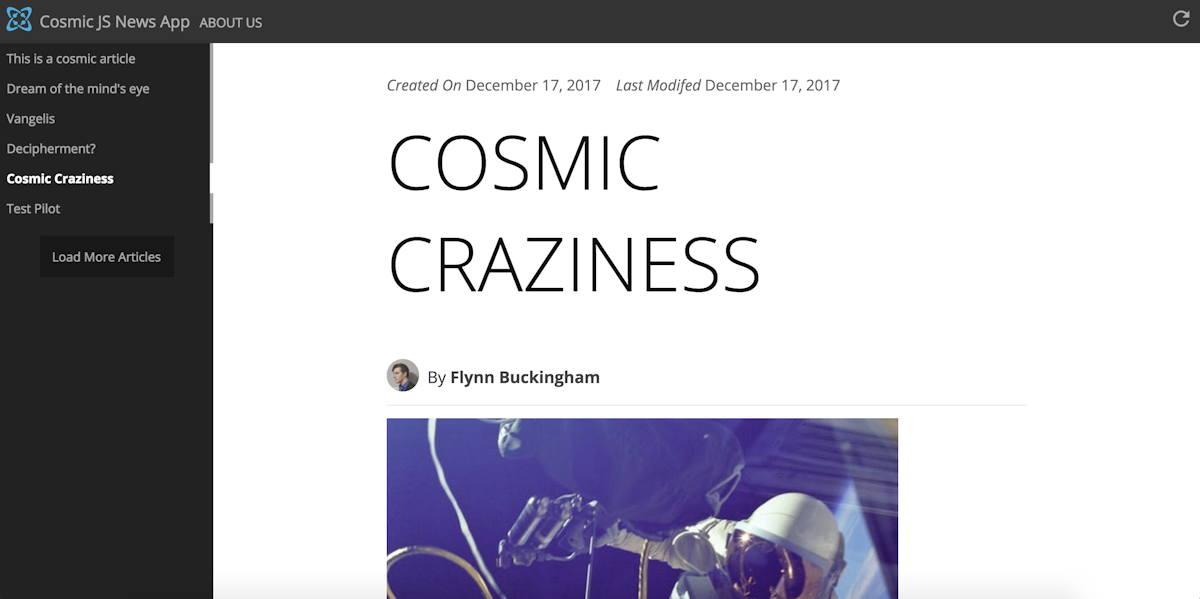
### [View the demo](https://cosmicjs.com/apps/react-news-app)
## Why
1. The ability to manage content using the [Cosmic JS API](https://cosmicjs.com)
2. Greater control over the style and layout of your news blog
3. Leverages the browser cache to help keep API requests lean
4. Minimal code for greater flexibility for your own adsense or React plugins
## How it works
1. The React based client requests the backend for the relevant listings or
article/page content.
2. The server uses minimal Express middleware `data.js` to fetch and list articles and pages
from the Cosmic JS API (reducing bulk data for lists)
3. The React client then renders the data as needed, caching all listings for a
minimal amount of time.
## Article
For further reading, checkout the Cosmic JS article [here](https://cosmicjs.com/articles/building-your-own-news-blog-with-cosmic-js-react-jba337s5).
## Getting started
Make sure you have npm and git installed before starting to work on this project.
Once available, clone the repository using `git clone` and install the required
build dependencies with `npm install`.
```bash
git clone https://github.com/cosmicjs/react-news-app
cd react-news-app
npm install
```
## Add / Edit Content
You can easily manage the content in your static site on Cosmic JS. Follow these steps:
Log in to Cosmic JS.
Create a bucket.
Go to Your Bucket > Apps.
Install the Cosmic JS News App
Deploy the code to the Cosmic App Server at Your Bucket > Web Hosting.
### Pages and Articles
The app utilizes two object types by default, **Pages** and **Articles**. **Pages** are simply
static pages that can be edited directly via Cosmic JS. Pages you create will automatically
be fetched and linked on the header of the App.
**Articles** are processed more heavily than Pages, and have some metadata requirements.
By default, Articles have fields for **Author**, **Profile Picture** and **Thumbnail**.
It is recommended that you fill out all of these fields as they are expected by the
React front-end by default.
Thumbnails and Profile pictures work bessed as lossly compressed JPEG files, with the best results
coming from Profile Pictures at 64px squared, and Thumbnails at a 4:3 ratio
with 300px as the minimum width. Anything lower and you risk a poor user experience.
## Configuration
This app uses a few other configurations in `config.js`besides the Cosmic JS defaults:
* `title`: The title of the application. Used within the build process and within the
titles of the app.
* `articlePageSize`: The number of articles loaded within each page.
## App and Components overview
The React app is located within the `app`
directory, and the built files are then located within the build directory.
**Only items within `build` and `static` are exposed via express. All other endpoints
are virtual.**
The news app uses a minimal front-end router via React that diassembles the url
checking for recognized names and ids. This is done via the root-level `App` component.
### Components
* `Article` the article component renders articles based on id (if they exist).
* `app/common/` contains key Components used for rendering shared items such as the Header,
Sidebar, and loading animation (`Loader`).
* `Home` is the default view for the app, showing minimal listings of tile elements that
will route to a article
* `Page` is like `Article`, but with less formatting than `Article`
The `App` component is responsible for managing the active list for articles and pages,
and as the router. It also manages the localStorage cache, which is cleared after 5 minutes.
`app/styles` contains the styles required for rendering compoents. `base.less` is
the primary file required for rendering the application. All other required less files
are included within `base.less` by default.