https://github.com/couchbase-examples/scala-quickstart
Entry level Couchbase Scala tutorial/demo. Steps to build REST APIs to manage user profile CRUD operations.
https://github.com/couchbase-examples/scala-quickstart
Last synced: 5 months ago
JSON representation
Entry level Couchbase Scala tutorial/demo. Steps to build REST APIs to manage user profile CRUD operations.
- Host: GitHub
- URL: https://github.com/couchbase-examples/scala-quickstart
- Owner: couchbase-examples
- License: other
- Created: 2022-01-10T13:44:50.000Z (over 4 years ago)
- Default Branch: main
- Last Pushed: 2025-02-12T16:08:34.000Z (over 1 year ago)
- Last Synced: 2025-02-12T17:24:27.906Z (over 1 year ago)
- Language: Scala
- Homepage:
- Size: 79.1 KB
- Stars: 4
- Watchers: 6
- Forks: 2
- Open Issues: 1
-
Metadata Files:
- Readme: README.md
- License: LICENSE.md
Awesome Lists containing this project
README
# Quickstart in Couchbase with Scala
#### Build REST APIs with Couchbase's Scala SDK
> This repo is designed to teach you how to connect to a Couchbase cluster to create, read, update, and delete documents and how to write simple parametrized SQL++ queries.
Full documentation can be found on the [Couchbase Developer Portal](https://developer.couchbase.com/tutorial-quickstart-scala-webservers).
## Prerequisites
To run this prebuilt project, you will need:
- [Couchbase Capella](https://www.couchbase.com/products/capella/) cluster with [travel-sample](https://docs.couchbase.com/php-sdk/current/ref/travel-app-data-model.html) bucket loaded.
- To run this tutorial using a self-managed Couchbase cluster, please refer to the [appendix](#running-self-managed-couchbase-cluster).
- Scala 2, version 2.13.9 or higher installed with [supported by it JDK](https://docs.scala-lang.org/overviews/jdk-compatibility/overview.html)
- Loading Travel Sample Bucket
If travel-sample is not loaded in your Capella cluster, you can load it by following the instructions for your Capella Cluster:
- [Load travel-sample bucket in Couchbase Capella](https://docs.couchbase.com/cloud/clusters/data-service/import-data-documents.html#import-sample-data)
## Source Code
```shell
git clone https://github.com/couchbase-examples/scala-quickstart.git
```
### Database and Web Server Configuration
All configuration for communication with the database and the three web servers is stored in the `/src/main/resources/application.conf` file. This includes the connection string, username, and password for Couchbase, and the port number for the API server.
The default username for Couchbase server is assumed to be `Administrator` and the default password is assumed to be `password`. If these are different in your environment you will need to change them before running the application.
### Couchbase Capella Specific Configuration
This section is only needed when you've opted for using a Couchbase Capella cloud instance for following the tutorial.
To enable the tutorial code to establish a connection to Capella, you will need to make a couple of changes:
- import `travel-sample` sample bucket with `airline` collection onto your Capella cluster
- make sure your `username` in `application.conf` is [configured for access](https://docs.couchbase.com/cloud/get-started/configure-cluster-access.html) to this bucket
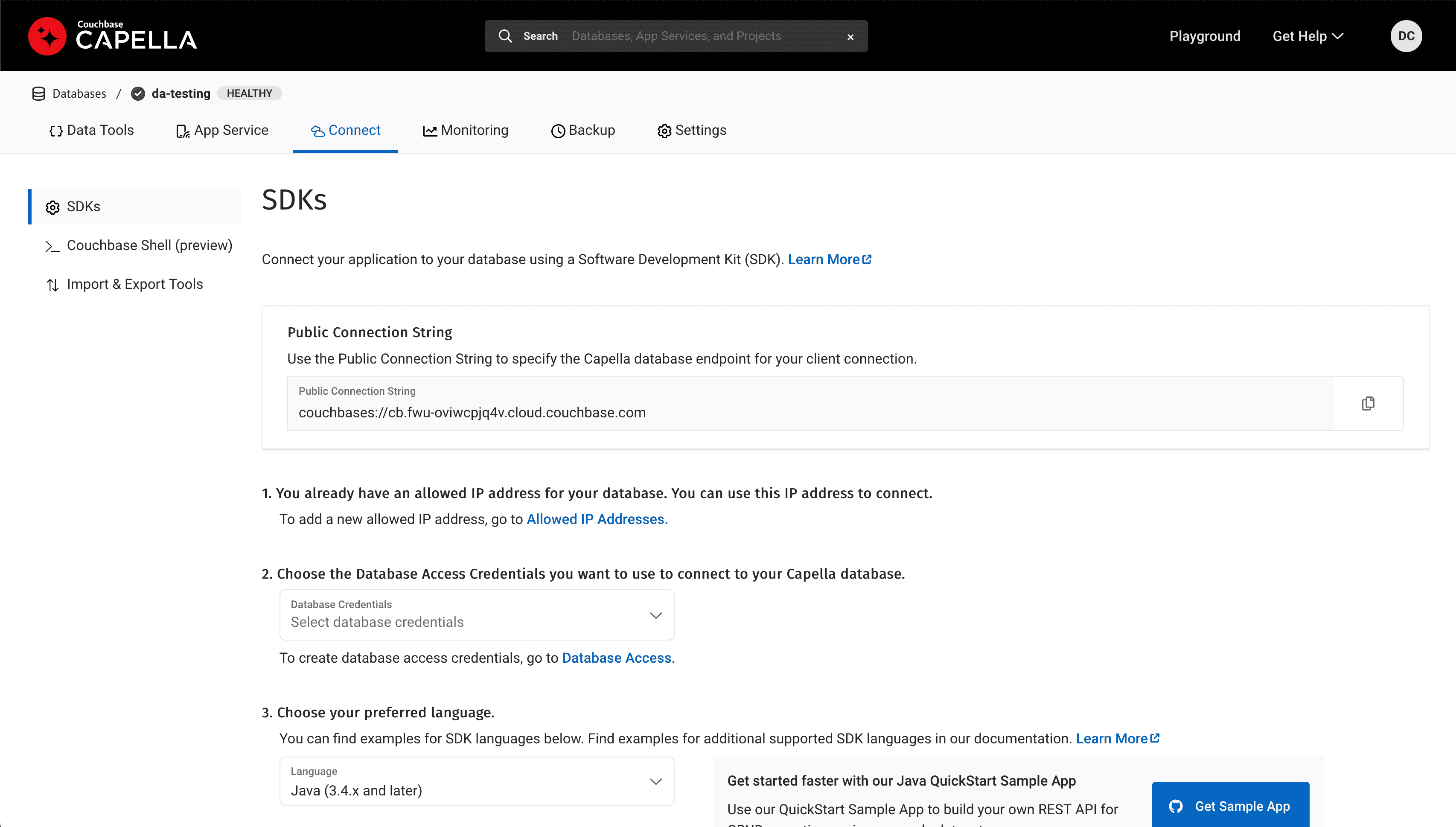
- change the `host` in `application.conf` to the **Public Connection String** address in Capella -> Databases -> `your_database_name` -> Connect. See the image below:
Possible issues:
- The Scala SDK does not support a bucket path as part of the `host` name in `application.conf`, use `bucket-name` instead
- It is not supported to create a bucket in Capella through the SDK. If you get a `Error: unable to find bucket `,
please make sure you've created the bucket through the Capella user interface, and the name lines up with `bucket-name` in `application.conf`
## Running The Application
At this point the application is ready, and you can run it via your IDE or from the terminal:
```shell
sbt run
```
> Note: If using multiple JDK installations, you will need to provide the path to the proper JDK home folder using `--jdk-home` argument to `sbt` command. This tutorial was tested to work with JDK17.
> Note: When using Option 2: Couchbase Server, then Couchbase Server 7 must be installed and running on localhost (http://127.0.0.1:8091) prior to running the Scala application.
The application will keep running until you provide a line of input, after which it will shut down the web servers.
You can launch your browser and go to API server's [Swagger start page](http://localhost:8080/docs/).
## What We'll Cover
Simple REST APIs using the Scala Couchbase SDK with the following Airline endpoints as example:
- [POST an airline](#post-an-airline) – Create a new airline record
- [GET an airline by Key](#get-an-airline-by-key) – Get a specific airline
- [PUT airline](#put-airline) – Update an airline
- [DELETE airline](#delete-airline) – Delete an airline
- [GET airlines by searching](#get-airlines-by-searching) – Get all airlines matching provided name or code
## Document Structure
We will be hosting up REST APIs using embedded Netty webserver. Endpoint descriptions and [Swagger documentation](https://swagger.io/) is created through the [tapir framework](https://tapir.softwaremill.com/).
The REST APIs will be used to manage airline records. Our airline document will have an auto-generated UUID for its key,
name of the airline as well as its country, callsign and both IATA and ICAO codes. For this demo we will store all airline information in
just one document in a collection named `airline`:
```json
{
"id": "b181551f-071a-4539-96a5-8a3fe8717faf",
"name": "CouchAir",
"country": "zz",
"callsign": "BASE",
"iata": "CBA",
"icao": "CBAR"
}
```
## Let's Review the Code
To begin clone the repo and open it up in the IDE of your choice to learn about how to create, read, update and delete documents in your Couchbase Server.
## POST an Airline
For CRUD operations we will use the [Key Value operations](https://docs.couchbase.com/scala-sdk/current/howtos/kv-operations.html) that are built into the Couchbase SDK to create, read, update, and delete a document. Every document will need an ID (similar to a primary key in other databases) in order to save it to the database.
If we look at the the `AirlineController` trait, found in the controllers folder and navigate to the postAirline function, then we can see the following type signature:
```scala
def postAirline(airlineInput: AirlineInput): F[Either[String, Airline]]
```
The abstract definitions in `AirlineController` (and `CouchbaseConnection`) are generalized over some effect `F`, making it easier to switch between implementations such as `Future` and `IO`. This will help in defining our different REST APIs and also make it easier to test our code.
Within the `F` type parameter, we can see that we return an `Either[String, Airline]]` representing an error string, or a successful result with the `Airline` case class.
The input for posting an `Airline` is an `AirlineInput`:
```scala
final case class AirlineInput(
name: String,
country: String,
callsign: String,
iata: String,
icao: String
)
```
The implementation for `postAirline` in `CouchbaseAirlineController` will transform the input object into airline model instance:
```scala
final case class Airline(
id: Int32,
name: String,
country: String,
callsign: String,
iata: String,
icao: String
)
}
```
Our `Airline` document is ready to be persisted to the database. We create call to the `collection` using the local variable `airlineCollection: Future[Collection]` and then call the `insert` method and passing it the UUID from the `Airline` as the key.
Note that the [Scala SDK has support for various types of JSON](https://docs.couchbase.com/scala-sdk/current/howtos/json.html) commonly used within the Scala community. Here we use the [circe](https://circe.github.io/circe/) JSON library to convert the `Airline` with `.asJson` and insert it.
Once the document is inserted we then return the document saved and the result all as part of the same object back to the user.
```scala
override def post(airlineInput: AirlineInput): Future[Either[String, Airline]] = {
import io.circe.syntax._
for {
ac <- airlineCollection
airline <- Airline.fromAirlineInput(airlineInput) match {
case Failure(exception) => Future.successful(Left(exception.toString))
case Success(a) =>
ac.insert[io.circe.Json](a.id.toString, a.asJson) map (_ => Right(a))
}
} yield airline
}
```
> *from controllers/CouchbaseAirlineController.scala*
## GET an Airline by Key
Navigate to the `getAirline` function in the `CouchbaseAirlineController` file in the controllers folder. We only need
the airline `id` from the user to retrieve a particular airline document using a basic key-value operation which is
passed in the method signature as a string. Since we created the document with a unique key we can use that key to find
the document in the scope and collection it is stored in.
```scala
override def get(id: UUID): Future[Either[String, Airline]] = {
for {
ac <- airlineCollection
res <- ac.get(id.toString).map(_.contentAsCirceJson[Airline]).
recover { case _: DocumentNotFoundException => Left(s"Could not retrieve Airline. ID: $id was not found.")}
} yield res
}
```
> *from getAirline function in controllers/CouchbaseAirlineController.scala and using the implicit class in models/CirceGetResult.*
## PUT Airline
Now let's navigate to the `putAirline` function of the `CouchbaseAirlineController` class. The entire document gets
replaced except for the document key and the `id` field. We create a call to the `collection` using the `upsert` method
and then return the document saved and the result just as we did in the previous endpoint.
The only difference in implementation with `postAirline` is the following line:
```scala
ac.upsert[io.circe.Json](args.id.toString, p.asJson)
```
> *from update method of controllers/CouchbaseAirlineController.scala*
## DELETE Airline
Navigate to the `deleteAirline` function in the `CouchbaseAirlineController` class. We only need the `Key` or `id` from
the user to remove a document using a basic key-value operation.
```scala
ac.remove(id.toString)
```
> *from deleteAirline method of controllers/CouchbaseAirlineController.scala*
## GET Airlines by Searching
[SQL++ (N1QL)](https://docs.couchbase.com/scala-sdk/current/howtos/n1ql-queries-with-sdk.html) is a powerful query language based on SQL, but designed for structured and flexible JSON documents.
We will use a SQL++ query to search for profiles with Skip, Limit, and Search options.
Navigate to the `getAirlines` method in the `CouchbaseAirlineController` class. This endpoint is different from all
the others because it makes the SQL++ query rather than a key-value operation. This means more overhead because the
query engine is involved. You may need to create an [index](https://docs.couchbase.com/server/current/learn/services-and-indexes/indexes/indexing-and-query-perf.html)
specific for this query on fields `name`, `country`, `callsign`, `icao`, `iata`, so it would be performant.
The individual `skip` (optional), `limit` (optional), and `search` values are obtained from their respective parameters.
Then, we build our SQL++ query using the parameters that were passed in.
Finally, we pass that `query` to the `cluster.query` method and return the result.
Take notice of the SQL++ syntax and how it targets the `bucket`.`scope`.`collection`.
```scala
override def list(args: ListingInput): Future[Either[String, List[Airline]]] = {
val query = s"SELECT p.* FROM " +
s"`${quickstartConfig.couchbase.bucketName}`.`${quickstartConfig.couchbase.scopeName}`.`${quickstartConfig.couchbase.collectionName}` a " +
s"WHERE lower(a.name) LIKE '%${args.search.toLowerCase}%' " +
s"OR lower(a.country) LIKE '%${args.search.toLowerCase}%' " +
s"OR lower(a.callsign) LIKE '%${args.search.toLowerCase}%' " +
s"OR lower(a.iata) LIKE '%${args.search.toLowerCase}%' " +
s"OR lower(a.icao) LIKE '%${args.search.toLowerCase}%' " +
s"LIMIT " + args.limit.getOrElse(5) + " OFFSET " + args.skip.getOrElse(0)
import cats.implicits._
for {
cluster <- couchbaseConnection.cluster
rows <- Future.fromTry(
cluster.query(
query,
QueryOptions(scanConsistency =
Some(QueryScanConsistency.RequestPlus())
)
)
)
airlines <- Future.fromTry(
rows
.rowsAs[io.circe.Json]
.map(_.map(json => json.as[Airline].left.map(_.getMessage())))
)
accumulatedAirlines = airlines.toList.sequence
} yield accumulatedAirlines
}
```
> *from getAirlines method of controllers/CouchbaseAirlineController.scala*