https://github.com/cowtoolz/webcamize
Use (almost) any camera as a webcam
https://github.com/cowtoolz/webcamize
camera linux video webcam
Last synced: 6 months ago
JSON representation
Use (almost) any camera as a webcam
- Host: GitHub
- URL: https://github.com/cowtoolz/webcamize
- Owner: cowtoolz
- License: bsd-2-clause
- Created: 2023-08-07T14:15:45.000Z (almost 3 years ago)
- Default Branch: master
- Last Pushed: 2025-10-06T22:58:59.000Z (10 months ago)
- Last Synced: 2025-12-26T16:21:26.102Z (7 months ago)
- Topics: camera, linux, video, webcam
- Language: C
- Homepage:
- Size: 18.3 MB
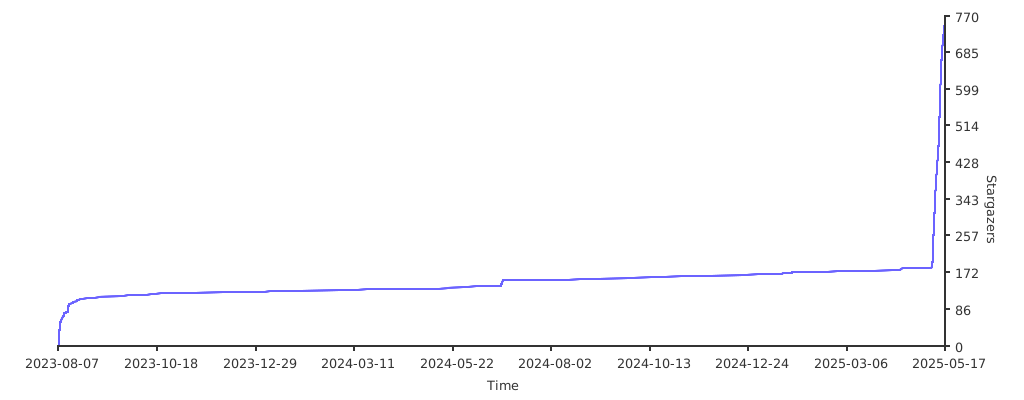
- Stars: 1,489
- Watchers: 10
- Forks: 34
- Open Issues: 5
-
Metadata Files:
- Readme: readme.md
- Contributing: contributing.md
- Funding: .github/FUNDING.yml
- License: license
Awesome Lists containing this project
README
> [!IMPORTANT]
> Progress is underway towards full support for both macOS and Windows.
> Significant help is needed in testing on these platforms.

webcamize
Use (almost) any camera as a webcam!


Webcamize allows you to use [basically any modern camera](./doc/supported.md) as a webcam on Linux—your DSLR, mirrorless, camcorder, point-and-shoot, and even some smartphones/tablets. It also gets many webcams that don't work out of the box on Linux up and running in a flash.

There's literally only two steps...
**1. Plug in your camera**
**2. Run the `webcamize` command**
Now your camera is a webcam! 🎉
## Using webcamize

Webcamize is designed to be as easy to use as possible. Just plug in your camera, turn it on, then run the `webcamize` command:
```console
$ webcamize
```
In the vast majority of cases, that's all you'll need to do. You might be asked to enter your password to enable and configure the video device.
[**View the list of supported cameras and devices**](./doc/supported.md).
### Advanced Usage
```console
$ webcamize --help
Usage: webcamize [OPTIONS...]
-s, --status Print a status report for webcamize and quit
-c, --camera NAME Specify a camera to use by its name; autodetects by default
-f, --file [PATH] Output to a file; if no argument is passed, output to stdout
-w, --wait Daemonize the process, preventing it from exiting
-x, --no-convert Don't convert from input format before writing
-p, --fps VALUE Specify the maximum frames per second (default: 60)
-l, --log-level LEVEL Set the log level (DEBUG, INFO, WARN, FATAL; default: INFO)
--no-color Disable the use of colors in the terminal
-v, --version Print version info and quit
-H, --help Show this help message
```
## Installation

### Package Managers
> [!NOTE]
> Webcamize is a small hobby project and probably not available via your distribution's package manager (yet)—if you want to support the project by maintaining a package for webcamize, I'd be eternally grateful.
[](https://repology.org/project/webcamize/versions)
#### Arch Linux (AUR)
Webcamize is available from the [Arch User Repository](https://aur.archlinux.org/packages/webcamize) as `webcamize`
```console
$ yay -S webcamize
```
### Building From Source
Webcamize has a few additional dependencies that you should make sure are installed before beginning:
- [libgphoto2](https://repology.org/project/libgphoto2/versions)
- [ffmpeg (libavutil, libavcodec, libavformat, libswscale)](https://repology.org/project/ffmpeg/versions)
- [v4l2loopback DKMS](https://repology.org/projects/?search=v4l2loopback)
- [libkmod](https://repology.org/project/kmod/versions)
- Linux headers
These should be available from your package manager.
**1. To get started, clone this repo somewhere**
```console
$ git clone https://github.com/cowtoolz/webcamize && cd webcamize
```
You don't have to, but you should check out a tag. To checkout the latest tag automatically:
```console
$ git checkout $(git describe --tags $(git rev-list --tags --max-count=1))
```
**2. Build Webcamize**
Webcamize doesn't require any configuration; you can just run `make`.
```console
$ make
```
**2. Install Webcamize**
If `~/.local/bin/` is on your path, you can use the `install-local` target—otherwise, use the normal `install` target:
```console
$ echo $PATH | grep -q ~/.local/bin && make install-local || sudo make install
```
Webcamize can be uninstalled with the `uninstall-local` and `uninstall` targets respectively, but if you installed it from source you should be able to safely `rm $(which webcamize)`.
**That's all; you're ready to go!** 🎉🎉
## Issues & Contributing

This project follows the following philosophy:
- If this project is not helping you, then there is a bug
- If you are having a bad time using this project, then there is a bug
- If the documentation is confusing, then the documentation is buggy
- If there is a bug in this project, then we can work together to fix it.
If you find yourself stumped, find a bug, have a bad time using webcamize, or have a suggestion that could make webcamize better, please open an issue in the [issue tracker](https://github.com/cowtoolz/webcamize/issues/)—noobs welcome!
## Cheers!

Webcamize does little more than orchestrate other open source software; the software it depends on is where the real magic happens. With that being said, a big thanks goes out from me to:
- [Michael Niedermayer](https://github.com/michaelni) and other contributors to [ffmpeg](https://github.com/FFmpeg/FFmpeg/graphs/contributors) for their incredible work on the absolute behemoth that is ffmpeg.
- [Marcus Meissner](https://github.com/msmeissn), [Hans Niedermann](https://github.com/ndim), and the other contributors to [libgphoto2](https://github.com/gphoto/libgphoto2). This project is underrated given the insane quality and scope.
- [You](), the reader! Thank you for using, supporting, and contributing to webcamize; without you, this project would not be possible.