https://github.com/cpmpercussion/empi
An Embodied Musical Predictive Interface using Mixture Density Networks
https://github.com/cpmpercussion/empi
creativity deep-learning interaction mixture-density-networks music nime
Last synced: 9 months ago
JSON representation
An Embodied Musical Predictive Interface using Mixture Density Networks
- Host: GitHub
- URL: https://github.com/cpmpercussion/empi
- Owner: cpmpercussion
- Created: 2017-06-06T13:56:59.000Z (about 9 years ago)
- Default Branch: master
- Last Pushed: 2024-03-05T12:33:27.000Z (over 2 years ago)
- Last Synced: 2024-03-06T06:34:49.318Z (over 2 years ago)
- Topics: creativity, deep-learning, interaction, mixture-density-networks, music, nime
- Language: Python
- Homepage:
- Size: 19.4 MB
- Stars: 6
- Watchers: 4
- Forks: 0
- Open Issues: 4
-
Metadata Files:
- Readme: README.md
Awesome Lists containing this project
README
# EMPI: Embodied Musical Predictive Interface
[](https://doi.org/10.5281/zenodo.3451730)
An embedded musical instrument for studying musical prediction and embodied interaction.

In this work musical data is considered to consist a time-series of continuous valued events. We seek to model the values of the events as well as the time in between each one. That means that these networks model data of at least two dimensions (event value and time).
Multiple implementations of a mixture density recurrent neural network are included for comparison.
## MDN Interaction Interface
Part of this work is concerned with using these networks in a Raspberry Pi-based musical interface.
### Installing on Raspberry Pi
### Assembly
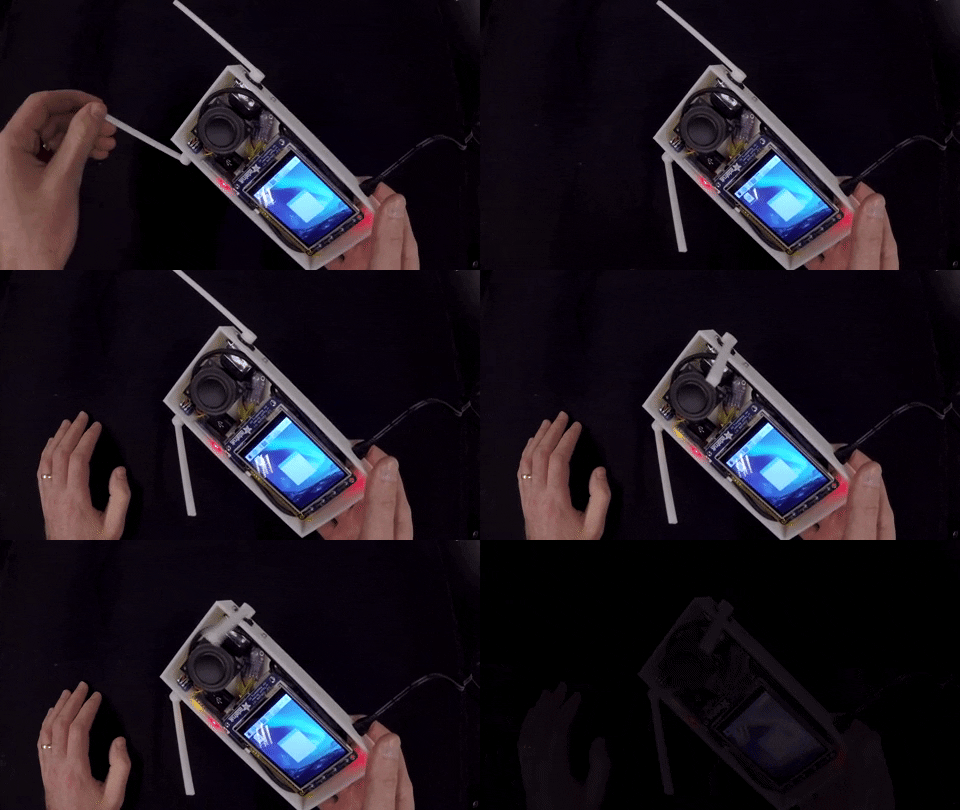
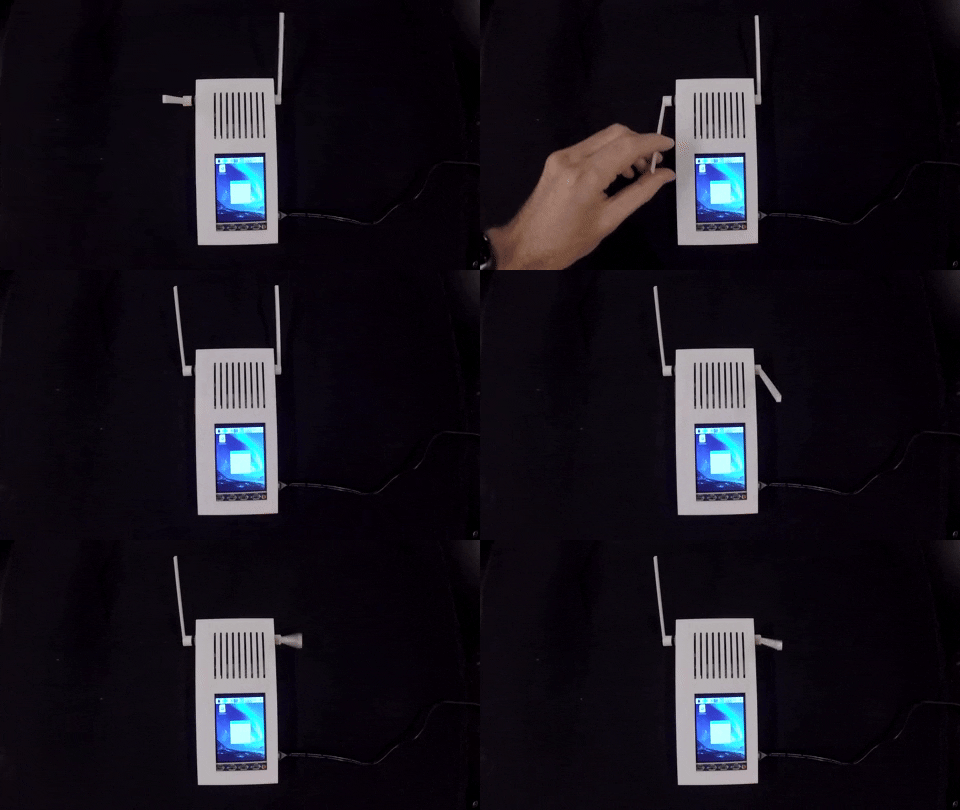
The EMPI consists of a Raspberry Pi, audio amplifier and speaker, input lever, and output lever, in a 3D-printed enclosure. The assembly materials and plans are below.
### Raspberry Pi
- Raspberry Pi 3B+
- Seeed Studios Grove Base Hat
- Alternatively, Arduino Pro Micro MIDI interface over USB.
### Training
1. download or generate some human data, then run `train_human_empi_mdn.py` to train the human model.
2. use `train_synthetic_mdn_data` notebook to generate and train synthetic data.
### SSH Access
You'll need ssh access to install EMPI: `ssh pi@rp1802.local`, `ssh pi@epecpi.local`
Good to use the [headless install hints](https://www.raspberrypi.org/documentation/configuration/wireless/headless.md)
### Raspbian Packages
sudo apt-get install -y python3-numpy python3-pandas python3-pip puredata git
### Python Packages
- [Tensorflow 1.14.0](https://github.com/PINTO0309/Tensorflow-bin) - slightly weird instructions while there is no piwheels build for TF 1.14.0 on Python 3.7.
sudo apt-get install -y libhdf5-dev libc-ares-dev libeigen3-dev
sudo pip3 install keras_applications==1.0.7 --no-deps
sudo pip3 install keras_preprocessing==1.0.9 --no-deps
sudo pip3 install h5py==2.9.0
sudo apt-get install -y openmpi-bin libopenmpi-dev
sudo apt-get install -y libatlas-base-dev
pip3 install -U --user six wheel mock
wget https://github.com/PINTO0309/Tensorflow-bin/raw/master/tensorflow-1.14.0-cp37-cp37m-linux_armv7l.whl
sudo pip3 install tensorflow-1.14.0-cp37-cp37m-linux_armv7l.whl
- [Tensorflow probability 0.7.0]()
pip3 install -U tensorflow-probability==0.7.0
- Keras-MDN-Layer: `pip3 install -U keras-mdn-layer`
- Python-OSC: `pip3 install -U python-osc`
- Keras: `pip3 install -U keras`
### Install the service
EMPI's startup script uses a [systemd service](https://www.raspberrypi.org/documentation/linux/usage/systemd.md) to start automatically.
To install type:
sudo cp empistartup.service /etc/systemd/system/empistartup.service
sudo systemctl enable empistartup
To start manually type:
sudo systemctl start empistartup
To stop manually for studies etc, run:
sudo systemctl stop empistartup
The service file simply runs the script: `empi_2_run.sh` with default arguments.
To follow the stdout from the service, run:
sudo journalctl -f -u empistartup
#### Start just Pd:
./start_pd.sh
pd -nogui synth/lever_synthesis.pd &
#### Start just the prediction server:
python3 predictive_music_model.py -d=2 --modelfile="models/musicMDRNN-dim2-layers2-units32-mixtures5-scale10-human.h5" --modelsize xs --call --log --verbose &
#### Stop Pd and Python:
pkill -u pi pd
pkill -u pi python3
pkill -u pi python3
#### Start prediction server on local system:
python3 predictive_music_model.py -d=2 --modelfile="models/musicMDRNN-dim2-layers2-units32-mixtures5-scale10-human.h5" --modelsize xs --call --log --verbose --clientip="rp1802.local"
python3 predictive_music_model.py -d=2 --modelfile="models/musicMDRNN-dim2-layers2-units32-mixtures5-scale10-synth.h5" --modelsize xs --call --log --verbose --clientip="rp1802.local"
python3 predictive_music_model.py -d=2 --modelfile="models/musicMDRNN-dim2-layers2-units32-mixtures5-scale10-noise.h5" --modelsize xs --call --log --verbose --clientip="rp1802.local" --serverip="voyager.local"
#### Start RNN run loop to send/receive from local system
python3 empi_2_runloop.py --synthip="127.0.0.1" --serverip="rp1802.local" -v
python3 empi_2_runloop.py --synthip="127.0.0.1" --serverip="rp1802.local" --predictorip="voyager.local" -v
### Study Procedure:
1. Connect to EMPI over ssh: `ssh pi@rp1802.local`
2. Cancel existing EMPI process with: `sudo systemctl stop empistartup.service`
3. Go to EMPI directory: `cd empi`
4. Choose commmand for required option from the list below.
5. It takes 25s to load the system on the RPi 3B+
- Human, no servo: `./empi_2_run.sh --human --noservo`
- Synth, no servo: `./empi_2_run.sh --synth --noservo`
- Noise, no servo: `./empi_2_run.sh --noise --noservo`
- Human, servo: `./empi_2_run.sh --human --servo`
- Synth, servo: `./empi_2_run.sh --synth --servo`
- Noise, servo: `./empi_2_run.sh --noise --servo`
Finally, shutdown before turning off: `sudo shutdown -h now`
# Training the models
## Generate Data
1. Generate the synthetic datasets by running the Jupyter Notbook: `notebooks/generate_synthetic_data.ipynb`
2. Generate the human dataset by running `empi_generate_human_dataset.py`
3. Train the neural network models by running `python3 train_empi_mdn.py -p`, `python3 train_empi_mdn.py -s`, and `python3 train_empi_mdn.py -n`.