https://github.com/cpsdisplay/cpsdisplay
A little minecraft mod that displays your clicks per seconds
https://github.com/cpsdisplay/cpsdisplay
clicksperseconds cps cpsdisplay cpsmod forge minecraft minecraftforge minecraftmod mod
Last synced: about 1 year ago
JSON representation
A little minecraft mod that displays your clicks per seconds
- Host: GitHub
- URL: https://github.com/cpsdisplay/cpsdisplay
- Owner: CPSDisplay
- License: gpl-3.0
- Created: 2022-04-20T10:15:26.000Z (about 4 years ago)
- Default Branch: v2.2.2
- Last Pushed: 2024-02-17T14:08:05.000Z (over 2 years ago)
- Last Synced: 2025-03-26T05:03:36.199Z (about 1 year ago)
- Topics: clicksperseconds, cps, cpsdisplay, cpsmod, forge, minecraft, minecraftforge, minecraftmod, mod
- Language: Java
- Homepage: https://cpsdisplay.github.io/
- Size: 1.75 MB
- Stars: 4
- Watchers: 1
- Forks: 2
- Open Issues: 0
-
Metadata Files:
- Readme: README.md
- License: LICENSE
Awesome Lists containing this project
README
# CPS Display [1.8.9 - 1.12.2] & [1.20.x](https://github.com/CPSDisplay/cpsdisplay3)
**1.20+ are in delevopment (alpha) there is only custom text, text color & scaling available**
**CPS Display/CPS Mod** is a forge mod for displaying your Clicks Per Seconds.
## Links
- [**Discord**](https://discord.gg/d7S4fyRUZR)
- [Website](https://cpsdisplay.github.io)
- [Github](https://github.com/CPSDisplay/cpsdisplay)
I am making this mod in my **free time**, so if you want to help me, [**pay me a drink**](https://www.paypal.com/donate/?hosted_button_id=ZZ2T95G9H72YE).
## What you NEED to know
To **configurate** the mod hit `P` key (can be changed) or execute `/cpsdisplay`
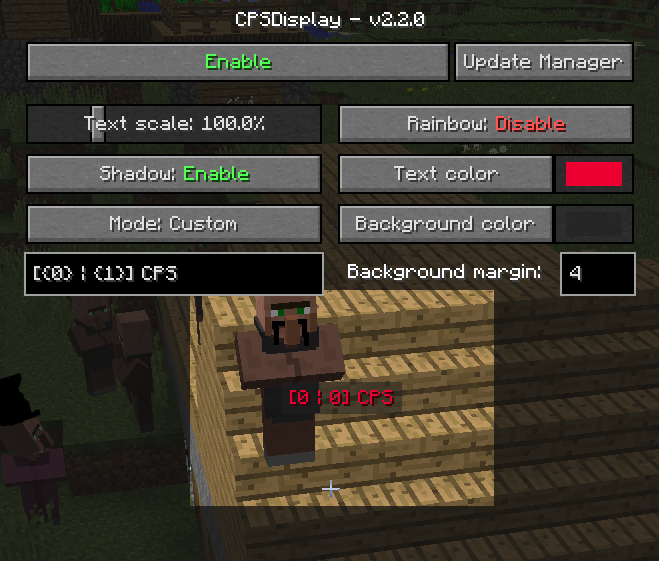
The mod offers a high level of **customization** and is **automatically updated**
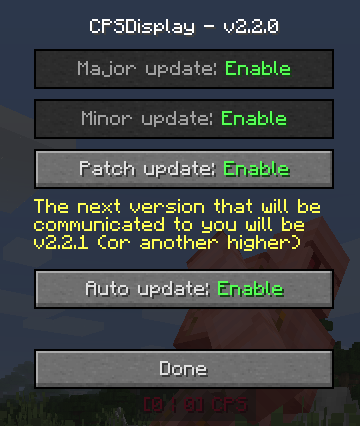
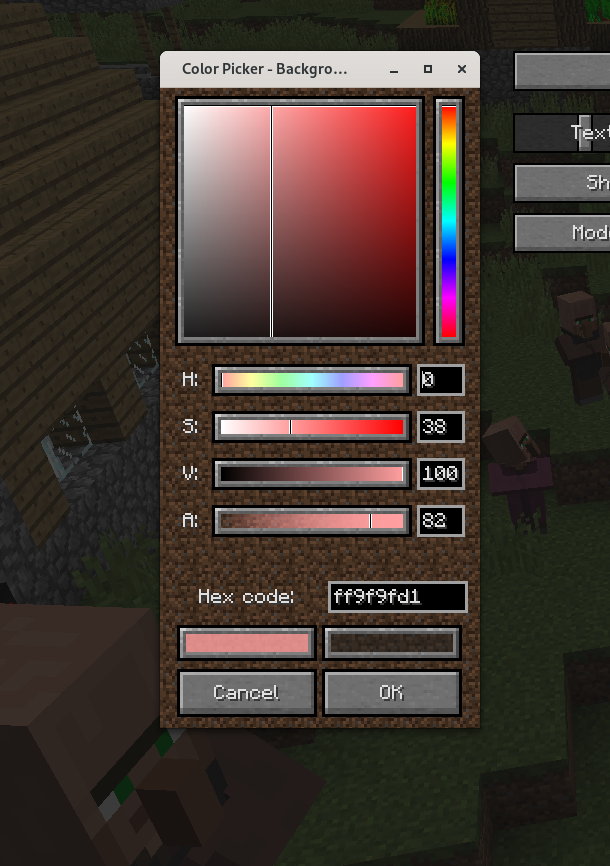
The mod features a built-in **color selector** for easy choice of the **ideal** color in the style of minecraft, but you can use resource packs for change its appearence.
## More about all the settings
### Move
To move the text you simply need to hold click on the text and drag our mouse where you want.
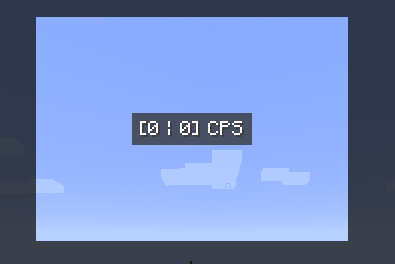
The GUI background is cut out around the text, so you can see what the text will look like during play.
### Text shadow
You can enable or disable it
### Text scale
From `10%` to `400%`
### Text color
Click on the button to open the color selector and select the color you want (no opacity available, minecraft limitation).
### Text mode
There are 4 different modes:
- Left
- Right
- Left & Right
- Custom
The first 3 modes have a default text, but can be redefined in the mod's lang files using resource packs.
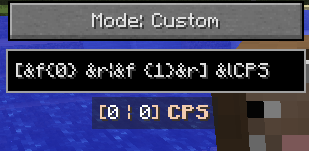
### Custom text
You have 999 characters available. `{0}` will be replaced by left clicks, `{1}` by right clicks.
You can use minecraft formatting (instead of `§` use `&`) and do things like this
### Rainbow
I usually call this the "epileptic mode" - the text color changes over time. Custom color is therefore not available, but you can use minecraft formatting as a workaround.
### Background color
Same as [text color](#text-color), but this time alpha channel is available.
### Background margin
How big is the background. Min: `0`; Max: `99`
## And that's it
There is nothing more, but if you want more, you have **2** solutions:
- Join the discord server and create a new post about the idea you have in the suggestion channel
- If you have programming skills, feel free to fork the github project to add what you want and create a pull request for everyone to enjoy
Thanks