https://github.com/crazykun/yii2-cropper
yii2图片裁剪插件
https://github.com/crazykun/yii2-cropper
cropper php yii2
Last synced: 4 months ago
JSON representation
yii2图片裁剪插件
- Host: GitHub
- URL: https://github.com/crazykun/yii2-cropper
- Owner: crazykun
- Created: 2018-09-03T07:07:06.000Z (almost 8 years ago)
- Default Branch: master
- Last Pushed: 2018-09-11T06:02:41.000Z (almost 8 years ago)
- Last Synced: 2025-10-13T02:53:04.274Z (8 months ago)
- Topics: cropper, php, yii2
- Language: JavaScript
- Homepage:
- Size: 711 KB
- Stars: 3
- Watchers: 1
- Forks: 2
- Open Issues: 0
-
Metadata Files:
- Readme: README.md
Awesome Lists containing this project
README
# yii2-cropper
Yii2 Image Cropper InputWidget
[](https://php.net/)
Cropper.js v4.0.0 - Bootstrap Cropper (recommended) (already included).
Features
------------
+ Image Crop 图片裁剪
+ Image Rotate 图片旋转
+ Image Flip 图片翻转
+ Image Zoom 图片缩放
+ Image Reset 图片重置
+ Coordinates 图片坐标
+ Image Sizes Info
+ Base64 Data 图片base64编码
+ Upload 图片上传
+ Delete Img 删除图片
Demo images
-----
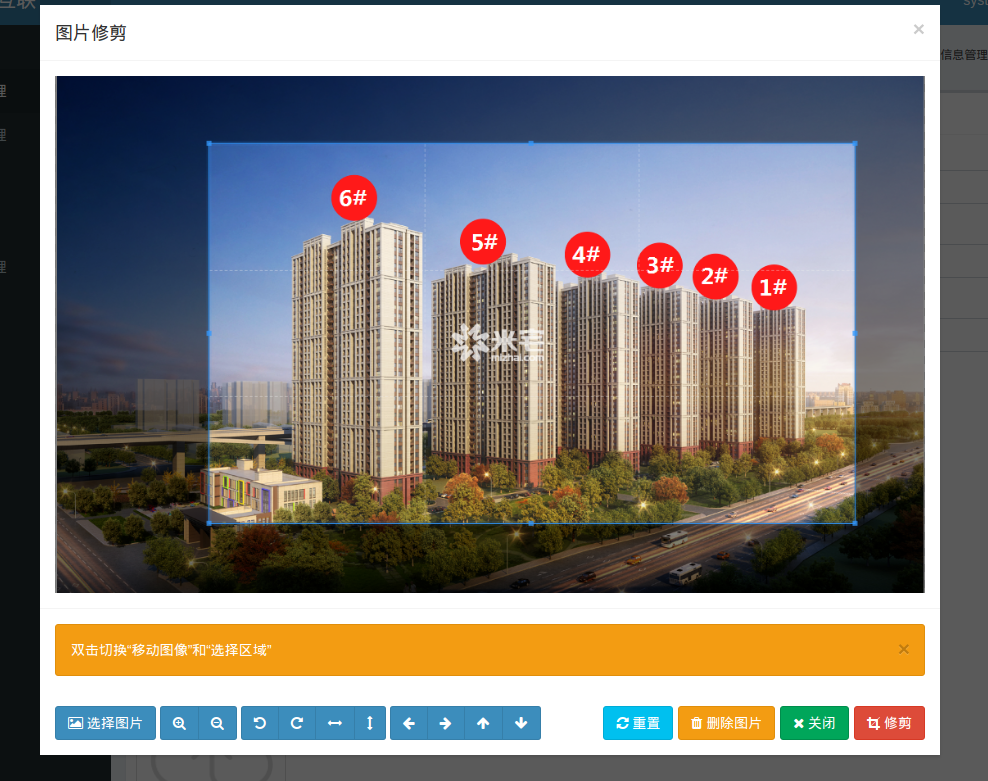
Installation
------------
The preferred way to install this extension is through [composer](http://getcomposer.org/download/).
Either run
```
php composer.phar require --prefer-dist coldlook/yii2-cropper "dev-master"
```
or add
```
"coldlook/yii2-cropper": "dev-master"
```
to the require section of your `composer.json` file.
Usage
-----
Let's add in your controller file
````php
public function actionBase64Img(){
$image=$this->param('image');
$fileName=$this->save_base64_image($image);
if(!$fileName){
return $this->ajaxMessage(1,'上传失败');
}
$successPath = Yii::$app->params['imageUploadSuccessPath'] . date('Ymd') . '/';
if ($successPath === false) {
return $this->ajaxMessage(1,'上传失败');
}else{
return $this->ajaxMessage(0,'上传成功',[
'url' => $successPath,
'attachment' => $successPath
]);
}
}
/**
* [将Base64图片转换为本地图片并保存]
* @param [Base64] $save_base64_image [要保存的Base64]
* @param [目录] $path [要保存的路径]
*/
public function save_base64_image($base64_image_content,$path=''){
if(!$path){
$path = Yii::$app->params['imageUploadRelativePath'] . date('Ymd') . '/';
}
//匹配出图片的格式
if (preg_match('/^(data:\s*image\/(\w+);base64,)/', $base64_image_content, $result)){
$type = $result[2];
if (!is_dir($path)) {
FileHelper::createDirectory($path, 0777);
}
$fileName= date('YmdHis') . rand(100000, 999999). '.' .$type;
if (file_put_contents($path.$fileName, base64_decode(str_replace($result[1], '', $base64_image_content)))){
return $fileName;
}else{
return false;
}
}else{
return false;
}
}
````
Simple usage in _form file
-----
````php
echo $form->field($model, '_image')->widget(\coldlook\cropper\Cropper::className(), [
'label' => '选择图片',
'imageUrl' => $model->_image,
'cropperOptions' => [
'width' => 255,
'height' => 150,
'preview' => [
'width' => 255,
'height' => 150,
],
],
'uploadOptions'=>[
'url'=>'/admin/upload/base64-img',
'response'=>'res.result.url'
]
]);
````
Advanced usage in _form file
-----
````php
echo $form->field($model, '_image')->lable("封面图1(非必填,尺寸:宽*高 建议尺寸225px*150px)")->widget(\coldlook\cropper\Cropper::className(), [
/*
* elements of this widget
*
* buttonId = #cropper-select-button-$uniqueId
* previewId = #cropper-result-$uniqueId
* modalId = #cropper-modal-$uniqueId
* imageId = #cropper-image-$uniqueId
* inputChangeUrlId = #cropper-url-change-input-$uniqueId
* closeButtonId = #close-button-$uniqueId
* cropButtonId = #crop-button-$uniqueId
* browseInputId = #cropper-input-$uniqueId // fileinput in modal
*/
'uniqueId' => 'image_cropper', // will create automaticaly if not set
// you can set image url directly
// you will see this image in the crop area if is set
// default null
'imageUrl' => Yii::getAlias('@web/image.jpg'),
'cropperOptions' => [
'width' => 100, // must be specified
'height' => 100, // must be specified
// optional
// url must be set in update action
'preview' => [
'url' => '', // (!empty($model->image)) ? Yii::getAlias('@uploadUrl/'.$model->image) : null
'width' => 100, // must be specified // you can set as string '100%'
'height' => 100, // must be specified // you can set as string '100px'
],
// optional // default following code
// you can customize
'buttonCssClass' => 'btn btn-primary',
// optional // defaults following code
// you can customize
'icons' => [
'browse' => '',
'crop' => '',
'close' => '',
'zoom-in' => '',
'zoom-out' => '',
'rotate-left' => '',
'rotate-right' => '',
'flip-horizontal' => '',
'flip-vertical' => '',
'move-left' => '',
'move-right' => '',
'move-up' => '',
'move-down' => '',
'reset' => '',
'delete' => '',
],
// you can customize your upload options
'uploadOptions'=>[
'url'=>'/upload/base64-img',
'response'=>'res.result.url'
]
],
// optional // defaults following code
// you can customize
'label' => '选择图片',
// optional // default following code
// you can customize
'template' => '{button}{preview}',
]);
````
jsOptions[]
-----
````php
echo $form->field($model, '_image')->widget(\coldlook\cropper\Cropper::className(), [
'cropperOptions' => [
'width' => 100, // must be specified
'height' => 100, // must be specified
],
'jsOptions' => [
'pos' => View::POS_END, // default is POS_END if not specified
'onClick' => 'function(event){
// when click crop or close button
// do something
}'
],
]);
````
Notes
-----
You can set crop image directly with javascript
Sample:
````
$('button').click(function() {
// #cropper-modal-$unique will show automatically when click the button
// you must set uniqueId on widget
$('#cropper-url-change-input-' + uniqueId).val('image.jpeg').trigger('change');
});
````
Thx
-----
[bilginnet](https://github.com/bilginnet/yii2-cropper).